
"AI dashboard" has gone from a buzzword to something you can use on your own data in an afternoon. This guide explains what the term means, what an AI dashboard does that a regular one doesn't, and how to build one, with pictures of working dashboards in Fastero on invented data.
The short answer: an AI dashboard is a dashboard you describe in plain English instead of building by hand. The AI writes a query for each number, picks the charts and lays them out from your own data. Afterwards you change it by asking, and ask it what the numbers show. The numbers still come from queries on your data, and you can open those queries and check them.
Three things people mean by "AI dashboard"
- A dashboard that AI builds for you, sometimes called an AI dashboard generator. You describe it, and the AI writes the queries and makes the charts. Most of this guide is about this kind.
- A dashboard with AI inside it. An ordinary dashboard with a chat box: ask a question in plain English and get an answer, a new chart or a short written note on what changed.
- A dashboard about AI. It tracks AI systems themselves: agent runs, model spend, failures. See the AI agent dashboard example.
The most useful tools combine the first two: AI builds the dashboard, then stays with it to answer questions and make changes.
What an AI dashboard does differently
| Task | A regular dashboard | An AI dashboard |
|---|---|---|
| Build it | Write SQL or drag fields onto charts, one at a time | Describe it in a paragraph; the AI writes the queries and makes the charts |
| Change it | Open each chart's settings | Ask: "split revenue by region", "show it by quarter" |
| Answer a follow-up | Build another chart, or ask an analyst | Ask the question; get an answer or a new chart |
| Explain a change | Read the charts and work it out | Ask for a short note on what changed |
| Stay current | Queries run again on a schedule | The same: the AI builds it once, the queries keep running |
Building it is the part that changes; the numbers work the same way. Every figure on the page is still the result of a query on your data. A chart drawn once in a chat is a snapshot. A dashboard keeps its queries and runs them again, so next week's numbers are next week's.
Fastero
Connect your database. Ask questions. Get dashboards.
Postgres, BigQuery, Snowflake, and 10+ sources — live-connected, AI-powered, no dashboard builder learning curve.
Try free →How to build an AI dashboard, step by step
Here is how it works in Fastero. The steps are much the same in any tool that builds from your data.
- Connect your data: a database such as Postgres or MySQL, a warehouse, a Google Sheet or a file. Use a read-only login; a dashboard never needs to write.
- Describe the dashboard. Say who reads it, which three to five numbers matter and how each one is defined, which charts you want and what period to use. For example:
Build a weekly dashboard for the leadership team from our orders tables: revenue in the latest month (completed orders only), orders, average order value and the 12-month cancellation rate as number cards; monthly revenue with its three-month average; revenue by channel each quarter; and the top ten products. Add a month and quarter switch.
- Let it build, then check it. The AI writes and runs a query for each chart, picks the chart type and lays out the dashboard. Open a chart's query (Edit query, on the chart's menu) and compare one number with a figure you trust, such as last month's revenue from finance.
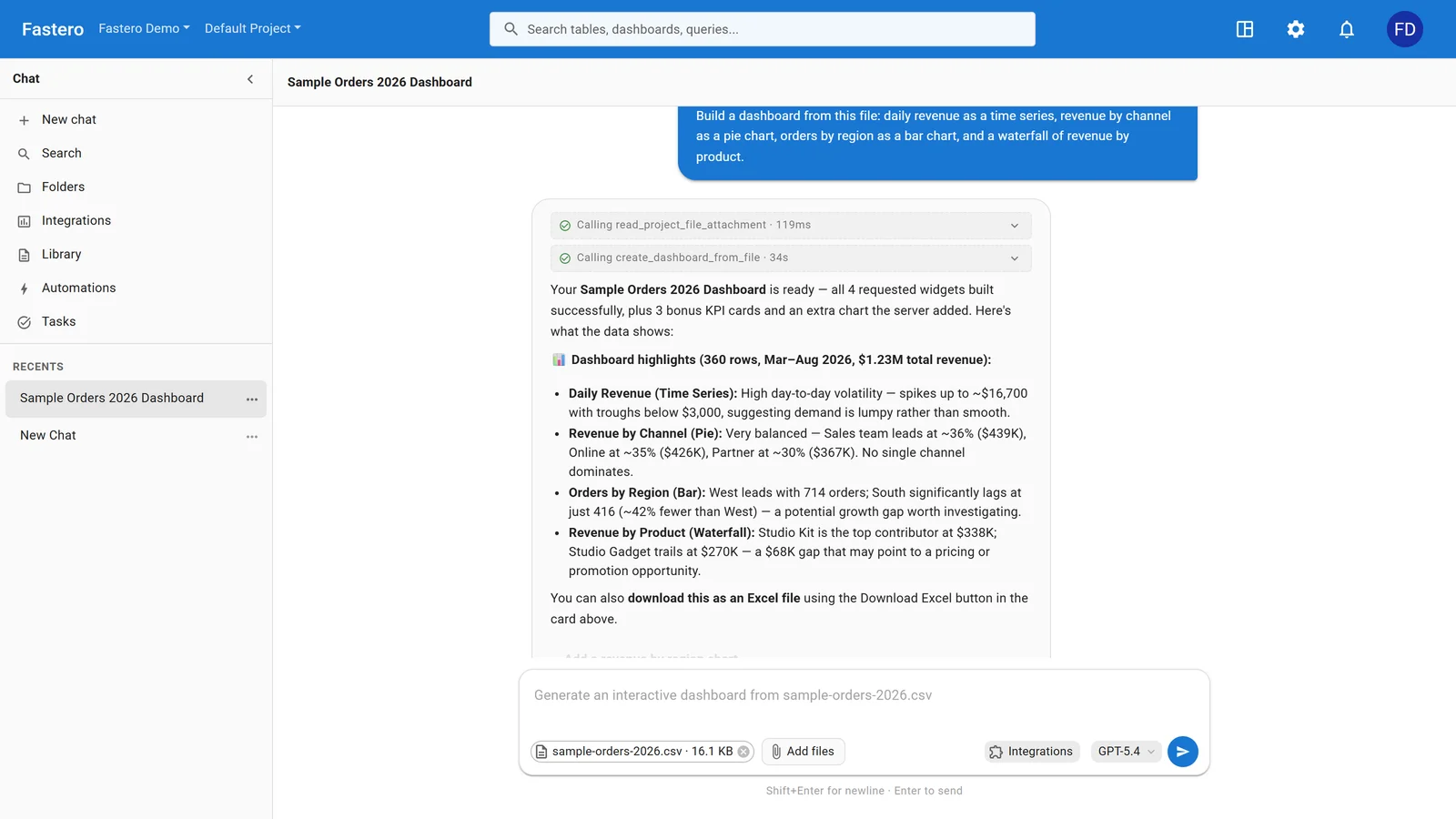
Asking for a dashboard in Fastero. Sample data.
- Change it by asking, for example "split revenue by region", "add the top ten customers as a table" or "write a short note on what changed this month". You can also edit any chart yourself.
- Share it and keep it current. Invite your team (viewers are free), schedule it to arrive by email as a PDF, and set it to refresh on a timer or when the data changes.
For the same steps done by hand, with what makes each one work, see how to create a dashboard.
Real examples, with the prompts that build them
These are working dashboards in Fastero, on invented data. Each example page lists what's on the dashboard, shows the SQL behind its key numbers and gives the prompt that builds a dashboard like it from your data.
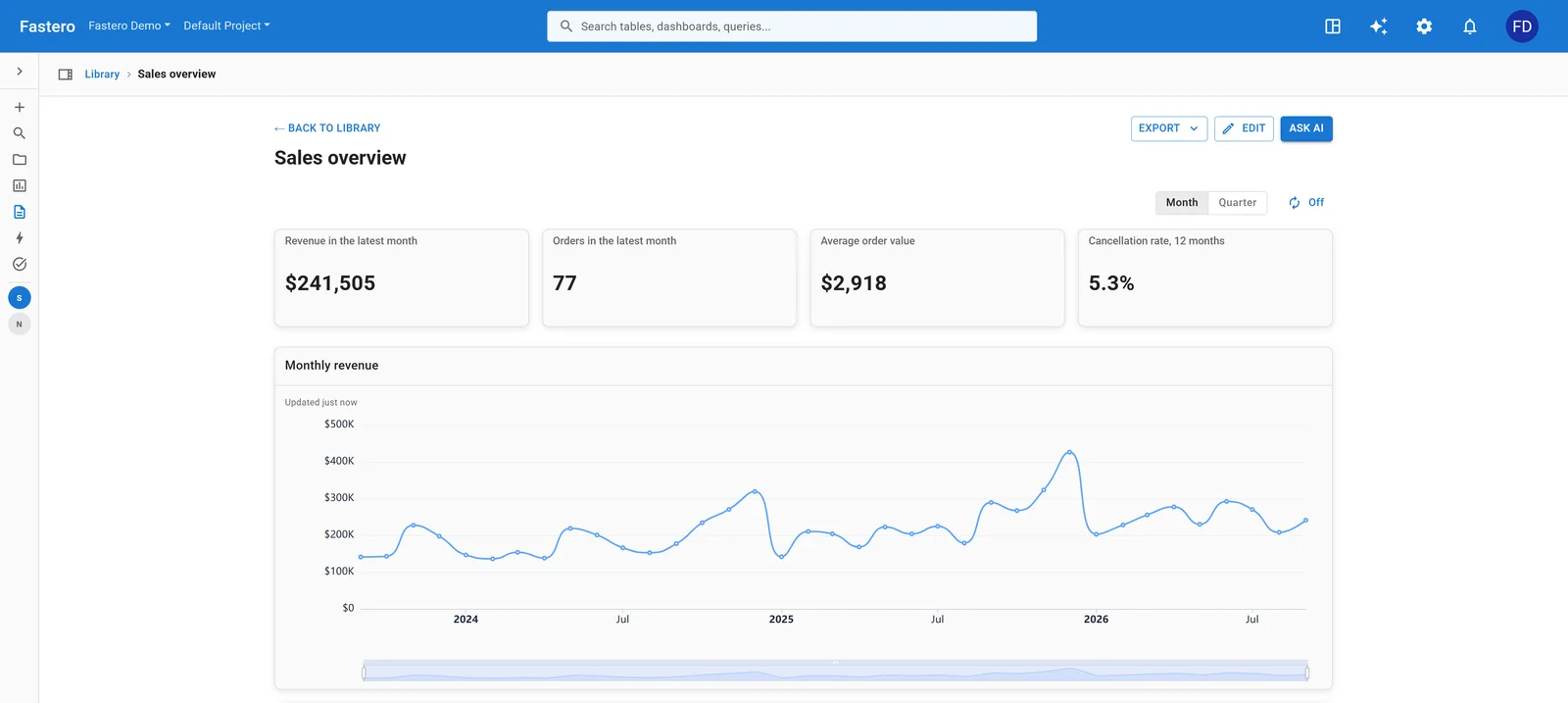
Executive dashboard: how the business is doing, and where revenue comes from. Sample data.
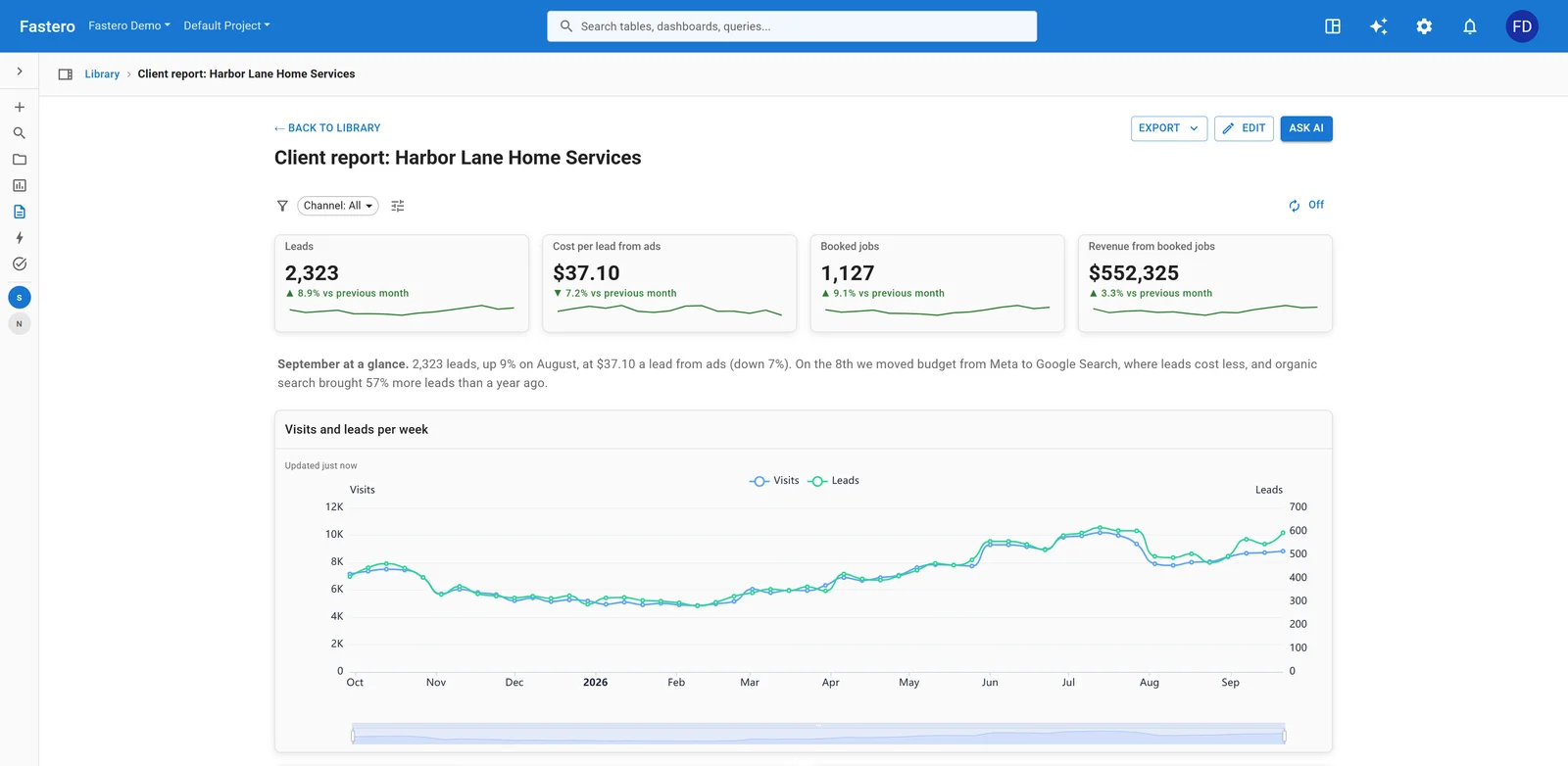
Monthly client report: what an agency sends a client every month. Sample data.
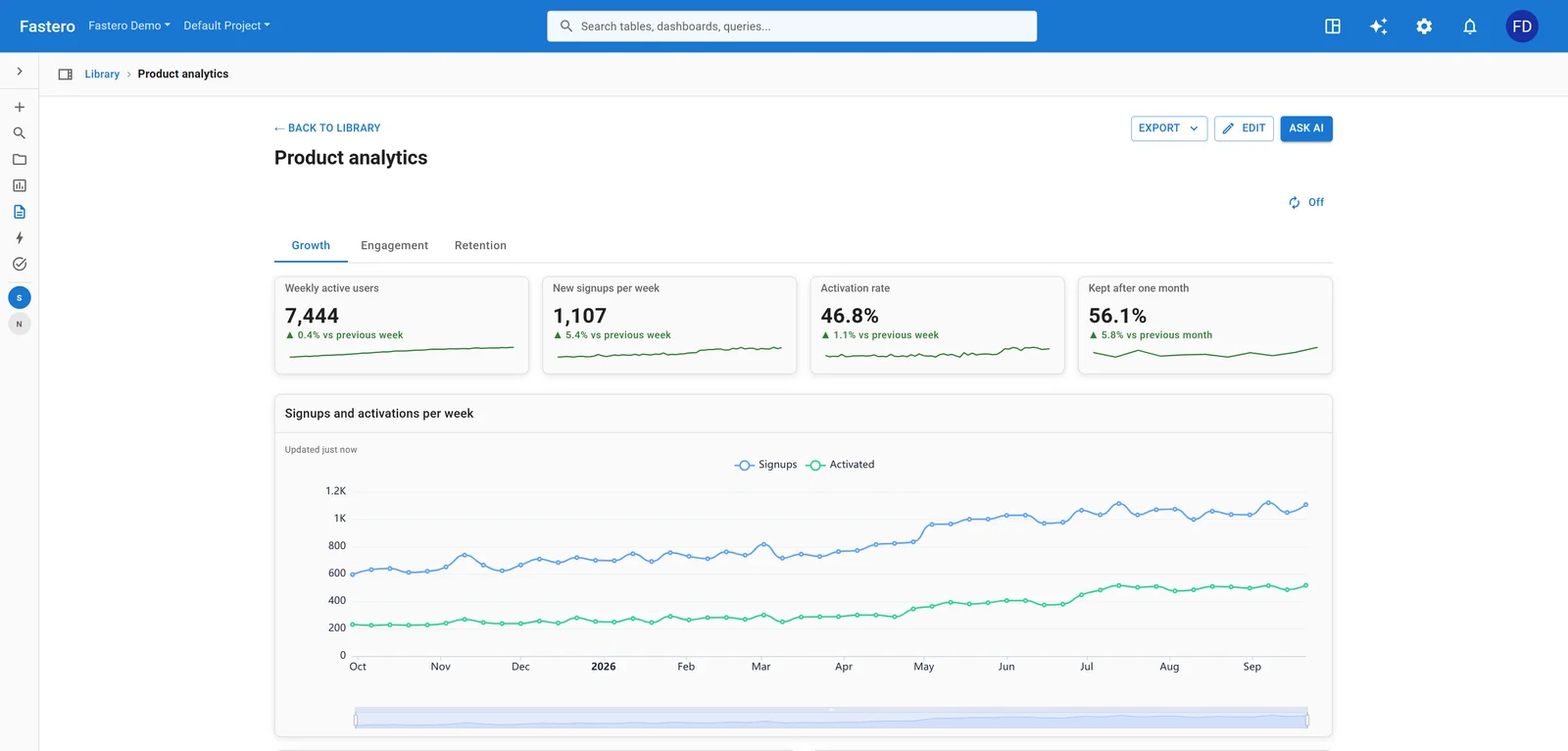
SaaS dashboard: signups, activation and whether people stay. Sample data.
All seven, including cohort retention, KPI rows and a solar fleet with its own Streamlit app, are in dashboard examples.
Build it from Claude
If you work in Claude, connect it to Fastero through Fastero's Claude connector. Claude queries your database through Fastero, can show you a chart in the conversation, and saves it to a dashboard in Fastero. Colleagues open that dashboard with their own login; they don't need Claude.
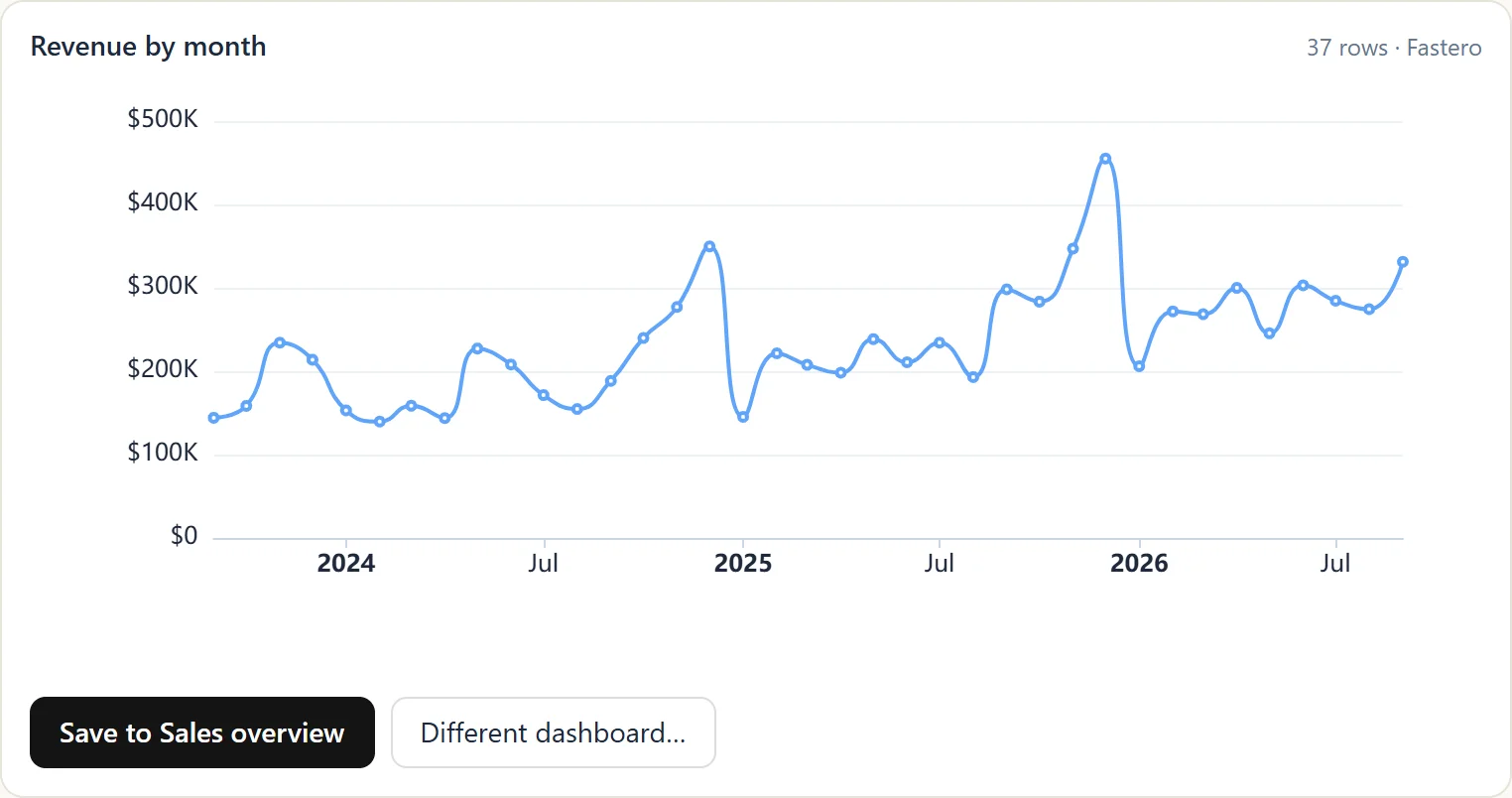
A chart from Fastero inside a Claude conversation. Sample data.
Claude also has its own Dashboards template, in beta on paid plans since 8 October 2026. It works with Redshift, BigQuery, ClickHouse, Databricks, Snowflake and Salesforce. For Postgres, MySQL and other databases, or for colleagues who don't use Claude, use a connector such as Fastero's. More in how to build a dashboard with Claude.
AI dashboard tools in 2026
| Tool | What the AI does | Data it works on |
|---|---|---|
| Fastero | Builds the whole dashboard from a description, changes it when asked, and works from Claude through its connector | Databases, warehouses, Google Sheets and files |
| Claude Dashboards (beta) | Writes one SQL query per chart from a conversation | Redshift, BigQuery, ClickHouse, Databricks, Snowflake, Salesforce |
| Data Studio (formerly Looker Studio) | Conversational Analytics answers plain-English questions about your data | Google Sheets, BigQuery and partner connectors |
| Power BI | Copilot creates report pages and answers questions, with the right licence | Power BI and Microsoft Fabric data |
| ChatGPT | Analyses a file you upload and draws charts in the chat | Uploaded files |
For a longer comparison, see the best AI dashboard tools in 2026.
What to check before you trust an AI dashboard
- One number against a figure you trust. If last month's revenue matches what finance reports, the definitions are probably right.
- The definitions in the queries. Completed orders only? Before or after refunds? Test accounts left out? The AI picks a sensible definition, but only you know the right one for your business.
- The period. A month that has only just started looks like a collapse next to complete months. Compare like with like.
- Who sees what. Share the dashboard with the people who should see these numbers, and connect it with a login that can read only the tables it needs.
FAQ
What is an AI dashboard?
A dashboard that AI builds from a plain-English description, which you can then change and question by asking. The AI writes a query for each number and picks the charts, and the numbers come from your own data.
Can AI create a dashboard from my data?
Yes. Tools such as Fastero connect to your database, warehouse, Google Sheet or file, take a description of the dashboard, and build the queries, charts and layout. Check one number against a figure you trust before you share it.
Is there a free AI dashboard generator?
Fastero's Free plan has no time limit and needs no card, and every account starts with $20 of AI usage. Viewers are free, so your team can open the dashboards you build.
Can ChatGPT or Claude make a dashboard?
Both can draw charts from a file you upload in a chat. Claude's Dashboards template (beta, paid plans) builds dashboards on supported warehouses. For a dashboard that your team opens with live numbers from your own database, connect Claude to Fastero through its connector.
Are AI dashboards accurate?
They are as accurate as the queries behind them. The AI writes those queries, so check the definitions (what counts as revenue, an active user, a cancellation) and compare one number with a figure you trust. In Fastero, each chart's query is saved with the chart, and you can open and edit it.
Related reading:
- Dashboard examples: 7 real dashboards with their SQL and prompts
- How to create a dashboard, step by step
- How to build an AI dashboard from your database
- Best AI dashboard tools in 2026
Try Fastero free — connect your data, describe the dashboard, and share it with your team. No credit card required.