
"AI report generator" covers three very different tools. Some write a report from a prompt, the way you would ask a colleague for a draft. Some design a good-looking report document. And some calculate the report from your data — the only kind whose numbers you can put in front of a manager or a client without checking every one by hand.
The short answer: for a written report from notes or a topic, ChatGPT, Claude or Manus will draft it in a minute. For a designed document, Venngage, Piktochart or Canva. For a report whose numbers come from your data and stay current, use a tool connected to that data that can send the report on a schedule: Fastero, Julius AI or Power BI with Copilot — or, for marketing agencies, AgencyAnalytics, DashThis, Databox or Whatagraph. Google's free Data Studio emails a report as a PDF on a schedule too, though its AI answers questions rather than building the report.
The three kinds of AI report generator
- From your data. You connect a database, a spreadsheet or a file; the tool calculates every number with real queries or code, draws the charts and, often, writes the commentary. Run it again next month and the numbers are next month's.
- From a prompt. You describe the topic or paste notes; the tool writes a structured document. Fast, but any number in it is only as good as what you typed in — or what the model guessed.
- Designed documents. You get a report that looks finished: layout, charts, branding. The charts hold the data you gave them that day.
Marketing agencies have a fourth kind: client reporting tools that connect to ad and analytics accounts and email each client their report every month.
16 AI report generators compared
| Tool | What it makes | From | Numbers stay current | Sends on a schedule | Price to start |
|---|---|---|---|---|---|
| Fastero | Dashboards and reports built from a description | Databases, warehouses, Google Sheets, files | Yes: its queries run again | Yes, as a PDF by email | Free plan |
| Julius AI | Data reports with charts it computed | Files and Sheets; Postgres, BigQuery, Snowflake on paid plans | Re-run on a schedule on Pro and above | Scheduled runs: 3 on Pro, unlimited on Business | Free; Plus $20 a month |
| Power BI Copilot | Report pages and summaries | Power BI data models | Yes | Email subscriptions with a PDF and a Copilot summary | Fabric F2 capacity ($262.80 a month) plus $14 per user |
| Data Studio | Live dashboards and reports; AI answers questions | 1,400+ sources | Yes | PDF by email; free plan: one schedule per report, daily at most | Free; Pro $9 per user per project a month |
| ChatGPT | Charts, files, research reports and Sites | Uploads and connected apps | Files are snapshots | Scheduled tasks re-run a prompt | Free; Plus $20 a month |
| Claude | Files, artifacts and Dashboards (beta) | Uploads and connectors | Files are snapshots; Dashboards stay current | Scheduled tasks on paid plans | Free; Pro $20 a month |
| Manus | Research and data reports, slides | A prompt and uploads | One-off | Scheduled tasks on paid plans | Free credits; $20 a month |
| Powerdrill Bloom | Data reports and slides | Excel, CSV and PDF uploads | One-off | One scheduled task on the free plan | Free; Pro $199 a year |
| Venngage | A designed report | A prompt or a template | One-off | No | Free (no downloads); $10 a month, yearly |
| Piktochart | A designed report | A prompt or a document | One-off | No | Free; $10 per member a month, yearly |
| Canva | Designed documents and slides | A prompt and uploads | Refreshed on request | Scheduled AI tasks; no email delivery | Free; Pro US$144 a year |
| Gamma | Slides, documents and web pages | A prompt or a file | One-off | No | Free credits; Plus €8 per seat a month, yearly |
| AgencyAnalytics | Client dashboards and reports | 85+ marketing integrations | Yes | Scheduled emails | Trial; $20 per client a month, yearly |
| DashThis | Marketing dashboards | 34+ integrations | Daily | Automated PDF emails | Trial; $44 a month, yearly |
| Databox | Dashboards and AI-written reports | 130+ integrations, including MySQL, Postgres and BigQuery | Hourly on paid plans | Scheduled snapshots | Free; $71 a month, yearly |
| Whatagraph | Client reports; builds one from a prompt | 68 integrations | Yes | Scheduled emails with a PDF | From €999 a month, yearly |
Prices are the vendors' own, checked on 16 October 2026.
Fastero
Connect your database. Ask questions. Get dashboards.
Postgres, BigQuery, Snowflake, and 10+ sources — live-connected, AI-powered, no dashboard builder learning curve.
Try free →Reports from your data
This is the kind to use when the numbers matter: a monthly report, a board pack, a client report.
Fastero connects to your database, a warehouse such as BigQuery, a Google Sheet or a file. Describe the report in plain English — the numbers, the charts, the period — and the AI writes the queries, builds the charts and lays out the report; ask it for a short written summary and it adds one. Every chart is a saved query, so the report shows today's numbers when it is opened, refreshes on a timer or when the data changes, and goes out as a PDF by email on the day you choose. Colleagues and clients open it with their own login; viewers are free.
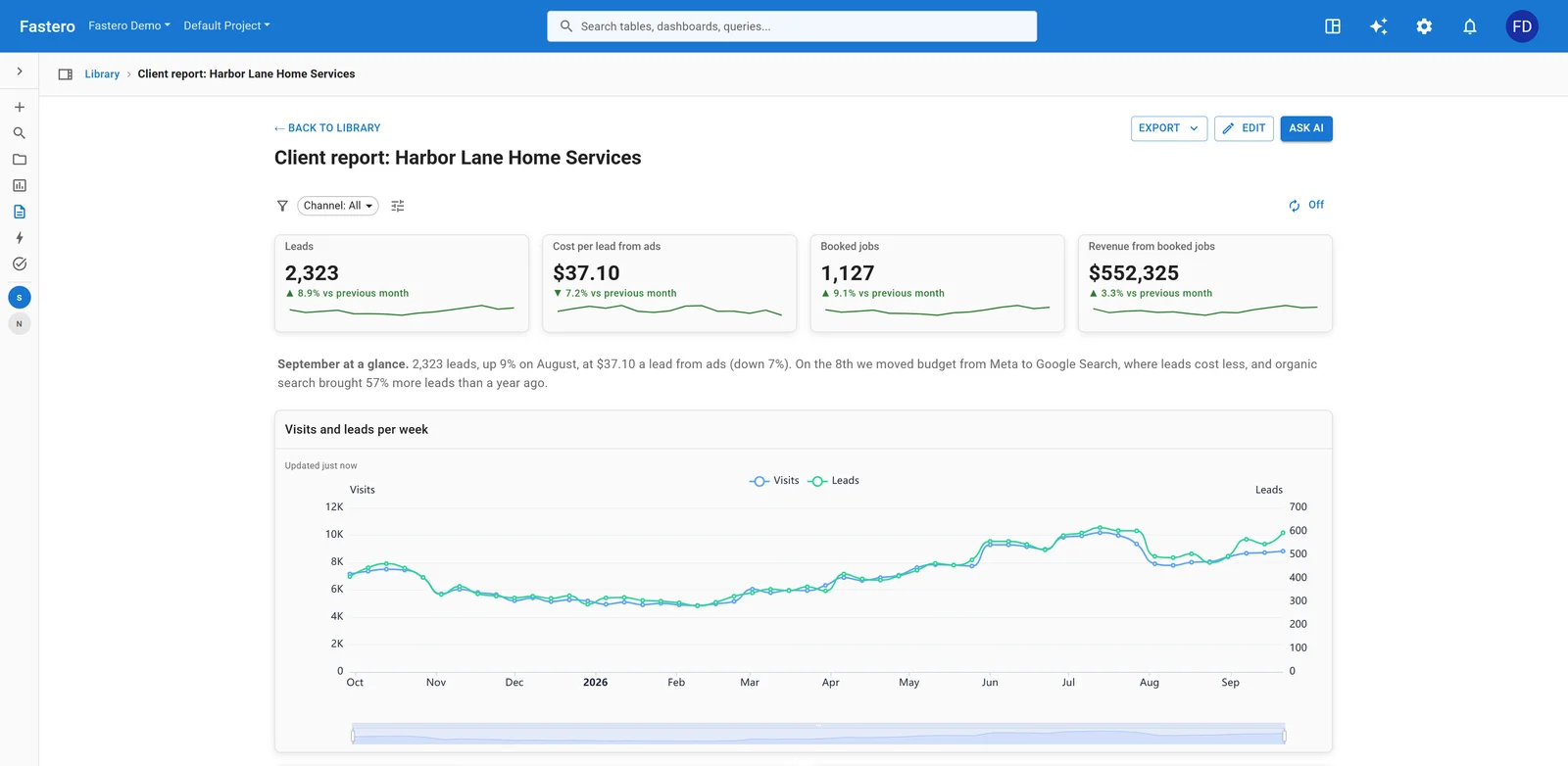
A monthly client report in Fastero. Sample data. See the whole example.
Julius AI analyses an upload or a connected database with real code and writes the report, and on its Pro plan and above it re-runs the analysis on a schedule. Power BI with Copilot builds report pages and adds an AI summary to scheduled emails, if your company already pays for Fabric capacity. Data Studio is free and emails a report as a PDF on a schedule; its Conversational Analytics answers questions about your data, but you build the report yourself. Databox has AI-written reports on top of its dashboards.
Reports from a prompt
ChatGPT and Claude will draft a report from notes, a topic or an uploaded spreadsheet, and both can turn it into a Word, PowerPoint or PDF file. The file is a snapshot: next month you ask again. Both can now run a task on a schedule on paid plans, and Claude's Dashboards (beta, paid plans) keep charts current from a connected warehouse. Manus, an AI agent that ranks near the top of Google for "AI report generator", produces research and data reports, slides and web pages from a prompt and your files.
Whatever writes the draft, check every number in it. A model that summarises a spreadsheet can misread a column; one that writes from a prompt can invent a figure that sounds right.
Designed report documents
Venngage and Piktochart turn a prompt or a document into a designed report, with templates and branding; Canva and Gamma do the same for documents and slides. They produce a good-looking file, once — the charts show the data you gave them, so a monthly report means building it again, or pasting new numbers in.
Client reports for agencies
For an agency, the report is the product. AgencyAnalytics, DashThis, Databox and Whatagraph connect to ad, analytics and SEO accounts, keep each client's numbers current, and email reports on a schedule; Whatagraph can build a report from a prompt. They price per client or by plan. If your clients' data sits in a database or a Google Sheet rather than only in ad platforms, a tool that reads those directly, such as Fastero, covers the rest — see our monthly client report example.
Names you'll see in older lists
Some tools in older "best AI report generator" lists have changed. Narrative BI is gone: its team joined Cube in September 2025. Akkio now sells only to large media companies. Google renamed Looker Studio to Data Studio in April 2026.
How to automate a monthly report with AI
- Connect the data, not a copy of it: the database, the warehouse or the Google Sheet the numbers live in.
- Describe the report: who reads it, the three to five numbers that matter and how each is defined, the charts, and the period.
- Check it once against a figure you trust, such as last month's revenue from finance. After that, the same queries run every month.
- Schedule it: a PDF by email on the first Monday of the month, or a link that always shows the current numbers.
- Add two sentences at the top on what changed and why. It is the part most readers remember.
FAQ
What is an AI report generator?
A tool that uses AI to produce a report. Some write it from a prompt or notes, some design a report document, and some calculate it from your data — querying a database or a spreadsheet, drawing the charts and writing the commentary.
Is there a free AI report generator?
Yes. ChatGPT and Claude draft reports on their free plans. Google's Data Studio is free and emails a report as a PDF on a schedule. Fastero's Free plan builds reports from your database, Google Sheet or file, with no time limit.
Can ChatGPT generate a report from data?
Yes. Upload a spreadsheet and ChatGPT can analyse it and produce charts and a report file. The file is a snapshot of that day's data, so a recurring report means running it again. For numbers that stay current, use a tool connected to the data.
How do I generate a report from Excel with AI?
Upload the workbook to an AI tool such as ChatGPT, Claude, Julius AI or Fastero and describe the report you want. Check the totals against the spreadsheet before you share it. If the report repeats every month, keep the data in a Google Sheet or a database the tool can read again.
Can AI automate monthly reports?
Yes. Build the report once from connected data, then schedule it: Fastero, Data Studio and Power BI email reports on a schedule, and the marketing tools above send client reports automatically. The AI's work is building the report; the schedule keeps it coming.
Related reading:
- Monthly client report example
- AI dashboard: what it is and how to build one
- How to schedule SQL reports to Slack and email
- Best AgencyAnalytics alternatives
Sources: Julius AI report generator and pricing, Copilot in Power BI, Copilot summaries in subscriptions, Power BI pricing, Fabric pricing, Data Studio and scheduled delivery, ChatGPT scheduled tasks, Claude Dashboards, Claude pricing, Manus, Powerdrill pricing, Venngage, Piktochart, Canva, Gamma, AgencyAnalytics pricing, DashThis pricing, Databox pricing, Whatagraph pricing, Data Studio release notes. Checked 16 October 2026.
Try Fastero free — connect your data, describe the report, and send it as a PDF on a schedule. No credit card required.