 Fastero Dev Team
Streamlit reruns your script from the top on every click, so an ordinary Python variable forgets its value each time. Session State is the dictionary that doesn't. Below is how it works, from Streamlit's docs, and three small apps we built and tested on Streamlit 1.67.0 on 20 November 2026, with the tests' real output.
The short answer: st.session_state is a dictionary-like object that keeps values between reruns, separately for each browser tab. Set a key once with if "count" not in st.session_state: st.session_state.count = 0, then read and write it with st.session_state.count or st.session_state["count"]. A widget created with key="name" keeps its value at st.session_state.name, and a callback (on_click or on_change, with args or kwargs) runs before the script does, which makes it the safe place to change state. The gotchas: you can't set a widget's value through Session State after the widget is drawn; a widget's value is deleted on any run where the widget isn't drawn (keep it with persist_state, new in 1.59); and everything is gone when the tab reloads (keep a filter in the URL with bind="query-params"). Data that every viewer shares belongs in st.cache_data or st.cache_resource.
Fastero
Host your Streamlit app for your team.
Deploy from GitHub with your team's login and secrets built in — no Docker, no auth proxy.
Try free →Why Session State exists
Streamlit's docs put it plainly: "Each full-script rerun starts with a blank slate for regular Python variables." They show it with a counter that sets count = 0 in the script: "No matter how many times we press the Increment button in the above app, the count remains at 1." Values stored in Session State are the exception: they "persist across full-script and fragment reruns".
A session is one browser tab. Two tabs on the same app are two sessions, and reloading the tab starts a new one.
Read, write, initialise
| Task | Code |
|---|---|
| Initialise once | if "count" not in st.session_state: st.session_state.count = 0, or st.session_state.setdefault("count", 0) |
| Read | st.session_state.count or st.session_state["count"] |
| Write | st.session_state.count = 5 |
| Delete | del st.session_state["count"] |
| See everything | st.write(st.session_state) |
Reading a key that was never set raises an error. Ours said: st.session_state has no key "name". Did you forget to initialize it?
Widget keys link widgets to Session State
"Every widget with a key is automatically added to Session State": after st.text_input("Your name", key="name"), the text is at st.session_state.name. To give a widget a starting value from code, write the key before the widget is drawn, and don't also pass value= (Streamlit logs a warning the first time you do both).
Writing it after the widget is drawn fails. We ran this:
import streamlit as st
st.slider("Size", 1, 10, key="size")
st.session_state.size = 7
and got:
StreamlitWidgetAlreadyInstantiatedError: `st.session_state['size']` cannot be modified after the widget
with that key is instantiated. Assign `st.session_state['size']` before creating the widget, or update it
from an `on_change` or `on_click` callback, which runs before the widget is instantiated. If this is a
read-only session state key (buttons, file and media inputs, `st.data_editor`, forms, chart or
`ButtonColumn` selections), store the value under a different session state key.
Callbacks: on_click, on_change, args
When someone uses a widget, Streamlit updates its value in Session State, then runs the callback, then reruns the script. Two consequences:
- A callback sees the new value, and the script that follows sees whatever the callback wrote. That's why a callback is the place to change state.
- Values passed through
argsorkwargs"are captured during the script run when the widget command is executed", not when the user clicks. To use a widget's current value in a callback, give it a key and readst.session_stateinside the callback.
Inside st.form, only the submit button can have a callback.
App 1: a counter
A plain variable next to a Session State counter, with callbacks that take args:
import streamlit as st

st.title("Counter")

# A plain variable starts again at 0 on every rerun
clicks = 0
if st.button("Add one (plain variable)"):
    clicks += 1

# Session State keeps its value between reruns
if "count" not in st.session_state:
    st.session_state.count = 0

def add(n):
    st.session_state.count += n

st.button("Add one", on_click=add, args=(1,))
st.button("Add five", on_click=add, args=(5,))

left, right = st.columns(2)
left.metric("Plain variable", clicks)
right.metric("st.session_state.count", st.session_state.count)
In headless Chrome we pressed Add five, Add one twice and the plain-variable button three times:
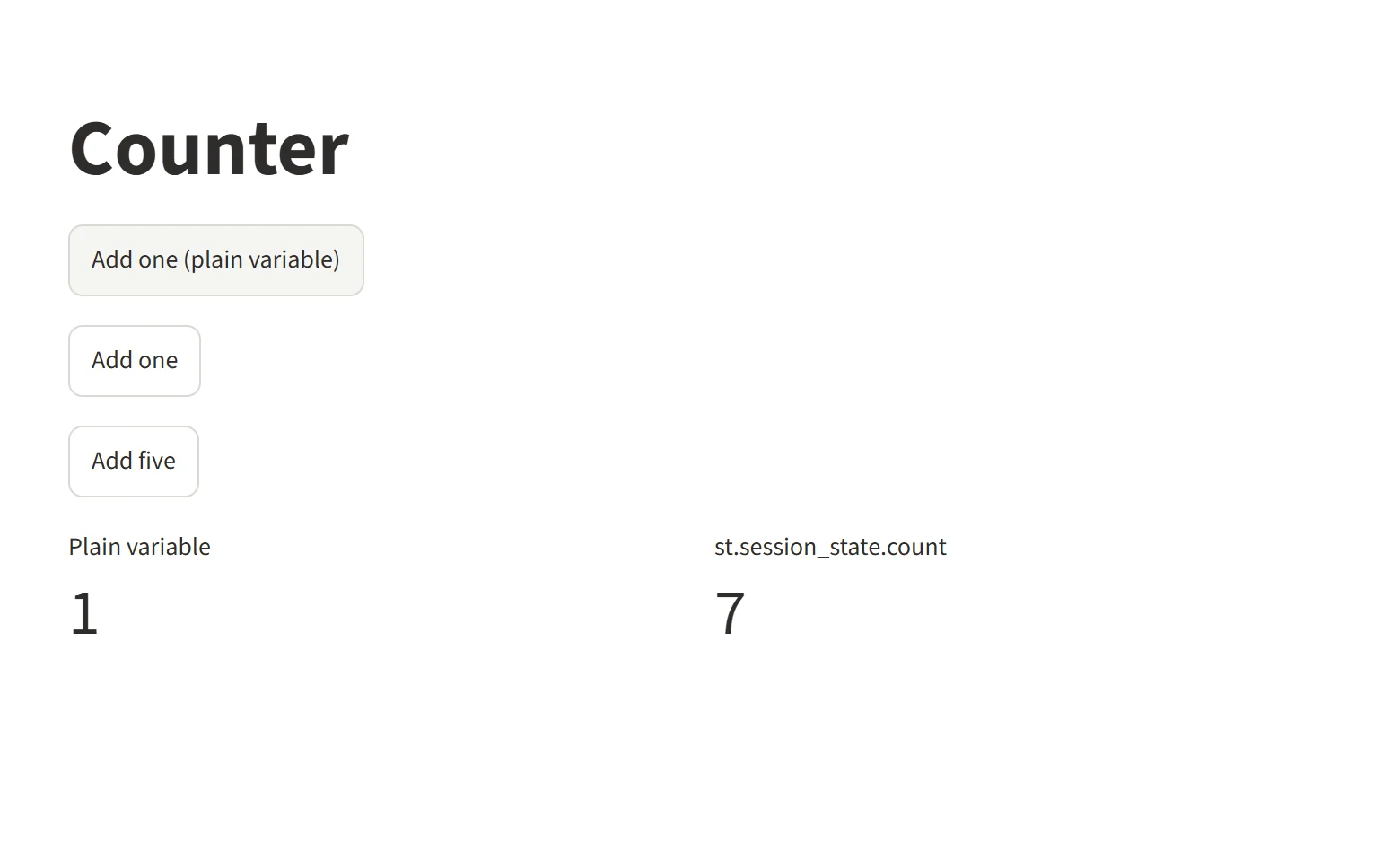
The counter after Add five, Add one twice and the plain-variable button three times: the plain variable is stuck at 1. Streamlit 1.67.0.
Then we reloaded the tab, and the count was back to 0. The docs warn: "As soon as you close or reload the tab, everything stored in Session State is lost." A brief network drop doesn't lose it; the server keeps a disconnected session for server.disconnectedSessionTTL seconds, 120 by default.
App 2: a multi-step form that keeps its answers
A three-step request form. The current step lives in Session State, the Back and Next buttons change it through a callback, and the review step reads every answer back:
import streamlit as st

st.title("Request a dashboard")
st.session_state.setdefault("step", 1)

def go_to(step):
    st.session_state.step = step

step = st.session_state.step
st.progress(step / 3, text=f"Step {step} of 3")

if step == 1:
    st.text_input("Your name", key="name", persist_state="page")
    st.text_input("Work email", key="email", persist_state="page")
    st.button("Next", on_click=go_to, args=(2,))

elif step == 2:
    st.selectbox("Data source", ["Postgres", "BigQuery", "CSV file"], key="source", persist_state="page")
    st.radio("Refresh", ["Daily", "Weekly", "Monthly"], key="refresh", persist_state="page", horizontal=True)
    back, next_ = st.columns(2)
    back.button("Back", on_click=go_to, args=(1,))
    next_.button("Next", on_click=go_to, args=(3,))

else:
    answers = {k: st.session_state[k] for k in ["name", "email", "source", "refresh"]}
    st.table(answers)
    st.button("Back", on_click=go_to, args=(2,))
    if st.button("Send request", type="primary"):
        st.success(f"Thanks, {answers['name']}. Request sent.")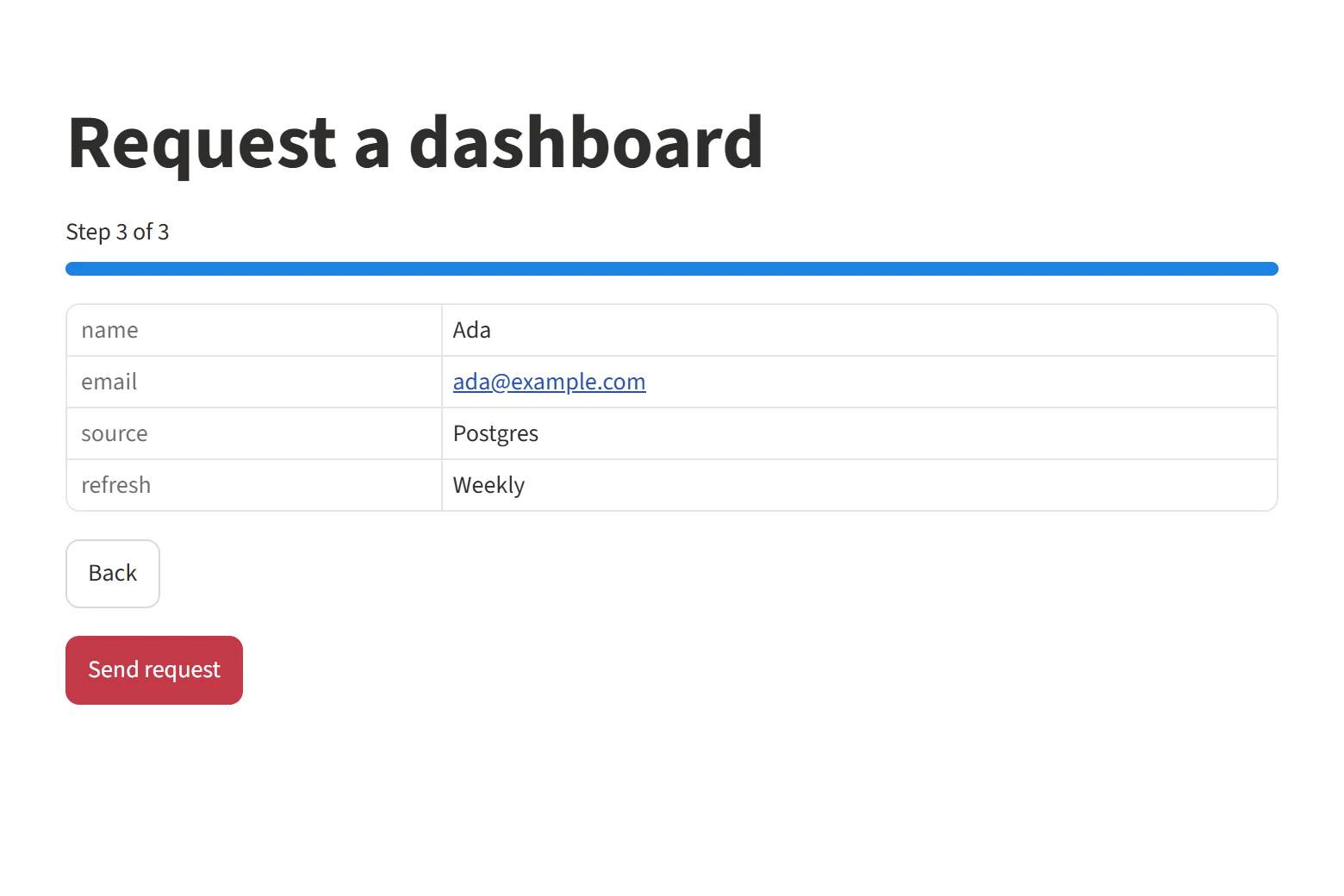
The review step reads answers typed two steps earlier. Example values, Streamlit 1.67.0.
persist_state="page" is what makes it work. By default, a widget that isn't drawn on a run loses "its key-value pair in Session State". On step 2 the name box isn't drawn, so its value goes. One of our tests deletes the four persist_state arguments and fills the form in again, and the review step crashed with st.session_state has no key "name". Before 1.59 added persist_state, the fix was to copy each value into a key of your own in an on_change callback; the docs still show that pattern.
Host your Streamlit app for your team.
Start free →App 3: a filter that survives switching pages
Widgets belong to the page that draws them: "If you have two widgets with the same key on different pages, they will be treated as two different widgets." This app uses both fixes the docs recommend. The region filter sits in the entrypoint, so it's drawn on every page, and bind="query-params" also writes it into the URL. The "Show top" box exists only on the Products page, so it uses persist_state="session":
# streamlit_app.py (the entrypoint)
import streamlit as st

st.sidebar.selectbox(
    "Region", ["All", "East", "North", "South", "West"], key="region", bind="query-params"
)

pg = st.navigation([
    st.Page("orders.py", title="Orders", icon=":material/receipt_long:"),
    st.Page("products.py", title="Products", icon=":material/inventory_2:"),
])
pg.run()
# products.py
import streamlit as st
from data import load_sales
sales = load_sales(st.session_state.region)
st.title(f"Products: {st.session_state.region}")
top_n = st.number_input("Show top", 3, 13, 5, key="top_n", persist_state="session")
top = sales.groupby("product", as_index=False).revenue.sum().nlargest(top_n, "revenue")
st.bar_chart(top, x="product", y="revenue", horizontal=True, sort="-revenue", x_label="", y_label="Revenue ($)")load_sales is a @st.cache_data function that reads the invented sample CSV and filters it by region. What our browser run printed:
filter: URL after choosing West -> http://localhost:8648/?region=West
filter: Products page after leaving and coming back -> title: Products: West | Show top: 8 | URL: http://localhost:8648/products?region=West
filter: after reload -> title: Products: West | Show top: 5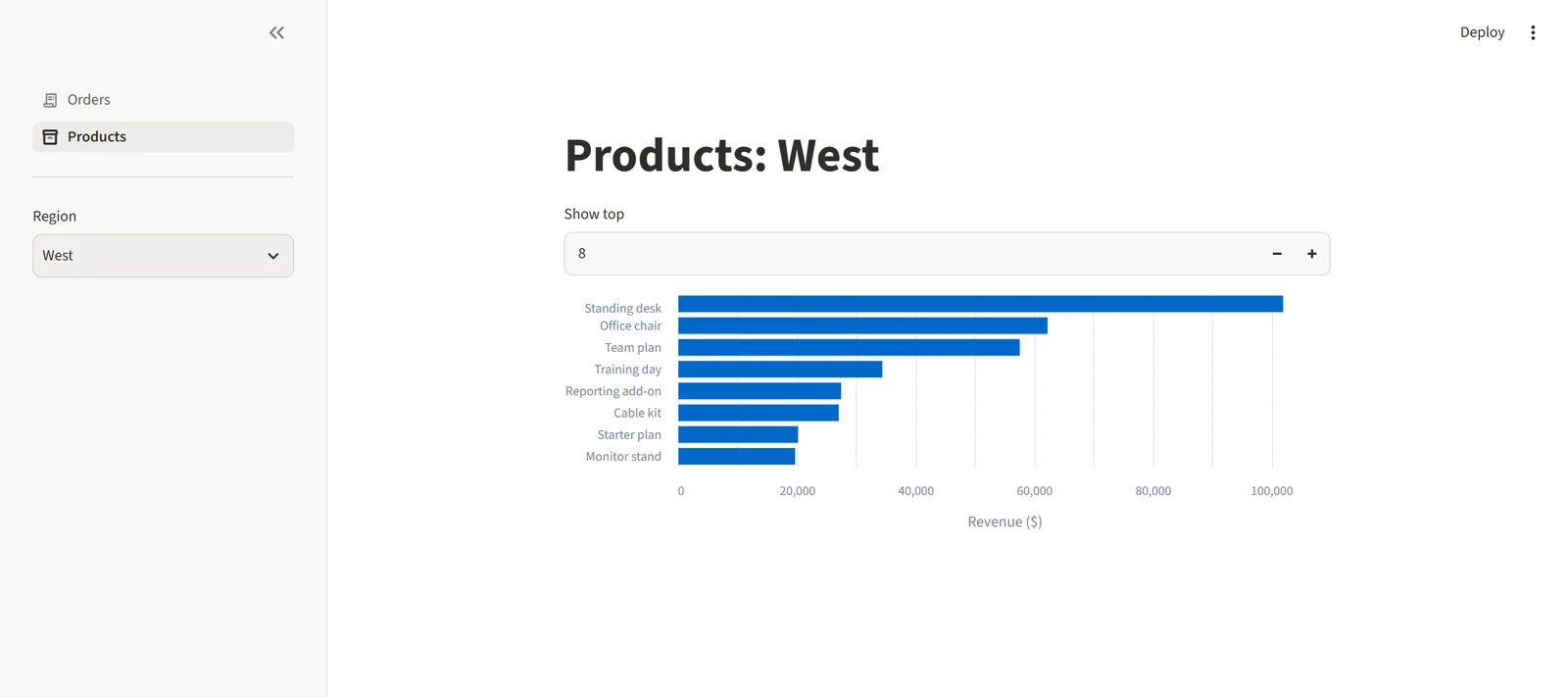
Region chosen on the Orders page, Show top set before leaving and coming back: both kept. Invented data, Streamlit 1.67.0.
The region survived the page switch, because the entrypoint draws it on every page, and the reload, because it's in the URL. "Show top" survived the page switch but not the reload, because persist_state keeps a value in Session State, and a reload starts a new session. In a copy of the app without persist_state="session", our test set it to 10, left the page, came back and found 5, the default.
The tests
AppTest from streamlit.testing.v1 runs an app without a browser and exposes at.session_state, so you can check state directly. Two of our ten tests:
def test_plain_variable_resets_on_every_rerun():
    at = AppTest.from_file("../counter.py", default_timeout=10).run()
    for _ in range(3):
        at.button[0].click().run()  # "Add one (plain variable)"
    assert at.metric[0].value == "1"  # not 3: the script starts again at clicks = 0

def test_each_session_has_its_own_state():
    first = AppTest.from_file("../counter.py", default_timeout=10).run()
    first.button[1].click().run()
    second = AppTest.from_file("../counter.py", default_timeout=10).run()  # a second browser tab
    assert first.session_state.count == 1
    assert second.session_state.count == 0
The run, python -m pytest tests/ -v -p no:cacheprovider, header lines trimmed:
collecting ... collected 10 items

tests/test_counter.py::test_session_state_keeps_counting PASSED          [ 10%]
tests/test_counter.py::test_plain_variable_resets_on_every_rerun PASSED  [ 20%]
tests/test_counter.py::test_each_session_has_its_own_state PASSED        [ 30%]
tests/test_counter.py::test_setting_a_widget_after_it_is_drawn_raises PASSED [ 40%]
tests/test_filter_app.py::test_region_survives_a_page_switch PASSED      [ 50%]
tests/test_filter_app.py::test_top_n_survives_leaving_the_page PASSED    [ 60%]
tests/test_filter_app.py::test_without_persist_state_top_n_resets PASSED [ 70%]
tests/test_wizard.py::test_answers_survive_every_step PASSED             [ 80%]
tests/test_wizard.py::test_back_button_shows_what_was_typed PASSED       [ 90%]
tests/test_wizard.py::test_without_persist_state_the_answers_are_deleted PASSED [100%]

============================= 10 passed in 9.57s ==============================
Five of them check documented behaviour that surprises people: the plain variable, the second session, the exception and the two copies without persist_state. Set default_timeout above the default 3 seconds; in our tutorial suite the first test hit it.
Session State gotchas at a glance
| Gotcha | What happens | Fix |
|---|---|---|
| Plain variable | Resets on every rerun | Keep it in st.session_state |
| Setting a widget after drawing it | StreamlitWidgetAlreadyInstantiatedError |
Set the key before the widget, or in a callback |
| Widget not drawn on a run | Its key is deleted | persist_state="page" (1.59+), or copy to your own key |
| Same widget on two pages | Resets when you switch | Draw it in the entrypoint, or persist_state="session" |
| Reload, new tab or a Markdown link | New session, empty state | bind="query-params" (1.55+) for widgets, or a database |
| Server restart or crash | Everything in Session State is lost | Save what matters elsewhere |
args read at draw time |
The callback gets a stale value | Read st.session_state inside the callback |
Session State or a cache?
st.session_state |
st.cache_data |
st.cache_resource |
|
|---|---|---|---|
| Shared by | One session (tab) | All users, by default | All users, by default |
| Keyed by | Names you choose | The function and its arguments | The function and its arguments |
| Returns | The object itself | A fresh copy on each call | The same object, shared |
| Use it for | Clicks, steps, choices, one user's results | DataFrames, query results, API calls | Database connections, ML models |
If the same data serves everyone, cache the function that loads it, as in step 4 of the tutorial; "Session State associates stored values to keys (strings)" and holds what belongs to one viewer. Both cache decorators also take scope="session" for a cache per session. More patterns for dashboards are in our Streamlit dashboard examples.
Hosting a stateful app for a team
Fastero hosts Streamlit apps behind your workspace's login on every plan, so you don't write sign-in code (other ways to add a login). On the Free plan an app wakes when someone opens it and sleeps after 10 idle minutes; always-on is a Pro feature ($20 per editor a month, checked 20 November 2026) and isn't part of the 14-day Pro trial. Every app gets 1 CPU and 2 GB of memory. For other hosts, see how to deploy a Streamlit app and why Community Cloud apps keep sleeping.
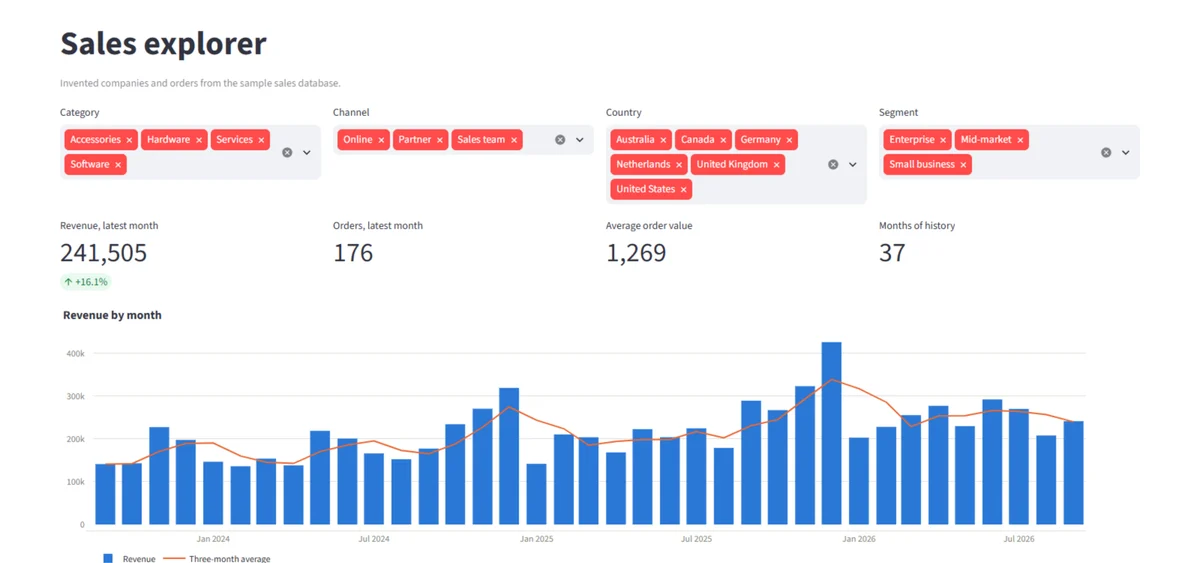
A Streamlit app hosted in Fastero. Invented data.
FAQ
What is st.session_state in Streamlit?
It's a dictionary-like object that keeps values between reruns of your script, one per browser tab. You read and write it with key or attribute syntax, and every widget with a key stores its value there.
How do I initialize session state in Streamlit?
Check for the key before setting it, if "count" not in st.session_state: st.session_state.count = 0, or use st.session_state.setdefault("count", 0). Either way the value is set on the first run only and kept after that.
Does Streamlit session state survive a page refresh?
No. Reloading the tab, opening a new one, or following a Markdown link starts a new session with empty state. To keep a filter across reloads, bind the widget to the URL with bind="query-params"; for anything else, save it to a database or file.
Is session state shared between users?
No. Each browser tab gets its own Session State, so one viewer's clicks never change another's. Data that should be shared between users belongs in st.cache_data or st.cache_resource, which are global by default.
How do I keep a widget's value when switching pages?
Draw the widget in the entrypoint file that calls st.navigation, so it exists on every page, or give it a key and persist_state="session" (Streamlit 1.59 or later). Without either, a widget resets when you leave its page.
What is the difference between session state and st.cache_data?
st.cache_data stores a function's result, keyed by its arguments, and by default shares it with every user. Session State stores values under names you choose for one session only. Cache data loads; keep clicks, steps and choices in Session State.
Sources
Read on 20 November 2026, against Streamlit 1.67.0:
- Streamlit docs: Add statefulness to apps, st.session_state, Widget behavior, Widgets in multipage apps
- Advanced concepts, Caching overview, st.cache_data, st.cache_resource
- AppTest API, Release notes, Fastero pricing
Try Fastero free: host your Streamlit app behind your team's login. No credit card required.