 Fastero Dev Team
A Streamlit app runs on your laptop with one command. Putting it where other people can open it is where the choices start: Streamlit's free Community Cloud, a Docker container on a server, Snowflake, or a hosting platform. Several of those changed in 2026, and so did Streamlit itself, which swapped its web server in April. We ran a small app locally and in Docker, behind nginx with and without the right proxy settings, on Streamlit 1.67.0, released on 5 November 2026.
The short answer: for a free, public app, push app.py and a requirements.txt that pins streamlit to a GitHub repository you administer, then deploy it from share.streamlit.io: choose the repository, branch and file, and under Advanced settings pick the Python version and paste your secrets. Community Cloud is free, with up to 2.7 GB of memory, one private app, and apps that sleep after 12 hours without a visitor. For anything else, build the Docker image from Streamlit's own pattern, point health checks at /_stcore/health, and make sure any proxy in front passes WebSocket headers, or the app shows grey placeholders forever. For an app a team relies on, behind its login and always awake, use a host built for that.
Fastero
Host your Streamlit app for your team.
Deploy from GitHub with your team's login and secrets built in — no Docker, no auth proxy.
Try free →Before you deploy
Every route needs the same three things:
- An entry file, usually
app.pyorstreamlit_app.py. - A
requirements.txtlisting your packages, with Streamlit pinned (streamlit==1.67.0), so a new release can't change the app under you. Streamlit 1.67 needs Python 3.11 or newer. - Secrets kept out of the code: database passwords and API keys in
.streamlit/secrets.tomllocally, read withst.secrets, and never committed to Git.
When you run an app locally, Streamlit's Deploy button in the top right opens a dialog with the three routes it suggests: Streamlit Community Cloud, "For community, always free"; Snowflake, "For enterprise"; and other platforms, where you "Set up and maintain your own authentication, resources, and costs."
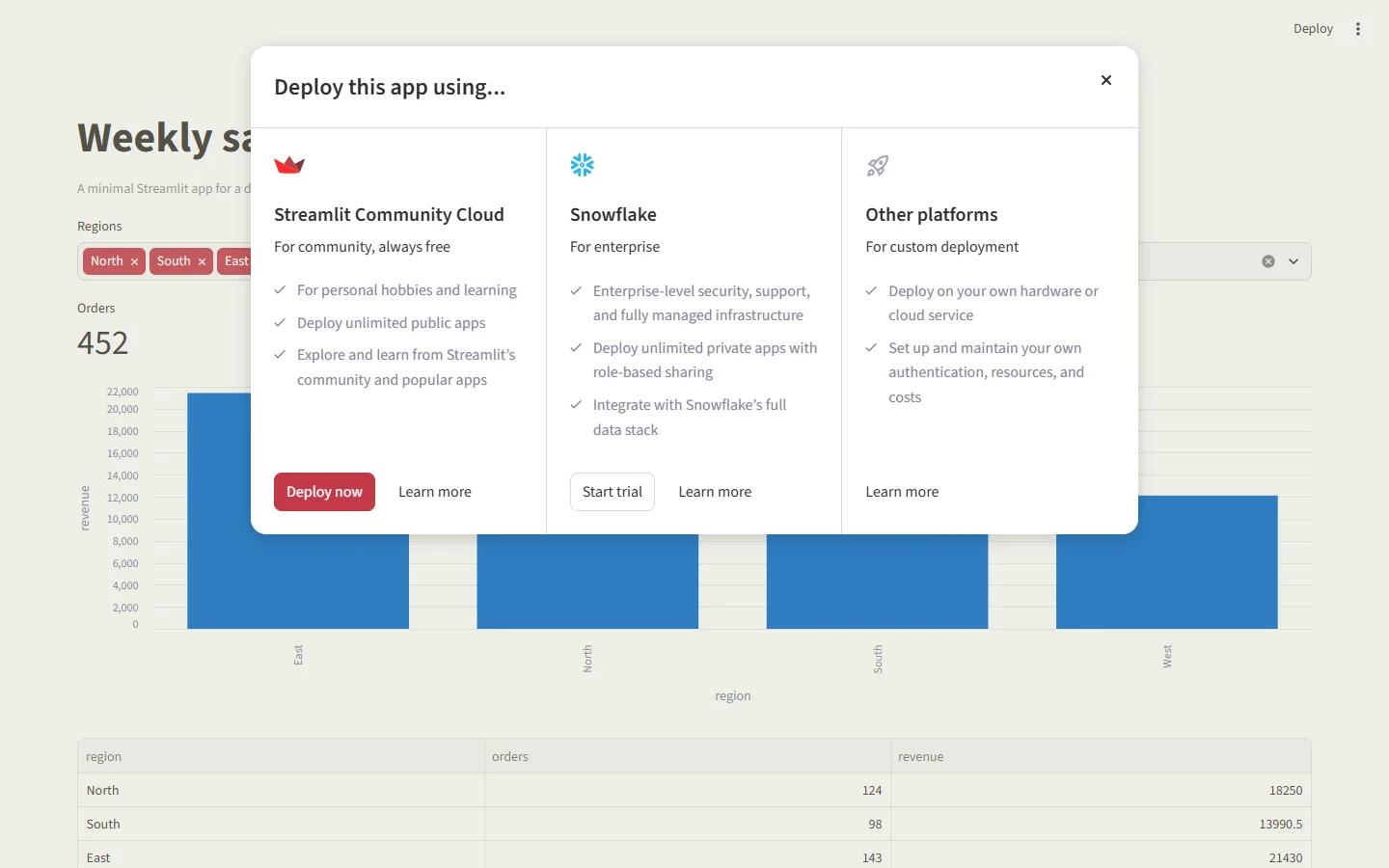
The Deploy dialog in a locally running Streamlit 1.67 app. Invented data.
Option 1: Streamlit Community Cloud (free)
- Sign in at share.streamlit.io and connect your GitHub account. You need admin rights on the repository: "a developer must have administrative permissions to a repository to deploy apps from it." Private repositories need a second authorization.
- Create an app, then choose the repository, branch and entry file, or paste the file's GitHub address. Optionally pick a custom subdomain of 6 to 63 characters; every app lives on
streamlit.app. - Open Advanced settings. Choose the Python version, 3.12 by default, carefully: "Python itself can't be changed after deployment", so changing it later means deleting and redeploying. In the Secrets field, "paste the contents of your secrets.toml file."
- Deploy. "Most apps are deployed within a few minutes." After that, every push to the branch redeploys the app.
Community Cloud installs requirements.txt with uv, falling back to pip, on Debian 11, and installs Linux packages listed in packages.txt. Its limits, as Streamlit lists them "as of February 2024":
| Community Cloud | |
|---|---|
| CPU | 0.078 to 2 cores |
| Memory | 690 MB to 2.7 GB |
| Storage | Up to 50 GB |
| Private apps | One: "You are only allowed one private app at a time." |
| Sleep | "All apps without traffic for 12 hours go to sleep." |
| Where it runs | "Community Cloud hosts all apps in the United States." |
| Address | A subdomain of streamlit.app |
Who can see the app follows the repository: "if your repo is private your app will be private and if your repo is public your app will be public." A private app's viewers are invited by email and sign in with Google or a single-use emailed link. A sleeping app wakes when anyone who can view it clicks Yes, get this app back up!; more on that in our guide to why Streamlit apps keep sleeping.
Option 2: Docker, on your own server
Streamlit's documentation gives a Dockerfile, which we built and ran:
FROM python:3.12-slim

WORKDIR /app

RUN apt-get update && apt-get install -y \
    build-essential \
    curl \
    git \
    && rm -rf /var/lib/apt/lists/*

COPY . .

RUN pip3 install -r requirements.txt

EXPOSE 8501

HEALTHCHECK CMD curl --fail http://localhost:8501/_stcore/health

ENTRYPOINT ["streamlit", "run", "app.py", "--server.port=8501", "--server.address=0.0.0.0"]
docker build -t my-streamlit-app .
docker run -d -p 8501:8501 my-streamlit-appIt worked: the container reported itself healthy and served the app. What we learned:
- Keep
WORKDIR /app. "Streamlit apps cannot be run from the root directory of Linux distributions." - The image is big. It came to 1.62 GB.
build-essentialandgitare only needed for packages that compile or for cloning; without them, with--no-install-recommendsandpip --no-cache-dir, ours was 837 MB. - Copy
requirements.txtbefore the code (COPY requirements.txt .,RUN pip3 install -r requirements.txt, thenCOPY . .), so editing the app doesn't reinstall every package. --server.address=0.0.0.0is what makes the app reachable from outside the container.
The health check, after the 2026 server change
Since version 1.57.0, released on 29 April 2026, "Streamlit now uses Starlette/Uvicorn instead of Tornado". On 1.67, GET /_stcore/health answered with a 2-byte plain-text body, ok, not JSON, so a probe that expects JSON will fail. And /healthz, or any made-up path, answered HTTP 200 with the app's page, so a load balancer pointed at the wrong path will always think the app is healthy. Use /_stcore/health.
Behind nginx or a load balancer: pass the WebSocket headers
A Streamlit page talks to the server over a WebSocket. We put nginx in front of the container without the two headers that allow it, and the page sat on grey placeholders for over 90 seconds with no error on screen, while /_stcore/health kept answering ok through the same proxy. The only clue was in the browser's console: Error during WebSocket handshake: Unexpected response code: 200.

What a Streamlit app looks like behind a proxy that drops WebSocket headers: placeholders, indefinitely.
Adding these lines to the proxy's location block fixed it at once:
proxy_http_version 1.1;
proxy_set_header Upgrade $http_upgrade;
proxy_set_header Connection "upgrade";
Older guides describe a "Connecting…" message for this problem; since Streamlit 1.29 the loading screen is placeholders instead. If you know your app's hostnames, Streamlit 1.61 added server.allowedHosts to restrict which hosts can open the WebSocket.
Option 3: Streamlit in Snowflake
If your data is in Snowflake, Snowflake hosts Streamlit apps next to it, billed in Snowflake credits. It has two runtimes: the warehouse runtime runs one app instance per viewer, with Conda packages, and the container runtime runs one shared instance with packages from PyPI and Streamlit 1.50 or newer, suspended "after three days of viewer inactivity". Running apps on Snowpark Container Services needs a compute pool, "which is not available in a trial account at this time."
Host your Streamlit app for your team.
Host a Streamlit app →Option 4: a hosting platform
Free hosting for Streamlit has mostly gone. As of 6 November 2026:
| Host | Free option | Worth knowing |
|---|---|---|
| Render | A free web service | Sleeps after 15 idle minutes, takes about a minute to wake; paid from $7 a month |
| Railway | A $5 trial for 30 days, then a Free plan worth $1 a month | Hobby plan $5 a month, including $5 of usage |
| Fly.io | $1 of credit for 7 days | Trial machines stop after 5 minutes; the smallest machine is $2.19 a month |
| Hugging Face Spaces | No longer for new Streamlit apps on a free personal account | The built-in Streamlit option is deprecated, and Docker Spaces need PRO ($9 a month) to create |
All of these run the same Docker image as option 2. Platforms that assign a port need --server.port set to it, and logins, secrets and keeping the app awake are yours to arrange.
Putting a login in front
For a private app, Streamlit has built-in sign-in since version 1.42: st.login() works with any OpenID Connect provider, such as Google, Microsoft Entra ID, Okta or Auth0, configured in the [auth] section of your secrets and installed with streamlit[auth]. The sign-in cookie lasts 30 days, and "authentication is not supported for embedded" apps. Our Streamlit login guide walks through it.
When a team depends on the app
Community Cloud is built for public demos, and running your own container means looking after the server, the proxy, sign-in and the bill. An app that colleagues use every day needs three things neither gives you easily: their own login, the company's database passwords kept safely, and an app that's awake when someone opens it.
Fastero hosts Streamlit apps for teams:
- Deploy from Git: point it at a GitHub, GitLab or Bitbucket repository and branch, private ones included, with an access token or by connecting GitHub, and choose the Python version. A push updates the app.
- Your team's login: colleagues sign in with their own account; no
st.loginsetup and no proxy. - Secrets and data: database passwords and API keys reach the app through
st.secrets, and a workspace database connection throughst.connection. - Awake when needed: keep any app always on, from $20 a month, or let it rest when nobody's using it and start again in about 15 seconds.
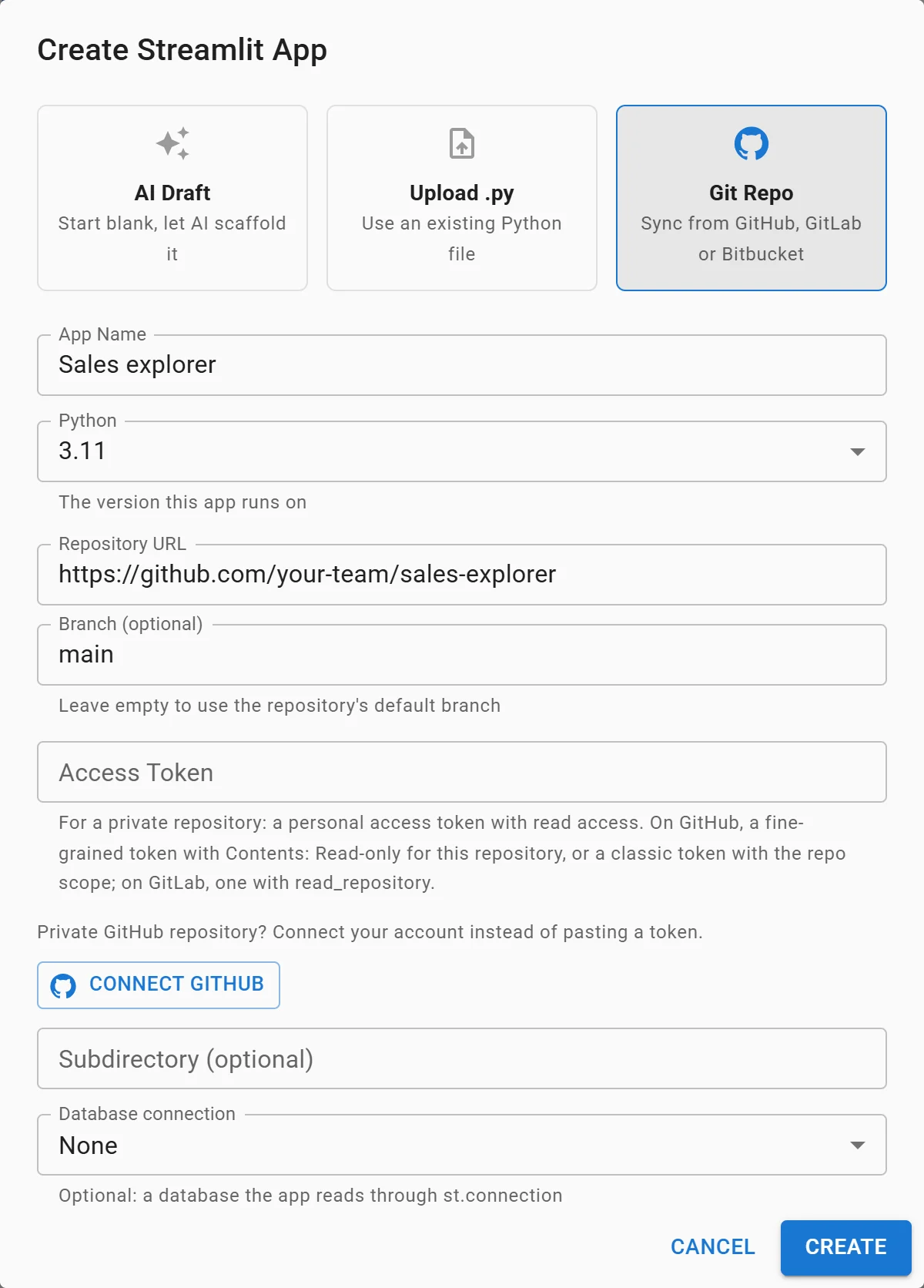
Deploying a Streamlit app from Git in Fastero. Example values.
More in our comparison of Streamlit Community Cloud and paid hosting and our list of platforms to deploy Python data apps.
FAQ
How do I deploy a Streamlit app for free?
Push it to a GitHub repository you administer and deploy it from share.streamlit.io on Streamlit Community Cloud. Public apps are unlimited and free; you get one private app. Render's free web service is the other free option, with a sleep after 15 idle minutes.
What are Streamlit Community Cloud's limits?
As Streamlit lists them: 0.078 to 2 CPU cores, 690 MB to 2.7 GB of memory, up to 50 GB of storage, one private app, US hosting, and a sleep after 12 hours without traffic.
Can I deploy a Streamlit app from a private GitHub repository?
Yes. On Community Cloud you authorize access to private repositories, and an app from a private repository is private; you can have one at a time. Hosts that deploy from Git, Fastero included, take an access token.
How do I add secrets to a deployed Streamlit app?
On Community Cloud, paste your secrets.toml into the Secrets field under Advanced settings when you deploy, or later in the app's settings. In Docker, mount the file or pass environment variables; never bake keys into the image.
How do I deploy a Streamlit app with Docker?
Use Streamlit's Dockerfile: python:3.12-slim, WORKDIR /app, install requirements.txt, a HEALTHCHECK on /_stcore/health, and streamlit run app.py --server.port=8501 --server.address=0.0.0.0. Build it with docker build and run it with docker run -p 8501:8501.
Why is my Streamlit app stuck loading behind nginx?
The proxy isn't passing WebSocket headers. Add proxy_http_version 1.1, proxy_set_header Upgrade $http_upgrade and proxy_set_header Connection "upgrade". Health checks keep passing while the page is stuck, so they won't warn you.
Can I change the Python version of a Streamlit Cloud app?
Not in place: "Python itself can't be changed after deployment." Delete the app and deploy it again with the new version.
Can I still host Streamlit on Hugging Face Spaces for free?
Not for a new app on a free personal account: the built-in Streamlit option is deprecated, and creating a Docker Space needs a PRO plan at $9 a month.
Sources
Read on 6 November 2026:
- Streamlit — Deploy your app on Community Cloud, Manage your app, Share your app, Status and limitations, App dependencies, Deploy with Docker, Release notes, st.login, Streamlit on PyPI
- Snowflake — Streamlit in Snowflake runtimes
- Hosts — Render free instances, Railway free trial, Fly.io free trial, Fly.io pricing, Hugging Face Spaces overview, Hugging Face Streamlit Spaces
- Our own tests: Streamlit 1.67.0, Docker Engine 29.5, nginx 1.31.8
Try Fastero free — deploy Streamlit apps from Git behind your team's login, with secrets and an app that's awake when people open it. No credit card required.