 Fastero Dev Team
A Postgres connection string is one line that tells a tool where your database is and how to log in. The format is the same everywhere, but tools read it differently, and that's where most connection problems come from.
The short answer: the format is postgresql://user:pass@host:5432/db, and over the internet you add ?sslmode=require to the end. postgres:// means the same thing to Postgres, though SQLAlchemy refuses it. Percent-encode the password if it contains characters such as @, # or /. Supabase, Neon, Heroku, Render, Railway, DigitalOcean and Aiven give you a ready-made string, while Amazon RDS, Google Cloud SQL and Azure give you the parts to assemble.
Fastero
Connect your database. Ask questions. Get dashboards.
Postgres, BigQuery, Snowflake, and 10+ sources — live-connected, AI-powered, no dashboard builder learning curve.
Try free →We ran every snippet and error below against a local PostgreSQL 16 server, with psql, psycopg, SQLAlchemy, Node pg and Prisma.
The format
postgresql://[user[:password]@][host][:port][/database][?param=value¶m=value]| Part | Example | If you leave it out |
|---|---|---|
| Scheme | postgresql:// or postgres:// |
Required |
| User | reporting_ro |
Your operating system username |
| Password | s3cret |
Asked for, or looked up in .pgpass |
| Host | db.example.com |
A local socket, or localhost on Windows |
| Port | 5432 |
5432 |
| Database | shop |
The same as the username, a common surprise |
| Parameters | sslmode=require |
sslmode defaults to prefer |
Leave out the database and you'll see FATAL: database "reporting_ro" does not exist, because Postgres went looking for a database named after the user.
There's a second format, keyword and value, which some providers show instead:
host=db.example.com port=5432 dbname=shop user=reporting_ro password=s3cret sslmode=requirepsql and libpq-based drivers accept both. Web forms and many other tools only take the URI.
Examples that ran
psql:
psql 'postgresql://postgres:test@localhost:55440/shop' -c 'select current_user, current_database()'Python, psycopg:
import psycopg

url = "postgresql://postgres:test@localhost:55440/shop"

with psycopg.connect(url) as conn:
    print(conn.execute("select current_user, current_database()").fetchone())
Python, pandas and SQLAlchemy:
import pandas as pd
from sqlalchemy import create_engine

engine = create_engine("postgresql+psycopg://postgres:test@localhost:55440/shop")

df = pd.read_sql("select id, customer, total from orders order by id", engine)
print(df)
SQLAlchemy needs postgresql spelled out. A postgres:// string, which is what Heroku hands you, fails with NoSuchModuleError: Can't load plugin: sqlalchemy.dialects:postgres.
Node.js, pg:
const { Client } = require('pg')

async function main() {
  const client = new Client({ connectionString: 'postgresql://postgres:test@localhost:55440/shop' })
  await client.connect()
  const { rows } = await client.query('select current_user, current_database()')
  console.log(rows[0])
  await client.end()
}

main()
Prisma reads it from DATABASE_URL, and adds parameters of its own:
DATABASE_URL="postgresql://postgres:test@localhost:55440/shop?schema=public"A Prisma URL isn't portable: psql answers that one with invalid URI query parameter: "schema".
A password with special characters
If your password contains @, /, #, ?, % or a space, a pasted string usually breaks, and the error rarely mentions the password. With the password p@ss#w/rd:1:
| Tool | What you see |
|---|---|
| psql | could not translate host name "ss#w" to address |
| psycopg | failed to resolve host 'ss#w' |
Node pg |
getaddrinfo ENOTFOUND ss |
| Prisma | P1001 Can't reach database server at `ss:5432` |
The fix is to percent-encode the whole password, which worked in every tool we tried:
from urllib.parse import quote

password = "p@ss#w/rd:1"
print(f"postgresql://app_user:{quote(password, safe='')}@localhost:55440/shop")
# postgresql://app_user:p%40ss%23w%2Frd%3A1@localhost:55440/shop
const password = 'p@ss#w/rd:1'
console.log(`postgresql://app_user:${encodeURIComponent(password)}@localhost:55440/shop`)Three encoders that look right and aren't:
quote(password)withoutsafe=''leaves the slash in. psql then reportsinvalid integer value "p@ss#w" for connection option "port".encodeURI(password)in JavaScript changes nothing here. UseencodeURIComponent.quote_plus(password)is fine until a password has a space in it. It writes+, which Postgres clients keep as a plus sign, and you getpassword authentication failed.
SQLAlchemy can skip encoding altogether with URL.create("postgresql+psycopg", username="app_user", password="p@ss#w/rd:1", host="localhost", port=55440, database="shop").
Where to find your connection string
| Provider | Ready-made string? | Where to look | Before it will connect |
|---|---|---|---|
| Supabase | Yes | Project → Connect, then choose the method | Direct is IPv6 unless you buy the add-on; the Session pooler works over IPv4 |
| Neon | Yes | Console → Connect | SSL is required; pooled (-pooler) by default |
| Amazon RDS | No, parts | RDS console → Databases → your instance → Connectivity & security | Public access on, and a security group rule |
| Aurora | No, parts | RDS console → Databases → your cluster | Same |
| Google Cloud SQL | No, an IP | Instance → Overview → Connect to this instance | Authorized networks |
| Azure flexible server | No, keyword form | Server → Overview | The firewall blocks everything by default; IPv4 rules only |
| Heroku | Yes, postgres:// |
heroku config:get DATABASE_URL, or Credentials in the dashboard |
Requires SSL; the URL can change |
| Railway | Yes, a variable | DATABASE_PUBLIC_URL, once you add Public Access |
DATABASE_URL is the private one |
| Render | Yes, two | Connect menu on the database's page | Use the external URL from outside Render |
| DigitalOcean | Yes | Cluster → Overview → Connection Details | Trusted sources; port 25060 by default |
| Aiven | Yes | Service overview page | Uses sslmode=require by default |
| Tiger Cloud | Yes | Services → your service → Service info → Connect | Password is in the credentials file from when you created it |
Menu paths are as each provider's docs state them on the day we checked. For RDS, Cloud SQL and Azure, assemble the string yourself:
postgresql://USER:PASSWORD@ENDPOINT:5432/DBNAME?sslmode=requireOn RDS, if you didn't create a database, connect to postgres. Supabase's pooler has its own rule: the username becomes postgres.[PROJECT-REF], and you can't work out the host from your region, so copy both from the Connect dialog. More in Supabase MCP server.
Which sslmode to use
Over the internet, use at least require. The default, prefer, can quietly fall back to sending your data unencrypted.
sslmode |
Encrypted? | Checks the server is who it says? |
|---|---|---|
disable |
No | No |
allow |
Only if the server insists | No |
prefer (default) |
If available | No |
require |
Yes | No |
verify-ca |
Yes | The certificate's issuer |
verify-full |
Yes | The issuer and the host name |
verify-full needs the provider's root certificate, or sslrootcert=system on recent clients. Against a server without SSL, require fails with server does not support SSL, but SSL was required.
Node's pg works differently, and we confirmed it. With no sslmode, Node connected without encryption to a server that supported SSL, where psql encrypted. And require in pg 8 currently checks the certificate like verify-full, so a self-signed server fails with DEPTH_ZERO_SELF_SIGNED_CERT. pg 9 will change this to match libpq, and it warns you when it runs. If you pass ssl: { rejectUnauthorized: false } and also put sslmode in the string, the string wins.
Connect any database. Ask in plain English.
Connect database →Useful parameters
| Parameter | What it does | Example |
|---|---|---|
connect_timeout |
Seconds before giving up. Default is forever | ?connect_timeout=5 |
application_name |
Your name for the connection in pg_stat_activity |
?application_name=weekly_report |
options |
Settings for the session, encoded | ?options=-csearch_path%3Dmyschema |
target_session_attrs |
Which of several hosts to accept | ?target_session_attrs=read-write |
To set a default schema, use the options line above. Unencoded, psql rejects it with extra key/value separator "=". Prisma uses its own ?schema=. Neon's docs warn that SET search_path doesn't work on pooled connections and suggest ALTER ROLE instead.
For several hosts, list them with commas, and psql tries each in turn:
postgresql://user:pass@host1:5432,host2:5432/shop?target_session_attrs=read-writeWe confirmed that a dead first host is skipped and that read-write skips a read-only one. A wrong password stops at the first host. SQLAlchemy and Node pg don't accept this form.
What the error means
| Error | Usually means |
|---|---|
password authentication failed for user "x" |
Wrong password, or that user doesn't exist. Postgres says the same for both on purpose |
database "x" does not exist |
A wrong name, or you left it out and "x" is your username |
Connection refused |
Wrong port, nothing running there, or a server listening only on localhost |
timeout expired or Connection timed out |
A firewall is silently dropping you. On RDS and Azure, check the security group or firewall |
could not translate host name |
A typo in the host, or an unencoded password |
no pg_hba.conf entry for host |
The server refuses this address or user, or demands SSL. Try sslmode=require |
server does not support SSL, but SSL was required |
The server has no SSL. Use sslmode=disable only on a trusted network |
invalid URI query parameter: "x" |
A parameter libpq doesn't know, often one meant for Prisma or JDBC |
role "yourname" does not exist on a socket |
psql didn't read it as a URI: a typo such as postgress://, or a postgresql+psycopg:// string |
Create a read-only user for analysis
Don't give a reporting tool or an AI agent your admin login. Run this as an admin, connected to the database. We tested it end to end.
CREATE ROLE reporting_ro LOGIN PASSWORD 'choose-a-long-password';
GRANT CONNECT ON DATABASE shop TO reporting_ro;
GRANT USAGE ON SCHEMA public TO reporting_ro;
GRANT SELECT ON ALL TABLES IN SCHEMA public TO reporting_ro;
ALTER DEFAULT PRIVILEGES IN SCHEMA public GRANT SELECT ON TABLES TO reporting_ro;
Then INSERT, UPDATE, DELETE and TRUNCATE fail with permission denied for table orders, and DROP with must be owner of table orders.
The trap in the last line: default privileges only apply to tables created by the role that ran it. If your app creates tables as a different role, the reader gets permission denied on them. Add this for that role:
ALTER DEFAULT PRIVILEGES FOR ROLE app_owner IN SCHEMA public GRANT SELECT ON TABLES TO reporting_ro;Two more things we found: GRANT CONNECT adds nothing on a default database, because every role already has it, and this "read-only" user can still create temporary tables. To stop that, run REVOKE TEMPORARY ON DATABASE shop FROM PUBLIC. For more hardening, such as a statement timeout, see Postgres MCP server.
Keep it out of chats and code
A connection string usually contains a password, so treat it like one. Keep it in an environment variable or a secrets manager, out of git:
import os

import psycopg

with psycopg.connect(os.environ["DATABASE_URL"]) as conn:
    print(conn.execute("select current_user").fetchone())
Don't paste one into an AI chat, either, because it stays in the transcript.
Use your connection string in Fastero
Fastero turns the string into dashboards, notebooks and apps your team can open. Choose New connection, then PostgreSQL, Supabase or Neon, and paste it. The form fills in the host, port, database, username and password, and it copes with an unencoded password that would break most tools. Pressing Connect tests the connection before saving.
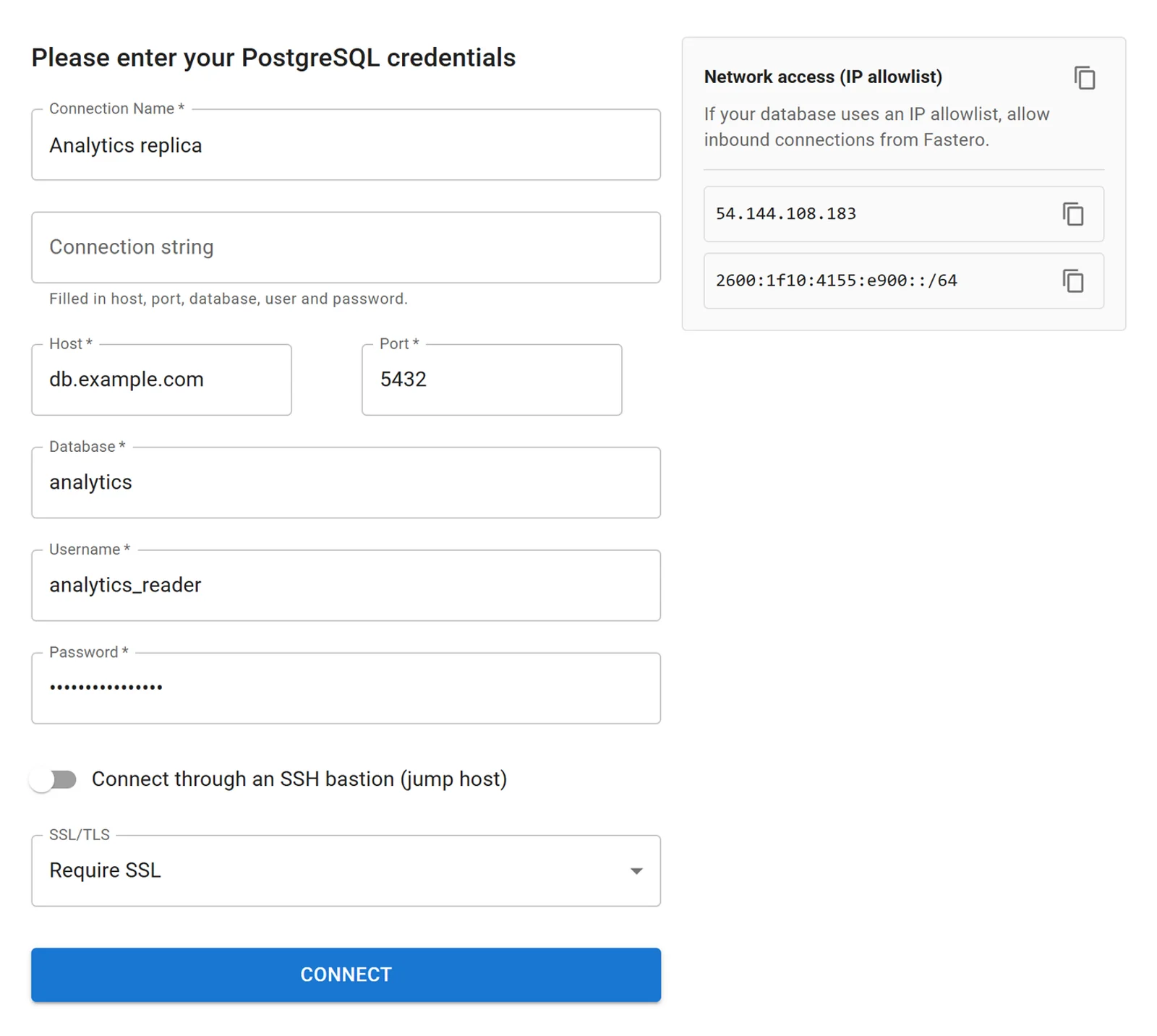
The form after pasting a connection string, with invented values.
- Behind a firewall? The form lists the addresses to allow, currently
54.144.108.183and2600:1f10:4155:e900::/64, and they're always published at api.fastero.com/api/v1/meta/network. On Azure, whose firewall rules are IPv4 only, use the first. - Private network? Turn on Connect through an SSH bastion.
- SSL is set to Require SSL by default.
- Supabase and Neon have their own tiles with their steps on the form.
Once connected, your team queries it in SQL or notebooks, and Claude can reach it through the connector: 12 prompts to try first. For what to set up on the database side, read how to connect PostgreSQL to AI data analysis.
FAQ
What is the format of a PostgreSQL connection string?
This, with optional ?param=value settings at the end:
postgresql://user:password@host:port/databaseEvery part after the scheme is optional, and the default port is 5432. The keyword form host=... port=... dbname=... user=... password=... also works in libpq-based tools.
What's the difference between postgres:// and postgresql://?
None to Postgres: "The URI scheme designator can be either postgresql:// or postgres://". SQLAlchemy is the exception: it refuses postgres://, so change it to postgresql://.
How do I find my Postgres connection string?
On Supabase and Neon, click Connect in your project. On Heroku, run heroku config:get DATABASE_URL. On RDS, Cloud SQL and Azure, copy the host from the console and assemble the string yourself. The table above covers twelve providers.
How do I put special characters in the password?
Percent-encode the whole password: quote(password, safe='') in Python or encodeURIComponent(password) in JavaScript. @ becomes %40, # becomes %23 and / becomes %2F.
What is the default port and database?
The port is 5432, though providers differ: DigitalOcean uses 25060. The database defaults to the same name as your user, so name it explicitly. A postgres database usually exists.
How do I set the schema in a connection string?
?options=-csearch_path%3Dmyschema. Prisma uses ?schema=myschema, which other tools reject.
Should I use sslmode=require or verify-full?
require encrypts but doesn't check who you're talking to. verify-full also checks the certificate and host name, and PostgreSQL's docs recommend it for security-sensitive environments. It needs the provider's root certificate or sslrootcert=system.
Sources
Read 2 November 2026. We ran the commands against PostgreSQL 16 with psql 16, psycopg 3.3, psycopg2 2.9, SQLAlchemy 2.1, pandas 3.1, Node pg 8.23 and Prisma 7. We didn't connect to the providers themselves.
- PostgreSQL: Connection strings, SSL support, ALTER DEFAULT PRIVILEGES, Privileges
- Drivers: SQLAlchemy engines, node-postgres SSL, Prisma connection URLs
- Providers: Supabase, Neon, Neon pooling, Amazon RDS, Aurora, Google Cloud SQL, Azure, Heroku, Railway, Render, DigitalOcean, Aiven, Tiger Cloud
Try Fastero free — paste your connection string, and have live dashboards your team can open in minutes. No credit card required.