
Jupyter notebooks are where you figure things out. Streamlit is where you hand that work to someone who doesn't want to figure things out — they just want the answer. The question isn't which tool is better. It's whether your analysis has graduated from "I'm exploring" to "other people need this," and if so, whether converting it into a Python web app is the right next step or an unnecessary detour.
The side-by-side
| Jupyter Notebook | Streamlit | |
|---|---|---|
| Purpose | Exploration, prototyping, narrative analysis | Productionized data apps, dashboards, tools for non-technical users |
| Audience | You. Maybe another analyst who reads .ipynb files |
Stakeholders, business users, anyone with a browser |
| Interactivity | Cell execution, ipywidgets (limited, clunky) | Sliders, dropdowns, file uploaders, chat input, native widgets |
| State management | Kernel state — variables persist between cells, order-dependent, messy | st.session_state — explicit, re-runs on every interaction |
| Deployment | JupyterHub, Colab, local | Community Cloud (free, sleeps), self-hosted, paid hosting |
| Collaboration | Share .ipynb files (JSON blobs, terrible diffs) |
Share a URL (it's a web app) |
| Reproducibility | Notorious for out-of-order execution, hidden state | Top-to-bottom execution every time, reproducible by design |
| Code structure | Cells (easy to get messy fast) | Regular Python scripts — imports, functions, classes |
| Visualization | Matplotlib, Plotly, Altair, inline output | All of the above + st.metric, interactive st.dataframe, st.map |
Most comparison articles stop here. But the table doesn't tell you when to actually make the switch. That's the part that matters.
The notebook-to-app graduation pipeline
Not every notebook should become an app. Most shouldn't. Here's the pipeline I use to decide:
  ┌─────────────────────────────────────────────────────┐
  │                    JUPYTER NOTEBOOK                  │
  │  You're exploring. Loading data, trying transforms,  │
  │  plotting things, seeing what's interesting.         │
  └──────────────────────┬──────────────────────────────┘
                         │
                    Did someone ask
                    to see this regularly?
                         │
                    NO ──┤── YES
                    │         │
                    ▼         ▼
              Keep it    ┌──────────────────────────────┐
              as a       │     DECISION POINT           │
              notebook.  │  Can they run a notebook?    │
              Done.      │  Do they need interactivity? │
                         └─────────┬────────────────────┘
                                   │
                         NO to either ──┐
                         │              │
                    YES to both         ▼
                         │    ┌─────────────────────────┐
                         ▼    │      STREAMLIT APP       │
                   Share the  │  Convert to .py, add     │
                   notebook   │  widgets, deploy as URL  │
                   directly.  └─────────┬───────────────┘
                                        │
                                   Is it always-on?
                                   Does it need auth?
                                   Are you tired of
                                   maintaining it?
                                        │
                                   YES ──┤── NO
                                   │         │
                                   ▼         ▼
                            ┌────────────┐  Keep self-
                            │  MANAGED   │  hosting or
                            │  PLATFORM  │  Community
                            │ (Fastero)  │  Cloud.
                            └────────────┘
The key insight: most notebooks die at the first decision point. Someone poked around in the data, found something interesting, moved on. That's fine. Notebooks are cheap. Apps are not.
Fastero
Connect your database. Ask questions. Get dashboards.
Postgres, BigQuery, Snowflake, and 10+ sources — live-connected, AI-powered, no dashboard builder learning curve.
Try free →When should you convert a notebook to an app?
Three signals, and you usually need at least two:
Someone who doesn't write Python needs the output. Your VP of Sales doesn't want to open a .ipynb file. They want a URL that shows them pipeline coverage by region with a date filter. The moment your audience shifts from "people who know what a kernel is" to "people who know what a quarter is," you've outgrown the notebook.
The analysis needs to be interactive. If someone needs to change inputs — pick a date range, filter by segment, upload a new file — and see results update, that's an app. Yes, ipywidgets exist. I've built plenty of notebook UIs with @interact decorators and dropdown menus. They work for demos. They break in production. The widget state doesn't serialize well, the rendering is flaky in different Jupyter environments, and the moment you need two widgets to depend on each other, you're fighting the framework instead of building the thing.
The analysis runs on a schedule or needs to be "always available." If you're re-running the same notebook every Monday morning to generate a report, that's a maintenance burden masquerading as analysis. Convert it to a Streamlit app, deploy it, and let people pull the data when they need it. Or better yet, skip the conversion entirely — more on that below.
If none of these apply, keep the notebook. Notebooks are great at what they're great at. Don't fix what isn't broken.
Can Streamlit replace Jupyter?
No. And you shouldn't try.
Jupyter's value is in the messy middle of analysis. You load a dataset, run df.describe(), notice something weird in the created_at column, write a quick groupby to investigate, realize the issue is a timezone bug, fix it, re-run the downstream cells, and discover a pattern you weren't looking for. That workflow — nonlinear, exploratory, full of dead ends — is exactly what cell-by-cell execution enables.
Streamlit can't do this. It runs top-to-bottom on every interaction. There's no "run just this one cell and see what happens." There's no inline output next to the code that produced it. There's no scratch space for trying three different approaches and keeping all of them visible. Streamlit is a presentation layer. Jupyter is a thinking tool.
The mistake I see teams make: they hear "Streamlit is better for sharing" and try to do all their analysis in Streamlit from the start. They end up writing st.write(df.describe()) in a script, running it, tweaking the script, re-running it, tweaking it again — basically recreating a worse version of a notebook with slower iteration cycles.
Work in Jupyter. Graduate to Streamlit when the work is done and someone else needs the result. (For a deeper look at the execution model differences, see our full Streamlit vs Jupyter comparison.)
What about JupyterLab?
JupyterLab is an IDE, not a different execution model. It gives you tabs, a file browser, a terminal, and a nicer layout — but the notebook itself still runs the same way. Cells, kernel state, execution order issues, all of it.
JupyterLab also has extensions for things like variable inspectors, table of contents, and Git integration. These make the development experience better for the analyst. They don't change the fundamental sharing problem: your stakeholder still can't use a .ipynb file.
Some teams set up JupyterHub so multiple analysts can work on notebooks in a shared environment. That solves collaboration between analysts. It doesn't solve the "share results with non-technical people" problem. Your finance team is not going to log into JupyterHub.
If your question is "JupyterLab or classic Jupyter Notebook?", the answer is JupyterLab — it's strictly better as a development environment. If your question is "JupyterLab or Streamlit?", you're comparing an IDE to a deployment framework. You'll probably use both. (For more on the IDE side of this, see Jupyter vs VS Code for Data Science.)
What the conversion actually looks like
Let's say you have a notebook that loads sales data, filters by region, and plots a trend chart. Here's what the conversion to Streamlit involves:
  JUPYTER NOTEBOOK (.ipynb)          STREAMLIT APP (.py)
  ─────────────────────────          ────────────────────
  Cell 1: import pandas, plotly      import pandas as pd
  Cell 2: df = pd.read_csv(...)      import plotly.express as px
  Cell 3: region = "US"              import streamlit as st
  Cell 4: filtered = df[df.region
           == region]                 st.title("Sales by Region")
  Cell 5: fig = px.line(filtered,
           x="date", y="revenue")    df = load_data()  # cached
  Cell 6: fig.show()
                                      region = st.selectbox(
                                        "Region", df.region.unique()
                                      )

                                      filtered = df[df.region == region]
                                      fig = px.line(filtered,
                                        x="date", y="revenue")
                                      st.plotly_chart(fig)
The work isn't hard. But it's work. You're restructuring cells into a linear script, replacing hardcoded values with widgets, adding caching (@st.cache_data), handling edge cases that the notebook silently ignored (what if the CSV is missing? what if the region filter returns zero rows?), and then dealing with deployment.
And deployment is its own whole thing. Community Cloud is free but sleeps your app after 12 hours of inactivity. Self-hosting means nginx, Docker, SSL certificates, WebSocket proxying, and ongoing maintenance. Paid hosting (Streamlit for Teams, Ploomber, etc.) costs money and still requires you to maintain a Python codebase.
Every time you convert a notebook to a Streamlit app, you're signing up for the maintenance cost of a web application. Make sure the value justifies it.
When neither tool is the right answer
Here's the scenario I keep running into: a data analyst builds a notebook, someone asks to see the results regularly, and the analyst spends a week converting it to a Streamlit app, deploying it, setting up auth, and maintaining it. The app shows three charts and a filter dropdown. It took longer to deploy than to build.
This is the gap that tools like Fastero fill. Connect your database, describe what you want to see in plain English, and get an interactive dashboard — always on, authenticated, no Python to maintain. It's the right choice when your "Streamlit app" is really just a SQL query with a filter widget on top.
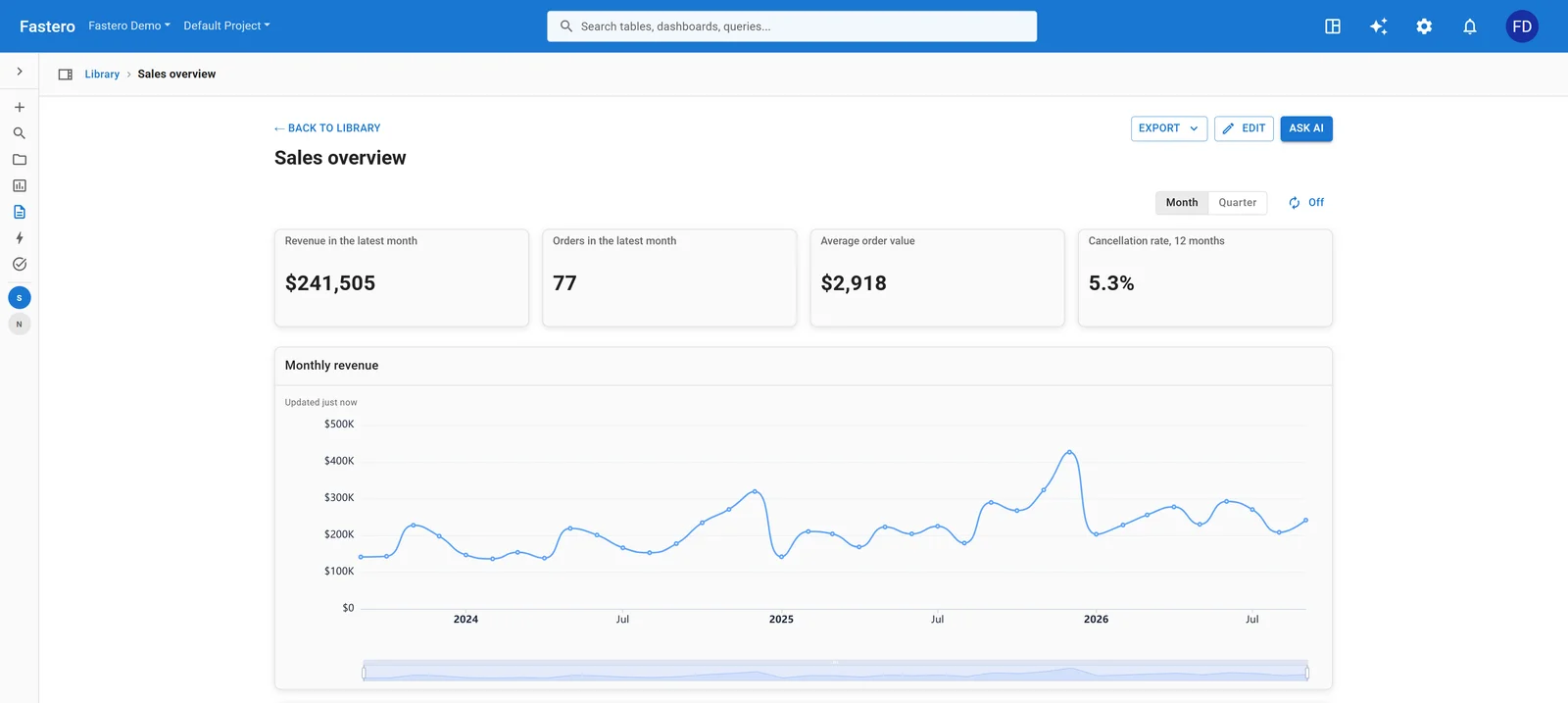
A dashboard in Fastero, built from saved queries that re-run against the database. Sample data.
The question isn't "Jupyter or Streamlit?" It's "do I even need to write an app?"
How do teams actually use both?
The pattern I see on mature data teams:
- Explore in Jupyter. Load data, poke around, find insights. This is where 80% of the value gets created.
- Prototype the UI in Jupyter. Use ipywidgets or just comment annotations to sketch what the interactive version would look like.
- Graduate to Streamlit only when there's a real audience. Someone specific needs this, on a regular cadence, and they can't run a notebook.
- Move off Streamlit when maintenance costs exceed the value. If you're spending more time fixing deployment issues than improving the analysis, it's time for a managed platform. (See how this plays out in practice: Streamlit vs Grafana and Streamlit vs Dash.)
The teams that struggle are the ones who skip steps or do them out of order. Building a Streamlit app before anyone's asked for one. Sharing a notebook with someone who should've gotten a URL. Staying on Community Cloud after the app became mission-critical.
FAQ
Is Streamlit harder to learn than Jupyter?
Jupyter has almost no learning curve if you know Python — it's just Python in cells. Streamlit has a small learning curve (the rerun model, st.session_state, caching decorators), but you can build a working app in 30 minutes. The real difficulty isn't learning either tool; it's learning when to use which one.
Can I embed a Jupyter notebook in a web page?
Technically yes — you can export to HTML (nbconvert), use Voila to serve notebooks as web apps, or embed via JupyterHub. In practice, all of these are fragile. Voila is the closest to "notebook as app" but it still runs on the notebook execution model with all its state-management quirks. If you need a web-based output, Streamlit is a cleaner path.
Should I use Jupyter or Streamlit for a data science portfolio?
Both. Show your analysis process in Jupyter notebooks (the thinking, the dead ends, the data cleaning). Show your finished products as Streamlit apps (the polished result). Recruiters want to see that you can explore data AND ship something usable.
What about Hex, Deepnote, or Observable?
These are cloud-native notebook platforms that try to bridge the Jupyter-Streamlit gap. Hex lets you build app-like interfaces inside a notebook. Deepnote adds collaboration features. Observable uses a reactive execution model instead of cell-by-cell. They're all interesting, but they're all proprietary — your work lives on their platform. If that trade-off works for you, check them out. If you want to own your code, the Jupyter → Streamlit pipeline is still the standard.
My Streamlit app works locally but sleeps on Community Cloud. What do I do?
This is the single most common Streamlit complaint. Community Cloud puts free apps to sleep after ~12 hours of inactivity, and the workarounds (UptimeRobot pings, empty GitHub commits, st_autorefresh) are all fragile. Your options: self-host on a VPS ($5-12/month), pay for hosted Streamlit, or use a managed platform that keeps apps always-on. We wrote a full breakdown of the sleep problem and every workaround.
Try Fastero free — skip the notebook-to-app conversion. Connect your database, describe the dashboard in English, get an always-on app with built-in auth. No credit card required.