
A script that pulls yesterday's numbers, refreshes an extract or emails a report is only useful if it runs by itself. Cron has done that job on Linux and macOS for decades, and when a cron job "doesn't run", it is almost always one of four things: the wrong Python, a relative path, no log to read, or two runs at once.
The short answer: on Linux, run crontab -e and add a line like 30 7 * * 1-5 cd /home/ana/reports && /home/ana/reports/.venv/bin/python send_report.py >> /home/ana/reports/cron.log 2>&1. It runs the script at 07:30 every weekday, with the project's own Python, from the project's folder, and keeps everything it prints. On a Mac, Apple recommends launchd; on Windows, Task Scheduler. With no computer that stays on, use a hosted scheduler: GitHub Actions is free for public repositories, and Fastero runs scheduled Python with its secrets on the Free plan.
Read a cron schedule in ten seconds
Five fields, then the command: minute, hour, day of the month, month, day of the week. * means every value, */15 every fifteenth, 1-5 a range and 1,15 a list. Day of the week runs from 0 to 7, where both 0 and 7 are Sunday, and names such as mon-fri work too.
| Schedule | Cron expression |
|---|---|
| Every 15 minutes | */15 * * * * |
| Every hour, on the hour | 0 * * * * |
| Every day at 07:30 | 30 7 * * * |
| Weekdays at 07:30 | 30 7 * * 1-5 |
| Mondays at 09:00 | 0 9 * * 1 |
| The first of the month at midnight | 0 0 1 * * |
One trap: when you set both the day of the month and the day of the week, cron runs when either matches. 30 4 1,15 * 5 runs at 04:30 on the 1st and the 15th — and on every Friday.
Step 1: Make the script safe to run unattended
A scheduler starts your script from a different folder, with almost no environment and nobody watching. Four habits keep it working:
- Build paths from the script's own location, not the folder it was started in.
- Read passwords and keys from the environment or a secret store, never from the code.
- Exit with an error when something fails, so the scheduler, and you, can tell.
- Make a second run harmless. Google, AWS and Heroku all say in their own documentation that a scheduled job can occasionally run twice; key the work by date and write with upserts, so a repeat changes nothing.
import logging
import os
import sys
from pathlib import Path

HERE = Path(__file__).resolve().parent
logging.basicConfig(level=logging.INFO, format="%(asctime)s %(levelname)s %(message)s")


def main():
    database_url = os.environ["SALES_DB_URL"]  # set by the scheduler, never written here
    output = HERE / "outputs" / "daily_sales.csv"
    logging.info("Writing %s", output)
    # ...query the database and write the file


if __name__ == "__main__":
    try:
        main()
    except Exception:
        logging.exception("Daily sales export failed")
        sys.exit(1)
We ran it from another folder: it found its outputs folder, and with SALES_DB_URL missing it logged the error and exited with status 1 — exactly what a scheduler needs to see.
Fastero
Connect your database. Ask questions. Get dashboards.
Postgres, BigQuery, Snowflake, and 10+ sources — live-connected, AI-powered, no dashboard builder learning curve.
Try free →Step 2: Linux — a crontab line that works
Open your crontab with crontab -e (and list it with crontab -l), then add the job:
SHELL=/bin/sh
PATH=/usr/local/bin:/usr/bin:/bin
30 7 * * 1-5 cd /home/ana/reports && /home/ana/reports/.venv/bin/python send_report.py >> /home/ana/reports/cron.log 2>&1
Why each part is there:
- The virtualenv's own Python, by its full path. Cron doesn't read your shell profile or activate a virtualenv, and on Debian and Ubuntu its
PATHis just/usr/bin:/bin. Python's documentation is clear that you don't need to activate a virtualenv: calling its interpreter by full path is enough. This one change fixes most "works in my terminal, fails in cron" and "ModuleNotFoundError only under cron" problems. cdfirst, for any script that opens files by relative path.>> cron.log 2>&1keeps both normal output and errors. Without it, cron tries to email the output, and most servers have no mail set up, so it disappears.
Two more things bite people:
%means "new line" in a crontab. Writedate +\%F, notdate +%F.- Variables don't expand in crontab settings:
PATH=$HOME/bin:$PATHdoesn't do what it looks like. Write paths out in full.
Stop runs from overlapping. If a job can take longer than its interval, put flock in front, so a new run gives up while the last one still holds the lock, and timeout to stop a run that hangs:
*/10 * * * * /usr/bin/flock -n /tmp/sync.lock timeout 9m /home/ana/reports/.venv/bin/python /home/ana/reports/sync.py >> /home/ana/reports/sync.log 2>&1Time zones. Cron runs schedules in the machine's time zone, often UTC on servers. A per-crontab CRON_TZ= works with cronie (Fedora, RHEL and similar) but not with the default cron on Debian and Ubuntu, which supports one time zone only. When the time zone matters, write the schedule in the server's time zone, or use a systemd timer, which takes one.
Step 3: Linux servers — or use a systemd timer
On a modern Linux server, a systemd timer is cron with three extras: it can catch up on a run missed while the machine was off (Persistent=true), it never starts a second copy while one is running, and every run's output lands in the journal. It takes two small files. /etc/systemd/system/report.service:
[Unit]
Description=Daily sales report

[Service]
Type=oneshot
User=ana
WorkingDirectory=/home/ana/reports
EnvironmentFile=/etc/report/report.env
ExecStart=/home/ana/reports/.venv/bin/python /home/ana/reports/send_report.py
TimeoutStartSec=30min
And /etc/systemd/system/report.timer:
[Unit]
Description=Run the daily sales report on weekdays at 07:30

[Timer]
OnCalendar=Mon..Fri 07:30
Persistent=true

[Install]
WantedBy=timers.target
Turn it on with sudo systemctl daemon-reload && sudo systemctl enable --now report.timer. systemctl list-timers shows when it runs next, journalctl -u report.service shows what it printed, and systemd-analyze calendar "Mon..Fri 07:30" checks a schedule before you trust it.
Step 4: macOS — launchd, which Apple prefers
Cron still works on a Mac, but Apple's own guide calls it "deprecated in favor of launchd", for a practical reason: a cron job due while the Mac sleeps never runs, while a launchd job runs when the Mac wakes. Save this in ~/Library/LaunchAgents/ as com.example.report.plist:
<?xml version="1.0" encoding="UTF-8"?>
<!DOCTYPE plist PUBLIC "-//Apple//DTD PLIST 1.0//EN" "http://www.apple.com/DTDs/PropertyList-1.0.dtd">
<plist version="1.0">
<dict>
    <key>Label</key>
    <string>com.example.report</string>
    <key>ProgramArguments</key>
    <array>
        <string>/Users/ana/reports/.venv/bin/python</string>
        <string>/Users/ana/reports/send_report.py</string>
    </array>
    <key>StartCalendarInterval</key>
    <dict>
        <key>Hour</key>
        <integer>7</integer>
        <key>Minute</key>
        <integer>30</integer>
    </dict>
    <key>StandardOutPath</key>
    <string>/Users/ana/reports/report.log</string>
    <key>StandardErrorPath</key>
    <string>/Users/ana/reports/report.log</string>
</dict>
</plist>
Load it, then run it once to test:
launchctl bootstrap gui/$(id -u) ~/Library/LaunchAgents/com.example.report.plist
launchctl kickstart gui/$(id -u)/com.example.report
Step 5: Windows — Task Scheduler
From Command Prompt, one line creates a daily task that uses the virtualenv's Python (the doubled quotes are how schtasks handles paths):
schtasks /create /tn "Daily sales report" /sc daily /st 07:30 /tr "\"C:\Users\ana\reports\.venv\Scripts\python.exe\" \"C:\Users\ana\reports\send_report.py\""schtasks has no option for the working folder, so the script should build its paths from its own location, as in Step 1; use pythonw.exe instead of python.exe to avoid a console window. Test it with schtasks /run /tn "Daily sales report". In PowerShell, the ScheduledTasks commands give you more control — a working folder, a time limit, retries, and a catch-up run if the computer was off:
$action = New-ScheduledTaskAction -Execute "C:\Users\ana\reports\.venv\Scripts\python.exe" -Argument "C:\Users\ana\reports\send_report.py" -WorkingDirectory "C:\Users\ana\reports"
$trigger = New-ScheduledTaskTrigger -Daily -At 7:30am
$settings = New-ScheduledTaskSettingsSet -StartWhenAvailable -ExecutionTimeLimit (New-TimeSpan -Hours 1) -RestartCount 2 -RestartInterval (New-TimeSpan -Minutes 5)
Register-ScheduledTask -TaskName "Daily sales report" -Action $action -Trigger $trigger -Settings $settings
Step 6: Or keep the schedule inside Python
The schedule and APScheduler libraries run jobs on a timetable from inside a Python process. The catch is that the process has to run all the time, so you still need a server and something that restarts it — they suit a long-running service more than a one-off script.
schedule (1.2.2, unchanged since May 2024) reads like English:
import time
import schedule


def job():
    print("Refreshing the sales extract")


schedule.every().day.at("07:30").do(job)
schedule.every(15).minutes.do(job)

while True:
    schedule.run_pending()
    time.sleep(30)
It doesn't catch exceptions: one error in a job stops the loop, so wrap the job in try/except.
APScheduler takes cron expressions and time zones. Use version 3 (3.11.3): version 4 is still an alpha, and its authors say not to use it in production.
from apscheduler.schedulers.blocking import BlockingScheduler
from apscheduler.triggers.cron import CronTrigger


def job():
    print("Refreshing the sales extract")


scheduler = BlockingScheduler(timezone="Europe/London")
scheduler.add_job(job, CronTrigger.from_crontab("30 7 * * mon-fri", timezone="Europe/London"))
scheduler.start()
The trap: use day names, not numbers. APScheduler 3 counts weekdays from Monday = 0, while cron counts from Sunday = 0. We checked: from_crontab("30 7 * * 1-5") runs Tuesday to Saturday, and "30 7 * * 0" runs on Mondays. mon-fri runs when you expect.
If you already run Celery, its beat scheduler does the same job for Celery tasks.
Step 7: In the cloud, with no server to keep on
| Option | Shortest interval | Price to start | Worth knowing |
|---|---|---|---|
| GitHub Actions | Every 5 minutes | Free for public repositories; 2,000 minutes a month for private ones on GitHub Free | Takes a time zone since March 2026; runs can start late at the top of the hour; schedules in public repositories stop after 60 days without activity |
| AWS EventBridge Scheduler + Lambda | Every minute | 14 million scheduler invocations and 1 million Lambda requests a month free | A Lambda function runs for at most 15 minutes |
| Google Cloud Scheduler + Cloud Run jobs | Every minute | 3 scheduler jobs free per billing account, then $0.10 a job a month | A Cloud Run job can run for up to 7 days |
| Render cron jobs | Any cron schedule | At least $1 a month per job; no free tier | UTC; the next run waits while one is still going |
| Railway cron | Every 5 minutes | $5 a month on the Hobby plan | UTC; skips a run if the last one is still going |
| PythonAnywhere | Hourly | $10 a month (Developer plan) | New free accounts have had no scheduled tasks since January 2026 |
| Modal | Any cron schedule | Free Starter plan with $30 of credits a month, up to 5 cron jobs | Takes a time zone; runs up to 24 hours |
| Heroku Scheduler | Every 10 minutes | A free add-on; the dyno time is billed | UTC; Heroku says a job can occasionally be skipped or run twice |
| Fastero | Every 5 minutes, or any cron expression | Free plan | Secrets, a log of every run, and a notice when a scheduled run fails |
A scheduled GitHub Actions workflow, at 07:30 London time on weekdays:
name: daily-sales-report
on:
  schedule:
    - cron: "30 7 * * 1-5"
      timezone: "Europe/London"
  workflow_dispatch:
concurrency:
  group: daily-sales-report
  cancel-in-progress: false
jobs:
  run:
    runs-on: ubuntu-latest
    timeout-minutes: 30
    steps:
      - uses: actions/checkout@v7
      - uses: actions/setup-python@v7
        with:
          python-version: "3.14"
      - run: pip install -r requirements.txt
      - run: python send_report.py
        env:
          SALES_DB_URL: ${{ secrets.SALES_DB_URL }}
workflow_dispatch adds a button to run it by hand; concurrency stops two runs overlapping. GitHub suggests avoiding the start of the hour, when scheduled runs are most often delayed.
Schedule it in Fastero
In Fastero, a Python project runs on a schedule with nothing to keep running. Write or upload the script, add its passwords as Secrets — they reach the script as environment variables, so os.environ["SALES_DB_URL"] works unchanged — and choose when it runs: a preset from every 5 minutes to monthly, or any cron expression.
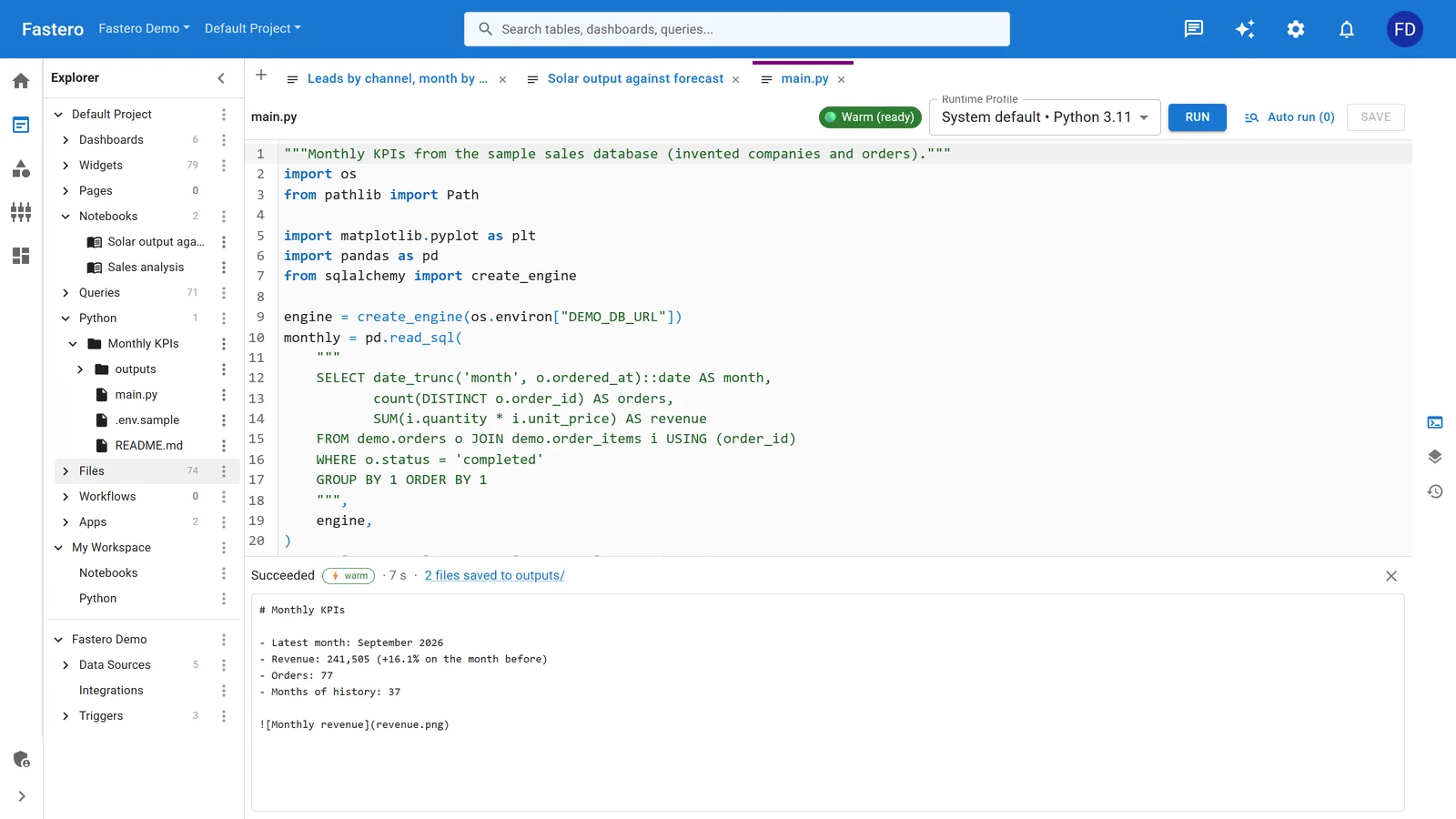
A Python project after a run in Fastero: the output, and two files saved to outputs/. Sample data.
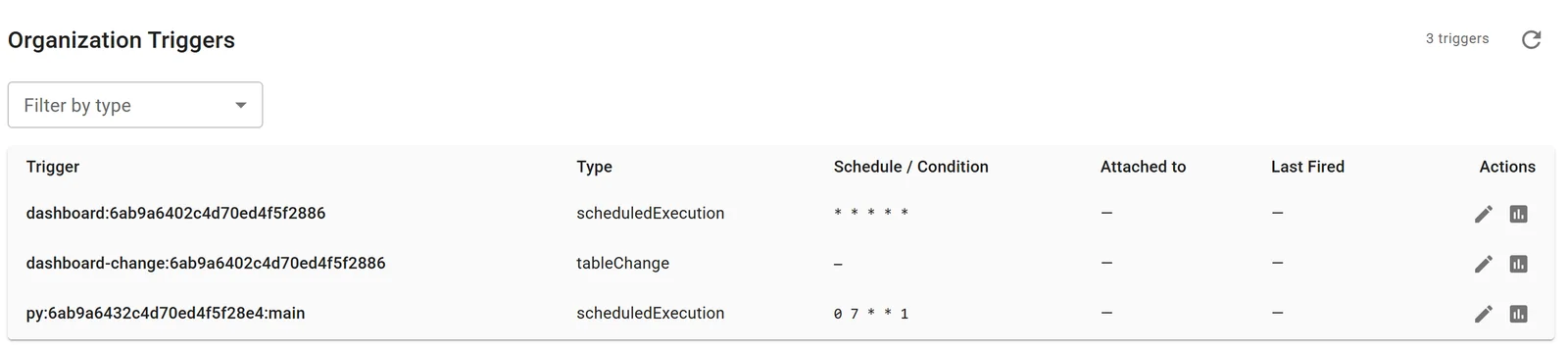
A Python project scheduled for 07:00 every Monday (0 7 * * 1). Sample data.

Secrets live in the workspace, not in the code. Sample data.
- Every run starts on a fresh machine, so nothing left over from the last run changes the next.
- Every run is logged, with what the script printed and the files it saved to
outputs/. - Failures don't go unnoticed. Whoever set the schedule is told when a scheduled run fails, and a run can call a webhook when it fails or finishes — for example, to start a Claude Code routine that looks into it.
For more on running Python in the cloud without a server, see run Python on a schedule in the cloud.
When it doesn't run: a checklist
| What you see | Likely cause | Fix |
|---|---|---|
| Runs in the terminal, not from cron | A different Python, or a missing PATH |
Call the virtualenv's Python by its full path |
ModuleNotFoundError only when scheduled |
The system Python, not the virtualenv's | The same: the full path to the virtualenv's Python |
FileNotFoundError |
A relative path | cd first, or build paths from Path(__file__) |
| Nothing happens, and no error anywhere | Output went to email that nobody receives | Add >> job.log 2>&1 |
| A date in the command is cut off | % starts a new line in a crontab |
Write \% |
| The job runs at the wrong hour | The server's time zone, often UTC | Write the time in the server's time zone, or use a scheduler that takes one |
| Two copies running | The job takes longer than its interval | flock -n, or a scheduler that skips or waits |
| "Operation not permitted" on a Mac | macOS privacy protection | Use launchd, or give /usr/sbin/cron Full Disk Access |
Last, make sure you'd hear about a run that never happened at all — a stopped server, a disabled workflow. A "dead man's switch" service such as Healthchecks.io expects a ping from each run and alerts you when one doesn't arrive.
FAQ
How do I run a Python script every 5 minutes?
With cron: */5 * * * * /path/to/.venv/bin/python /path/to/script.py >> /path/to/script.log 2>&1. Add flock -n in front if a run might take longer than 5 minutes. In the cloud, GitHub Actions, Railway and Fastero all go down to every 5 minutes.
Why isn't my Python cron job running?
Usually because cron starts it with a minimal environment: a different Python without your packages, a different working folder, and no log. Call the virtualenv's Python by its full path, cd to the script's folder, and send output to a log with >> job.log 2>&1 to see the real error.
How do I schedule a Python script on Windows?
Use Task Scheduler: schtasks /create /tn "My job" /sc daily /st 07:30 /tr "<path to python.exe> <path to script.py>", with the virtualenv's python.exe, or the New-ScheduledTaskAction and Register-ScheduledTask commands in PowerShell.
What's the best free way to schedule a Python script in the cloud?
GitHub Actions is free for public repositories and includes 2,000 minutes a month for private ones on GitHub Free. Google Cloud gives three free Cloud Scheduler jobs per billing account. Fastero runs scheduled Python with secrets and run logs on its Free plan.
Do I need to activate the virtualenv in a cron job?
No. Call the virtualenv's interpreter directly — /path/to/.venv/bin/python on Linux and macOS, .venv\Scripts\python.exe on Windows. Python's documentation says activation isn't needed when you use the full path.
Related reading:
- Run Python on a schedule in the cloud
- How to build a daily metrics email with SQL and Python
- How to schedule SQL reports to Slack and email
- Claude Code routines: run Claude on a schedule
Sources: crontab(5), cronie, crontab(5), Debian, Python venv, flock(1), systemd.timer(5), Apple: scheduling timed jobs, schtasks create, schedule, APScheduler 3 cron trigger, GitHub Actions schedule event, GitHub Actions billing, EventBridge pricing, Lambda timeout, Cloud Scheduler pricing, Render cron jobs, Railway cron jobs, PythonAnywhere scheduled tasks, Modal cron, Heroku Scheduler. Checked 16 October 2026.
Try Fastero free — run your Python script on a schedule with secrets and a log of every run, without a server. No credit card required.