 Fastero Dev Team
The BigQuery sandbox is Google's way to try BigQuery without a billing account or a credit card. It's generous on queries and strict on keeping data, and most surprises come from the second part: tables that vanish after 60 days, and statements that simply aren't allowed.
The short answer: the BigQuery sandbox is free and needs only a Google account. You get 1 TiB of query processing a month, the same as BigQuery's free tier, and 10 GiB of storage, which Google's sandbox page calls "a lifetime limit" that "is not refunded upon data deletion". Tables, views and partitions expire after 60 days. Streaming, DML (INSERT, UPDATE, DELETE) and the BigQuery Data Transfer Service aren't supported, and all normal quotas apply. To upgrade, enable billing on the project: the free tier still covers 10 GiB of storage and 1 TiB of queries each month, and on-demand queries beyond that are listed at $6.25 per TiB. After upgrading, remove the 60-day expiration from your datasets and existing tables, or they'll still be deleted. Checked 12 November 2026.
Fastero
Connect your database. Ask questions. Get dashboards.
Postgres, BigQuery, Snowflake, and 10+ sources — live-connected, AI-powered, no dashboard builder learning curve.
Try free →BigQuery sandbox limits
From Google's sandbox and pricing pages, checked 12 November 2026:
| BigQuery sandbox | Free tier, on a billing account | |
|---|---|---|
| Credit card or billing account | Not needed | Billing account required |
| Queries | 1 TiB processed a month | First 1 TiB a month free, then $6.25 per TiB on demand |
| Storage | 10 GiB, "a lifetime limit" | First 10 GiB a month free, then billed per GiB |
| Table, view and partition expiry | 60 days, always | None unless you set one |
DML (INSERT, UPDATE, DELETE, MERGE) |
Not supported | Supported |
| Streaming data | Not supported | Supported, billed |
| Data Transfer Service | Not supported | Supported |
| Quotas and limits | All apply | All apply |
Two notes. Google's list of unsupported features says "including the following", so streaming, DML and the Data Transfer Service are the named examples, not necessarily all of them. And the two pages describe storage differently: the sandbox page says 10 GiB for life, not refunded when you delete data, while the pricing page says the free tier's storage is "The first 10 GiB per month" and that "You can try BigQuery's free tier in the BigQuery sandbox without a credit card." Plan around the stricter reading: loading and deleting data repeatedly may use up the sandbox's storage for good.
How to start the sandbox
Google's steps:
- Go to BigQuery Studio in the Google Cloud console and sign in with a Google account.
- Pick your country, accept the terms and click Agree and continue.
- Click Create project, give it a name and choose an organization, or No organization. Managed accounts, such as a university's, must pick one.
- Click Create. A sandbox notice appears on the BigQuery page.
No card, no billing account, nothing to delete afterwards: "billing is not enabled for your project, and you don't need to delete the project."
What the 60-day expiry means
Every dataset in the sandbox has a default table expiration, and "all tables, views, and partitions automatically expire after 60 days." When a table expires, "it's deleted along with all of the data it contains." For a partitioned table, each partition goes 60 days after its date, so a table of daily events loses its oldest days as new ones arrive.
There is a short safety net: an expired table can be undeleted "within the time travel window specified for the dataset". Treat the sandbox as a place to explore and test queries, not to keep anything you'll need in three months. Save results you care about elsewhere.
What you can't do in the sandbox
- No DML. You can't
INSERT,UPDATE,DELETEorMERGErows, so data gets in by loading it; Google's sandbox page points to creating a dataset and loading data as the next step. - No streaming. Real-time inserts from an app or pipeline won't work.
- No Data Transfer Service, so no scheduled imports through it.
- Limited storage, as above: 10 GiB.
Querying is the part that is barely limited. Public datasets don't use your storage at all: "Google pays for the storage of these datasets", and you pay only for queries, within the same 1 TiB.
Sandbox vs free tier vs free trial
Google has three different free offers, easy to confuse:
| Sandbox | Free tier | Google Cloud Free Trial | |
|---|---|---|---|
| What it is | BigQuery with no billing account | Monthly allowances on any billing account | $300 of credit for new customers |
| Card needed | No | Yes, a billing account | Yes: "you must provide a credit card or other payment method" |
| How long | No end date | No end date: "available during and after the free trial period" | 90 days |
| BigQuery limits | 1 TiB queries a month, 10 GiB storage, 60-day expiry, no DML | 1 TiB queries and 10 GiB storage a month free; the rest billed | Credit covers usage beyond the free tier |
| When it ends | n/a | n/a | If you don't upgrade, the trial billing account "will be closed and all of its associated projects and resources will be stopped" |
The Free Trial is for people who've "never been a paying user of Google Cloud, Google Maps Platform, or Firebase" and haven't had a trial before. Google says the card check is "a temporary hold, it isn't an actual charge", of between $0 and $1.
How to upgrade, and what changes
Google's upgrade steps are two lines: enable billing for the project, then choose a pricing model. On-demand pricing charges for bytes scanned, from $6.25 per TiB after the free 1 TiB on Google's pricing page (rates vary by region); BigQuery editions sell capacity instead.
Once billing is on, DML, streaming and transfers work, and storage beyond the free allowance is billed. What doesn't change by itself is the expiry. Google's sandbox page says you "should update the default expiration times" after upgrading, and changing a dataset's default doesn't help existing tables: "any tables that already exist expire according to the original table expiration setting." So clear all three, with the bq tool (Google's flag values; 0 removes the expiration):
# New tables in the dataset: no default expiry
bq update --default_table_expiration 0 my-project:my_dataset
# New partitioned tables: no default partition expiry
bq update --default_partition_expiration 0 my-project:my_dataset
# Each table that already exists
bq update --expiration 0 my-project:my_dataset.my_table
For an existing partitioned table, also run ALTER TABLE my_dataset.my_table SET OPTIONS (partition_expiration_days = NULL), which Google's docs give as the way to remove partition expiry. INFORMATION_SCHEMA.TABLE_OPTIONS lists each table's expiration_timestamp, so you can check nothing is still due to expire.
Connect any database. Ask in plain English.
Start free →Public datasets to try
Public datasets sit in the bigquery-public-data project, already visible in BigQuery Studio. Tables Google's own docs use:
| Table | What's in it |
|---|---|
bigquery-public-data.new_york.citibike_trips |
NYC Citi Bike trips since September 2013; the sandbox tutorial maps the busiest stations |
bigquery-public-data.austin_bikeshare.bikeshare_trips |
Austin bike-share trips, used in Google's Data Studio tutorial |
bigquery-public-data.usa_names.usa_1910_2013 |
US names by year, used in Google's cost-control examples |
bigquery-public-data.stackoverflow.posts_questions |
Stack Overflow questions, also in the cost examples |
bigquery-public-data.bbc_news.fulltext |
BBC News text, Google's example of a fully qualified public table name |
To keep within 1 TiB, follow Google's cost advice: preview a table instead of running SELECT * on it ("Don't run queries to explore or preview table data"), select only the columns you need, and check the estimate the editor shows before you run. LIMIT doesn't help: "a LIMIT clause won't reduce compute costs" on tables that aren't clustered. Each query is billed at least 10 MB per table it reads. The maximum bytes billed setting makes a query whose estimate is over your limit fail "without incurring a charge".
Connecting a BI tool or notebook
- Data Studio (formerly Looker Studio), Google's no-cost BI tool, opens query results directly: in BigQuery Studio, Open in → Data Studio. Its charts show at most 5,000 rows.
- Notebooks: Colab and Jupyter query BigQuery with the
%%bigquerycell magic or the Python client library, as Google's notebook tutorials do. Google's public datasets page says you can start querying "without enabling billing", since the first terabyte a month is free. - Other tools usually connect with a service account key. Create a service account in the project and give it BigQuery Data Viewer (
roles/bigquery.dataViewer) to read tables and BigQuery Job User (roles/bigquery.jobUser) to run queries. If your project belongs to a Google Cloud organization created on or after 3 May 2024, the organization policy that prevents "creating persistent keys for service accounts" is on by default, so an administrator may need to allow it.
Every query a connected tool runs counts toward the project's 1 TiB, so a dashboard that refreshes every few minutes over a large table spends it fastest.
When the dashboard is for a team
The sandbox is for finding out whether BigQuery fits. Once the data matters, you need a billing account, and a place where colleagues can see the answers without opening the Cloud console. Fastero is an AI and data platform where people and AI agents work together on a team's data:
- BigQuery connects with a service account's JSON key, the option Fastero's form recommends for scheduled jobs and anything long-lived.
- Dashboards on BigQuery tables that colleagues open with their own login; viewers are free. Choose refresh intervals with the query allowance in mind.
- Notebooks with SQL cells that run on the BigQuery connection and hand the rows to Python as a pandas DataFrame, with no key file in the notebook.
- Scheduled email of a dashboard, and public links you can revoke.
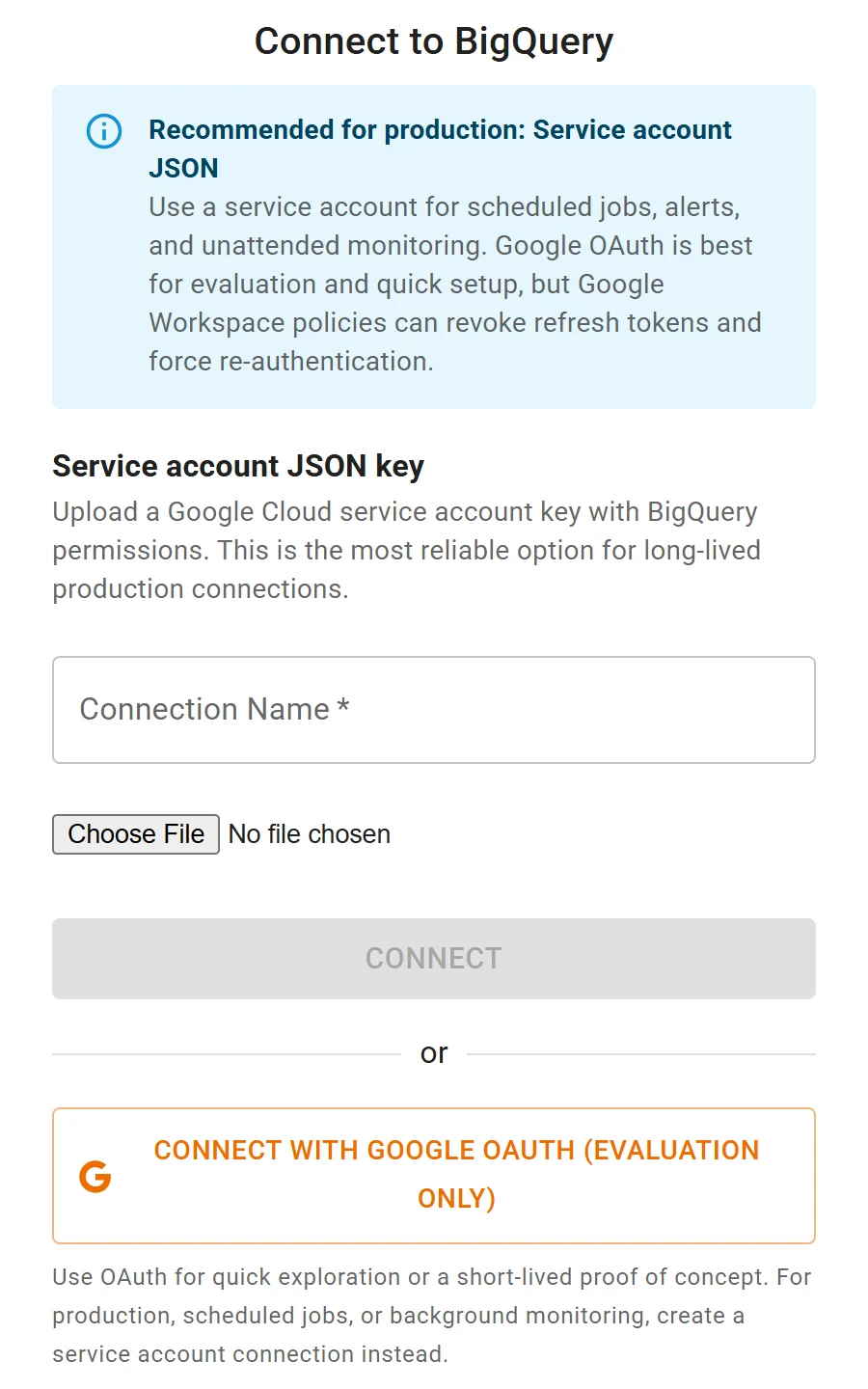
Connecting BigQuery to Fastero: a service account key for scheduled work, or Google sign-in to try it out.
More on BI tools for BigQuery, connecting Claude to BigQuery and SQL in a Jupyter notebook.
FAQ
Is the BigQuery sandbox free?
Yes. It needs no credit card or billing account, and you aren't charged. It gives 1 TiB of queries a month and 10 GiB of storage, with tables expiring after 60 days.
What are the limits of the BigQuery sandbox?
1 TiB of query processing a month, 10 GiB of storage (a lifetime limit, per Google's sandbox page), 60-day expiry on tables, views and partitions, no streaming, no DML and no Data Transfer Service, plus BigQuery's normal quotas.
What is the difference between the BigQuery sandbox and the free tier?
The free tier is a monthly allowance on a billing account: 1 TiB of queries and 10 GiB of storage free each month, everything else billed, all features on. The sandbox has the same query allowance but no billing account, 60-day expiry and no DML.
Does the BigQuery sandbox expire?
The sandbox itself doesn't; there's no end date. Your tables do: each one, and each partition, is deleted 60 days after it's created.
Can I run INSERT or UPDATE in the BigQuery sandbox?
No. DML statements aren't supported in the sandbox. Enable billing to use them; the free tier still applies.
What happens to my data when I upgrade from the sandbox?
It stays, but the expiry settings stay too. Remove the default expiration on each dataset and the expiration on each existing table and partition, or they'll be deleted on schedule.
Sources
Read on 12 November 2026:
- Google Cloud: Try BigQuery using the sandbox (updated 10 November 2026), BigQuery pricing, Free cloud features and Free Trial, BigQuery public datasets
- BigQuery docs: Updating datasets, Managing tables, Managing partitioned tables, Controlling costs, Access control, Analyze data with Data Studio, Visualize data in a Colab notebook
- Data Studio returns as new home for Data Cloud assets (11 April 2026), Security baseline constraints