
The best Apache Superset alternatives in 2026 are Metabase (easiest self-hosted BI), Preset (managed Superset without the ops), Grafana (time-series and mixed-source dashboards), Lightdash (dbt-native metrics), Looker Studio (free, zero setup), Mode Analytics (SQL notebooks), Redash (minimal SQL dashboards), and Fastero (AI-powered, no infrastructure). The right pick depends on your team size, SQL fluency, and tolerance for self-hosting.
Why do data teams leave Superset?
Nobody questions the feature set. SQL Lab is the best browser-based SQL editor in any open source BI tool. The chart library is deep — 40+ types, ECharts-based, extensible via plugins. The semantic layer (datasets with pre-defined metrics and calculated columns) keeps numbers consistent across dashboards. At Airbnb-scale, it earns its complexity.
The problems are all operational.
A production Superset deployment means managing Flask/Gunicorn, a metadata Postgres database, Redis, and Celery workers. Configuration lives in superset_config.py, not a UI. Upgrading across major versions can break custom configs without warning. The Jinja templating inside SQL is powerful but arcane — most analysts never touch it, and the ones who do become single points of failure.
There's also no built-in NL2SQL or AI assistant. In 2026, that's a gap. Non-SQL users hit a wall: the visual query builder exists but it's limited compared to Metabase's, and the learning curve from "I got Superset running" to "my whole team self-serves" is measured in months, not days.
If that sounds familiar, here are your options — ranked by the problem they solve best, not by GitHub stars.
How do the alternatives stack up?
| Tool | Setup effort | SQL support | Non-SQL self-service | Cost | Open source | Alerting |
|---|---|---|---|---|---|---|
| Metabase | Low | Full SQL + visual builder | Strong | Free (OSS) / $85/user Pro | Yes (AGPL) | Basic |
| Preset | None (managed) | Full SQL Lab | Moderate | From $20/user/mo | No (hosted Superset) | Yes |
| Grafana | Medium | SQL + PromQL/LogQL | Low | Free (OSS) / Cloud free tier | Yes (AGPL) | Production-grade |
| Lightdash | Medium | Via dbt models | Moderate | Free (OSS) / Cloud from $0 | Yes (MIT) | Limited |
| Looker Studio | None | SQL + connectors | Strong | Free | No | None |
| Mode Analytics | None (managed) | Full SQL + Python/R | Moderate | ~$35/user/mo | No | Yes |
| Redash | Low | Full SQL | Low | Free (OSS) | Yes (BSD) | Basic |
| Fastero | None (managed) | Full SQL + NL2SQL | Strong (AI agent) | Free tier available | No | Yes |
Fastero
Connect your database. Ask questions. Get dashboards.
Postgres, BigQuery, Snowflake, and 10+ sources — live-connected, AI-powered, no dashboard builder learning curve.
Try free →Which alternative fits which team?
Your situation                            Best alternative
────────────────────────────────────────  ──────────────────
Small team, want SQL + self-serve         Metabase
Love Superset, hate the ops               Preset
Already run dbt, want BI on top           Lightdash
Need monitoring + business dashboards     Grafana
$0 budget, data in Google ecosystem       Looker Studio
Analysts who live in notebooks            Mode Analytics
Want AI to write SQL and build charts     Fastero
Running Redash, no reason to leave        Stay on Redash
One thing the table won't capture: how each tool handles the gap between "analyst who writes SQL" and "stakeholder who reads dashboards." That gap is where Superset adoption stalls — and where the right alternative makes the biggest difference.
What are the best Superset alternatives in 2026?
1. Metabase — the easiest self-hosted BI tool
Metabase is what most teams should try first. Single JAR file or Docker container. Point it at your Postgres, MySQL, or BigQuery instance, and you've got a working BI tool in under an hour.
The visual query builder is the differentiator. Non-SQL users can build joins, filters, and aggregations by clicking — no training, no documentation. SQL users get a native query mode with variables and result caching. That overlap between "easy for beginners" and "doesn't annoy experts" is narrow, and Metabase sits squarely in it. We covered the feature-level differences in our Metabase vs Superset comparison.
Where it falls short: scale. Past 50-100 concurrent users, you'll hit performance limits unless you invest heavily in caching and query optimization. Embedded analytics require a paid license. And if your data model involves 20+ table joins with window functions, you'll outgrow the visual builder and end up in raw SQL anyway.
2. Preset — Superset without the infrastructure
Preset is managed Apache Superset, built by the people who created Superset. You get SQL Lab, the full chart library, datasets, and role-based access — without touching Docker, Celery, or superset_config.py.
If your team already knows Superset's UI and your dashboards are already built, Preset lets you migrate without retraining anyone. Superset configs, saved queries, and dashboard layouts carry over. The trade-off is per-seat pricing replacing self-hosting labor. For teams under 50 who'd otherwise spend 10+ hours per month on Superset ops — upgrades, Celery tuning, Redis memory issues — the math usually works.
Preset also ships updates faster than the open source release cycle. Security patches and new chart types land in Preset before they reach the community Docker image.
3. Grafana — when your data is mostly time-series
Grafana was built for ops — Prometheus dashboards, Loki log panels, CloudWatch alarms — and it does that better than anything else on this list.
It earns a spot here because Grafana has quietly gotten better at SQL analytics. The Postgres, MySQL, and ClickHouse data source plugins now handle full SQL, and you can put a revenue chart from your warehouse next to a latency panel from Prometheus on the same dashboard. For teams that need both infrastructure monitoring and business KPIs, one tool beats two. The Grafana vs Superset breakdown covers the architectural split in detail.
The caveat: business analytics is a second-class citizen. No SQL IDE. No semantic layer. No visual query builder. Grafana defaults to auto-refreshing the last 6 hours — quarterly revenue breakdowns fight the UI at every turn.
4. Lightdash — built for dbt teams
If your transformation layer runs on dbt, Lightdash reads your project directly — models, metrics, dimensions — and exposes them as an explorable BI layer. No re-defining "revenue" in a separate tool. No drift between what dbt computes and what the dashboard shows.
The Lightdash Cloud offering syncs with your dbt project via GitHub and deploys on every merge. If you're running dbt Cloud, the two pair naturally. Self-hosting is also straightforward — Docker Compose with fewer moving parts than Superset.
It's narrow by design. That's the point. If you don't run dbt, skip this one entirely.
5. Looker Studio — free, zero friction, limited ceiling
Looker Studio costs nothing, requires no installation, and connects natively to BigQuery, Google Sheets, GA4, and 800+ third-party connectors via the community gallery. For teams in the Google ecosystem who need basic reporting, the activation energy is zero. The drag-and-drop report builder handles cross-filtering, and sharing is a Google Drive link away.
The limits are real though. No SQL IDE. No version control. No API. Performance degrades with large datasets, and data blending across sources is limited. You're locked into Google's world — useful if you're already there, painful if you're not. The open source dashboard tools roundup covers where Looker Studio fits alongside self-hosted options.
6. Mode Analytics — SQL notebooks for analyst teams
Mode combines a SQL editor, Python/R notebooks, and a report builder in one managed platform. Write SQL, pull results into a Python notebook, run pandas transformations, build Plotly charts, publish everything as one interactive report. That SQL-to-Python pipeline is something neither Metabase nor Superset offers natively.
Pricing is the friction point. Mode's free tier is limited, and paid plans scale per seat. For a 20-person analytics team, the annual cost rivals Looker. Smaller teams that don't need Python notebooks will get more value per dollar from Metabase or Fastero.
7. Redash — minimal and stable, but aging
Redash pioneered the "connect, query, dashboard" pattern. It still works. You write SQL, get a chart, pin it to a dashboard, set an alert if a number crosses a threshold. Simple.
Development has slowed since the Databricks acquisition in 2020. No visual query builder. No AI features. No semantic layer. The visualization options are thin compared to everything else on this list. The three-way comparison covers where Redash sits in the current landscape.
If you're already running it and it does what you need, stay. But I wouldn't start a new project on it.
8. Fastero — AI agent that builds dashboards from natural language
Fastero takes a different approach. Instead of handing you a chart builder, it gives you an AI agent that connects to your database, reads your schema, and builds dashboards from plain-English requests.
You: "Monthly revenue by product line, split by
      new vs returning customers, last 12 months"

Fastero agent:
  1. Inspects schema  -->  finds orders, customers, products
  2. Writes SQL       -->  correct joins, date truncation, CTEs
  3. Builds chart     -->  grouped bar with the breakdown
  4. Pins to dashboard you can share via URL
It connects to 20+ databases — Postgres, MySQL, BigQuery, Snowflake, Redshift, and more. A built-in DuckDB engine handles cross-source joins, so you can combine Stripe data with your warehouse without building a pipeline. Non-SQL users get the same access as your senior analyst — describe what you want, get a dashboard. No Celery workers. No Redis. No superset_config.py.
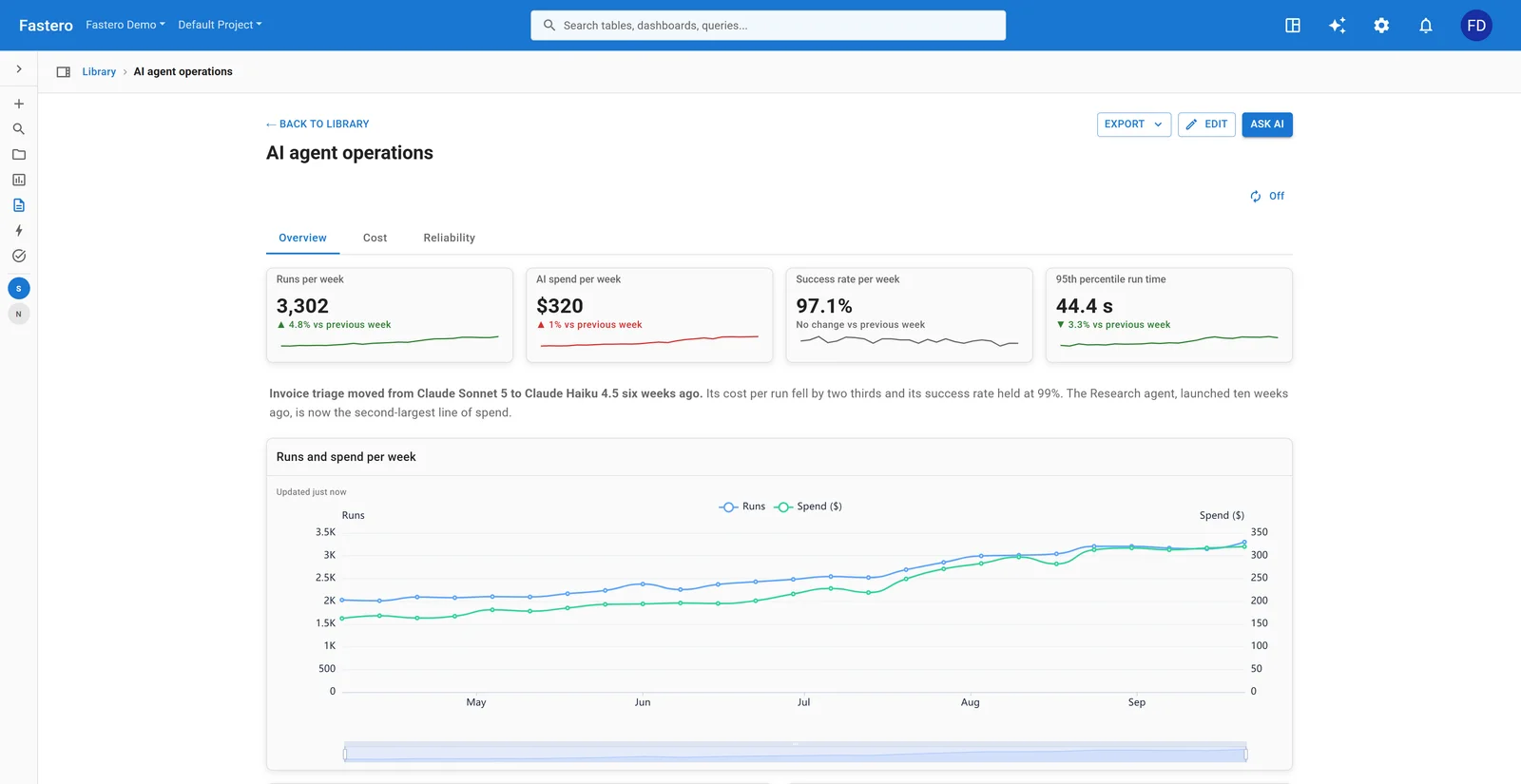
A dashboard in Fastero. Sample data.
For a broader look at BI options across both open source and managed tools, see our best BI tools comparison.
What does a typical migration off Superset look like?
Most teams don't rip-and-replace in a weekend. Here's the pattern that works:
Week 1   Spin up the alternative alongside Superset
         +-- Connect the same databases
         +-- Rebuild 2-3 high-traffic dashboards

Week 2   Run both tools in parallel
         +-- Verify numbers match
         +-- Collect feedback from dashboard consumers

Week 3+  Migrate remaining dashboards
         +-- Move SQL queries (every tool here imports raw SQL)
         +-- Redirect bookmarks and Slack links

After    Decommission Superset
         (or keep it for power users who prefer SQL Lab)
The queries themselves transfer — every tool on this list runs raw SQL. What doesn't transfer cleanly: Superset's Jinja templates ({{ filter_values(...) }}), row-level security rules, and dataset-level metric definitions. Audit for those before committing to a timeline.
FAQ
Can I export my Superset dashboards to another tool? Not directly. Superset's export format is JSON that no other tool imports natively. What transfers is the SQL itself — export your queries from SQL Lab and saved datasets, then rebuild the visualizations. The chart configurations don't carry over.
Is Preset just Superset with a price tag? Preset is Superset with managed infrastructure, SSO, and faster updates. The UI is identical. The value is eliminating ops burden — Redis, Celery, upgrades, security patches — not adding new features on top.
Which alternative is best for non-technical users? Metabase's visual query builder or Fastero's NL2SQL agent. Both let non-SQL users build their own charts without writing queries. Metabase requires learning a point-and-click interface; Fastero requires typing a question in English. Looker Studio is also viable if your data lives in Google's ecosystem.
Do I need an open source alternative specifically? Only if self-hosting is a hard requirement — data residency, air-gapped networks, compliance mandates. If you're self-hosting Superset mainly because it's free, consider that the ops cost is real: managed tools like Preset, Mode, or Fastero often cost less than the engineer-hours spent maintaining a Superset cluster.
Can Grafana replace Superset for business analytics? Technically yes, practically uncomfortable. Grafana has no SQL IDE, no semantic layer, and its default time-range behavior fights business reporting. If you need both monitoring and BI, run Grafana for ops and a separate tool for business dashboards.
What's the biggest risk in migrating off Superset? Losing Jinja-templated queries and dataset-level metric definitions. Raw SQL transfers to any tool, but Superset-specific templating (time grain macros, user-attribute filters) needs to be rewritten. Export your SQL early and audit for Jinja before committing to a timeline.
Try Fastero free — connect any database, ask questions in plain English, and get dashboards without managing a Superset instance. No credit card required.