

I keep having the same conversation with data team leads at smaller companies. They have a few analysts, a growing pile of dashboards, and a question: do we pay for Hex, or do we just use Streamlit?
It sounds like a pricing question, but it isn't. It's a question about what kind of tool your team actually needs — and what your team looks like. Streamlit and Hex solve overlapping problems from completely different angles. Picking wrong means either paying for capabilities you won't use or burning engineering time reinventing things that should come out of the box.
Here's the honest breakdown.
The philosophy split
Streamlit is a Python framework. You write .py files on your machine, run them locally, push to git, and deploy wherever you want. It's open-source under the Apache 2.0 license. The framework is free. The cloud hosting options cost money, but the core tool is yours to run.
Hex is a managed platform. You open a browser, write code in notebook cells (SQL and Python), build interactive apps with a drag-and-drop builder, and share them with your team — all inside Hex's cloud. There's nothing to install, nothing to deploy, nothing to self-host. You pay per seat.
This is the fundamental difference, and everything else flows from it. Streamlit gives you freedom and responsibility. Hex gives you convenience and a bill.
Neither model is wrong. But they attract different teams, reward different workflows, and break down in different ways.
Development experience
Streamlit: write code, see results. Your development loop is: open a .py file in VS Code (or whatever), write Python using Streamlit's API (st.dataframe(), st.plotly_chart(), st.selectbox()), and run streamlit run app.py. A browser tab opens with your app, and it hot-reloads on save. It's fast, it's familiar to any Python developer, and you get your full local toolchain — debugger, linter, type checking, everything.
The tradeoff: you're writing all of it in code. Layout, logic, data fetching, styling — it's all Python. There's no visual editor. The script runs top-to-bottom on every interaction (though st.fragment now allows partial reruns). State management lives in st.session_state, which is straightforward until it isn't.
Hex: browser-based notebook with superpowers. You work in cells — some SQL, some Python, some Markdown, some charts. Cells form a reactive DAG, so changing something upstream automatically re-executes everything downstream. No "I ran cell 7 before cell 3" bugs. You can reference a SQL result as a DataFrame in a Python cell without any boilerplate.
The tradeoff: you're in a browser. No local debugger, no custom dev environment, no offline work. Version control exists inside Hex but it's Hex's version control, not git (though they do have git sync now). If you're the kind of engineer who has strong opinions about their editor setup, working inside Hex might feel constraining.
Fastero
Connect your database. Ask questions. Get dashboards.
Postgres, BigQuery, Snowflake, and 10+ sources — live-connected, AI-powered, no dashboard builder learning curve.
Try free →The app builder — Hex's killer feature
This is where Hex genuinely pulls ahead for a specific use case.
Hex lets you toggle any notebook into "app mode." You get a drag-and-drop layout builder where you can arrange your notebook's outputs — charts, tables, input widgets, Markdown — into a polished grid. Hide the code, publish a URL, and hand it to a product manager or VP. They see dropdowns and charts, not Python.
Streamlit can produce the same kind of interactive app, but you're building the entire layout in code. st.columns(), st.tabs(), st.sidebar — it all works, and you get more control over behavior. But it takes more time, and iterating on layout means editing Python and watching the reload. There's no visual preview of the grid.
For teams that frequently turn analyses into stakeholder-facing tools, Hex's app builder saves real time. For teams that need precise control over how the app behaves — custom logic, complex state, non-standard interactions — Streamlit's code-first approach is more powerful, just slower.
Collaboration
Hex wins here. Real-time multiplayer editing in notebooks. Comments on individual cells. Built-in version history with diffs. Status labels (draft, review, published). If your analysts work together on analyses and need to hand off work to each other, Hex has the collaboration layer built in.
Streamlit's collaboration story is... git. Your app is a Python file in a repo. You use branches, pull requests, and code review. Engineers love this. It's the workflow they already know. But it completely excludes non-technical stakeholders from the development process. A product manager can't comment on a Streamlit app during development the way they can comment on a Hex cell. They can only react to the deployed result.
If your team is all engineers who live in git, Streamlit's approach works fine and arguably keeps things cleaner. If your team includes analysts with varying technical backgrounds who need to collaborate in real time, Hex is materially better.
Deployment and sharing
This is where the cost question starts to bite.
Hex: Sharing is built in. You publish an app or notebook, set permissions, share a URL. Done. No infrastructure to think about. The app runs on Hex's cloud. This is the advantage of paying for a managed platform — deployment is a non-problem.
Streamlit Community Cloud: Free hosting for apps in public GitHub repos. It works, and it's genuinely useful for open-source projects or personal portfolios. But for private team use, the free tier has limitations — private repos require a paid plan, you get limited resources, and apps go to sleep after inactivity.
Streamlit self-hosted: You can deploy Streamlit apps on any infrastructure — EC2, GCP, a Docker container, Kubernetes, whatever you want. Full control, zero vendor lock-in. But now you're managing infrastructure: authentication, HTTPS, process management, scaling, uptime. For a 5-person data team at an SMB, this overhead is non-trivial.
The practical reality for private team use: Hex includes deployment in the seat price. Streamlit needs either a paid cloud plan or self-hosting effort. "Free" is only free if your time has no cost.
Pricing reality
Let's do the math for a 5-person data team.
Streamlit: The framework is free. Streamlit Community Cloud's free tier works for public apps. For private team use, you're looking at either a managed hosting provider (pricing varies, roughly $20-50/month for a small deployment) or self-hosting costs (your own infrastructure plus the time to maintain it). If you already have infrastructure and DevOps knowledge on the team, the marginal cost is close to zero. If you don't, budget real hours for setup and maintenance.
Hex: Professional plan runs about $38/user/month (billed annually) for basic notebooks with collaboration. For a 5-person team, that's $190/month or $2,280/year. The Team plan at ~$65/user/month adds scheduled runs, published apps with permissions, and priority compute — $325/month or $3,900/year. Enterprise (SSO, Git sync, audit logs) is custom pricing, typically $80-120+/seat.
The delta: you're comparing "effectively free plus your time" against $2,300-3,900/year. For a bootstrapped startup where everyone can write Python, Streamlit's economics are hard to beat. For a team that bills clients or whose analysts' time is expensive, Hex's all-inclusive model might be cheaper once you account for the hours you're not spending on deployment infrastructure.
SQL support
Hex has first-class SQL cells. You connect a database, write SQL in a cell, and the result is available as a DataFrame in downstream cells. You can mix SQL and Python freely. For teams that think in SQL first and reach for Python when SQL gets awkward, this is a genuine productivity win.
Streamlit has no SQL support. More precisely: Streamlit is a Python framework, and Python can execute SQL. You write pd.read_sql() or use SQLAlchemy or st.connection() — but you're writing Python that happens to contain SQL strings. There's no SQL editor, no schema browser, no result preview. The SQL is just a string inside your Python code.
For SQL-heavy teams, this is a real ergonomic gap. For Python-first teams who treat SQL as an implementation detail, it barely matters.
Head-to-head comparison
| Streamlit | Hex | |
|---|---|---|
| Type | Open-source Python framework | Managed notebook + app platform |
| Cost | Free (framework); hosting varies | $38-65/user/month |
| SQL support | None (write Python that runs SQL) | First-class SQL cells |
| Python support | Native (it is Python) | Notebook cells with managed runtime |
| Development environment | Local editor (VS Code, etc.) | Browser-based |
| Layout | Code-based (st.columns, etc.) |
Drag-and-drop app builder |
| Collaboration | Git (branches, PRs) | Multiplayer editing, comments |
| Version control | Git (native) | Built-in (Hex's own + git sync) |
| Deployment | Self-host or managed cloud | Built-in, included in pricing |
| Authentication | Build or buy it yourself | Built-in |
| Scheduling | Build it yourself (cron, Airflow) | Built-in scheduled runs |
| Sharing | URL to deployed app | URL with permissions |
| Offline work | Yes (it's local files) | No (browser-based) |
| Custom components | Python API for custom widgets | Limited |
| Open source | Yes (Apache 2.0) | No |
| Vendor lock-in | None (your code, your infra) | High (notebooks live in Hex) |
| Learning curve | Know Python, learn Streamlit API | Learn Hex's notebook + builder |
| Best for | Engineers who want control | Mixed teams who want convenience |
When Streamlit wins
Your team is all engineers. If everyone on the data team can write Python, deploy a container, and use git, Streamlit's model is natural. You get full control, zero per-seat costs, and the ability to run the same code locally that runs in production. The "overhead" that non-technical teams struggle with is just Tuesday for your team.
You need to own your stack. No vendor lock-in, no proprietary formats, no "what happens if Hex raises prices or gets acquired." Your Streamlit apps are .py files. You can move them anywhere. If portability and long-term independence matter to your organization, this is a real consideration.
You're building something complex. Apps with custom authentication flows, multi-step wizards, heavy computation, WebSocket connections, or integration with internal systems. Streamlit's code-first approach lets you build anything Python can build. Hex's app builder is great for standard dashboard-style apps, but it has guardrails that start to bind on non-standard requirements.
Budget is tight. For a startup or small team that already has Python skills, the cost difference between free and $2,300+/year is not nothing. Especially when you're not sure if the investment will pay off yet.
When Hex wins
Your team mixes SQL and Python regularly. The ability to write a SQL cell, get a DataFrame, transform it in Python, and visualize it — all in one reactive notebook — is a meaningfully better workflow than managing SQL strings inside Python files. If your analysts think in SQL and reach for Python when they need to, Hex's hybrid model maps to how they actually work.
You need to share interactive analyses with non-technical people. Hex's app mode turns notebooks into polished tools without a deployment step. If your stakeholders need to interact with data (filter, explore, drill down) and your current workflow is "analyst runs a notebook, exports a PDF, emails it," Hex solves that problem directly.
You don't have DevOps capacity. Deployment, authentication, SSL, process management, uptime monitoring — if nobody on your team wants to own this, Hex's managed platform eliminates the problem entirely. The per-seat cost is the cost of not doing DevOps.
Onboarding speed matters. A new analyst can start working in Hex immediately — open a browser, connect a database, start writing queries. With Streamlit, they need a local Python environment, git access, knowledge of your deployment pipeline, and familiarity with the framework's API. The onboarding gap is real for teams that hire junior analysts.
The middle ground nobody talks about
Here's what I actually see in practice: teams start with Streamlit because it's free and flexible, build a few apps, and then hit the wall on deployment and sharing. They evaluate Hex, like the notebook experience and app builder, but balk at the per-seat pricing. Some switch. Some don't. Some end up running both — Hex for collaborative analysis, Streamlit for production apps that need custom behavior.
There's also a growing category of tools that sidestep the "build apps and notebooks" model entirely. If your team's real need is "get answers from our data" rather than "build interactive applications," you might not need either Streamlit or Hex. Platforms like Fastero take a different approach — an AI analyst writes and runs the Python and SQL for you, so your team gets the analysis without building or maintaining apps. That won't replace a production Streamlit app or a collaborative Hex notebook, but it removes the need for one in a lot of cases.
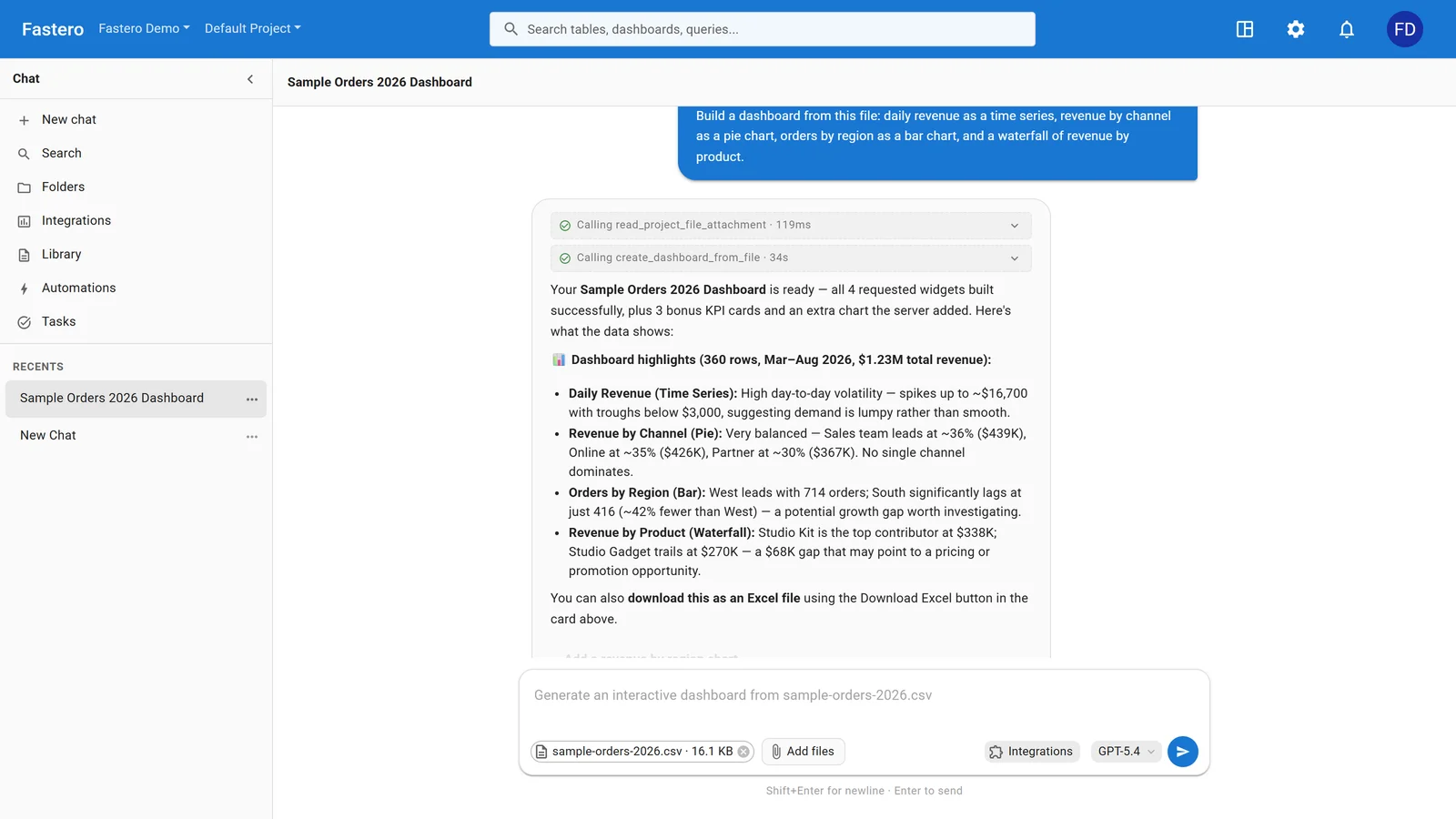
Fastero's AI analyst reading a file and building the dashboard, with a summary of what it found. Sample data.
What I'd pick today
For a 5-person data team at an SMB where everyone writes Python: Streamlit. The cost savings are real, the control is valuable, and the deployment problem is solvable with a weekend of setup.
For a 5-person team where 2 people write Python and 3 write SQL and need to share interactive work with stakeholders: Hex. The collaboration and app builder justify the cost, and the team will actually use the tool instead of waiting for an engineer to build them a Streamlit app.
For a team that's not sure yet: start with Streamlit. It's free, it's flexible, and if you outgrow it, migrating to Hex is straightforward because the core skill (Python) transfers directly. Going the other direction — from Hex to Streamlit — means rewriting everything, which is a harder sell.
Related: Deepnote vs Hex vs Jupyter | Best Platforms to Deploy Python Data Apps | Hex Pricing: Is It Worth It?
Try Fastero free — deploy Python data apps with built-in auth, scheduling, and always-on hosting — no infrastructure to manage. No credit card required.
Last updated: August 2026.