 Fastero Dev Team
There are six ways to show a Power BI report to someone outside your company. They differ on the two things a client asks: do I need a licence, and can anyone else see our numbers?
The short answer: invite the client as a Microsoft Entra B2B guest. They sign in with their own email, Gmail included, but Microsoft says "the guest user must have the proper licensing in place": a Pro licence at $14 a month (paid yearly), from you or their own company, unless the workspace sits on a Fabric capacity of F64 or larger, $5,002.67 a month reserved. Publish to web costs viewers nothing but is public: "anyone on the Internet can view" it, and the data behind it can be reached. Embedding in your own app needs no client licence but a capacity, from $156.33 a month, plus an app you build. Email subscriptions to outside addresses need a paid capacity; exporting a PDF yourself costs nothing. Guest licences plus your own come to $84 a month for 5 client viewers and $1,414 for 100. Prices checked 20 November 2026.
Fastero
Connect your database. Ask questions. Get dashboards.
Postgres, BigQuery, Snowflake, and 10+ sources — live-connected, AI-powered, no dashboard builder learning curve.
Try free →The six ways compared
| Method | What the client needs | What it costs you | Does the data stay private? |
|---|---|---|---|
| Guest access (Entra B2B) | A sign-in, plus Pro or PPU unless the content is on F64+ | $14 per guest a month, or an F64 capacity | Yes, behind their sign-in; split clients with row-level security |
| Workspace app for guests | Same as guest access | Same as guest access | Yes, with audiences per client |
| Publish to web | A browser | Your Pro licence | No: public, and the model's data can be reached |
| Embed in your app ("app owns data") | Your app's login | A capacity from $156.33 a month, plus building the app | Yes, if your app checks who's asking |
| Email subscription with PDF | An inbox | A paid capacity from $156.33 a month (F2, reserved) | The PDF is a copy that can be forwarded |
| Export to PDF or PowerPoint | An inbox | $0 for a PDF from Power BI Desktop | A static copy |
Share with external users as guests (Microsoft Entra B2B)
Your Power BI admin enables "Invite external users to your organization", and the person inviting also needs the Guest Inviter role in Microsoft Entra ID. You can then add the client from a report's Share dialog: "Most email addresses are supported for guest user invitations, including personal email accounts like gmail.com, outlook.com, and hotmail.com." Use a "Specific people" link; "People in your organization" links don't work for guests.
The licence decides whether they get in. Microsoft lists three ways to cover it:
- Put the workspace on a capacity. On Premium capacity "only a Fabric Free license is necessary"; on Fabric, that means F64 or larger.
- Assign the guest a Pro or PPU licence from your own organisation. Microsoft tells you to "consult the Product Terms site" first.
- The guest brings their own Pro or PPU, if their company already pays for Power BI.
Three catches. A guest with Pro can't open your PPU workspaces. Guests who sign in with a personal address "can't use the Power BI Mobile apps". And sharing a report shares its semantic model: "a report consumer's read access isn't restricted to the elements and data visible in the report", and "hiding isn't a security measure". If two clients share one model, give each row-level security or a model of their own (see our row-level security guide).
A workspace app packages several reports for the same guests: "If you distribute your app to external users, those users receive an email with a direct link." One app can have up to 25 audiences. The licence rules are the same: below F64, every viewer needs Pro or PPU.
Power BI Publish to web: public, with no sign-in
Publish to web gives you a link and an embed code anyone can open. Microsoft's warning is blunt: "anyone on the Internet can view your published report or visual. Viewing requires no authentication." It goes further: "anyone can access the underlying data in your model even if your report does not display it."
- You need Pro or PPU to publish from a workspace, and only one embed code exists per report.
- It doesn't work for reports with row-level security, DirectQuery or live connections, or for paginated reports.
- "The data is cached for one hour from the time it is retrieved."
- To stop it, delete the embed code under Manage embed codes: "Deleting it disables any links to that report or visual."
Admins control it. The Publish to web tenant setting must be on, "Only admins can allow the creation of new publish-to-web embed codes", and turning the setting off marks existing codes "Infringed". Check the setting before you promise a client a public link.
Embed it in your own app ("app owns data")
If you run a client portal, embed the report there: "To use your application, your users don't need to sign in to Power BI or have a Power BI license." Your app signs in to Power BI, with a service principal as Microsoft recommends, and decides who sees what. Free embed tokens are for development and show a trial banner; "To move to production you'll need a capacity."
Any F or A SKU works: F2 costs $156.33 a month reserved ($262.80 pay-as-you-go), A1 $1.0081 an hour. The capacity is the cheap part; you also build, host and secure the app. Every SKU's price is in our Power BI pricing guide.
Email the report: subscriptions and PDF export
Subscriptions send a snapshot and a link, or the whole report as a PDF or PowerPoint attachment of "no more than 50 pages and less than 25 MB", hourly, daily, weekly, monthly or after a data refresh. Outside addresses are the problem: external recipients only work from a workspace on a paid capacity, not a PPU workspace and not a trial, and only if the admin allows "Users can send email subscriptions to external users". Microsoft doesn't name a minimum size; F2, at $156.33 a month reserved, is the smallest paid capacity, so test it before you sell a client a Monday email.
Export is the free fallback. In the service, choose Export, then PDF or PowerPoint; Power BI Desktop, a free download, exports PDFs too. Each report page becomes a PDF page or one PowerPoint image, a snapshot you send again every month by hand. Admins can switch export off, and reports larger than 250 MB can't be exported to PDF. For the shape of the monthly document itself, see our client report template.
What one report costs for 5, 25 and 100 client viewers
We adapted our pricing calculator to one person sharing one report: Python 3.14.3 in a venv, on the prices saved on 20 November 2026 (Pro $14 a user a month paid yearly; Fabric $0.18 per capacity unit an hour, or $938 a year reserved; A1 $1.0081 an hour; East US). It counts one Pro licence for you wherever Microsoft requires one. The viewer counts are examples, and building an app isn't counted. The output, unedited:
| Method | 5 viewers | 25 viewers | 100 viewers |
|---|---|---|---|
| Guests, you buy each a Pro licence | $84.00 | $364.00 | $1,414.00 |
| Guests bring their own Pro licence | $14.00 | $14.00 | $14.00 |
| Guests, report on an F64 capacity (reserved) | $5,016.67 | $5,016.67 | $5,016.67 |
| Publish to web | $14.00 | $14.00 | $14.00 |
| Embed in your own app, F2 capacity (reserved) | $170.33 | $170.33 | $170.33 |
| Embed in your own app, A1 capacity, all month | $749.91 | $749.91 | $749.91 |
| Scheduled email with PDF, F2 capacity (reserved) | $170.33 | $170.33 | $170.33 |
| Export to PDF in Desktop, email it yourself | $0.00 | $0.00 | $0.00 |
| Fastero Free plan, viewers free | $0.00 | $0.00 | $0.00 |
| Fastero Pro, one editor | $20.00 | $20.00 | $20.00 |
Per viewer at 100 viewers, Pro bought for each guest: $14.14
Per viewer at 100 viewers, F64 reserved: $50.17
Guests on F64 cost less than buying them Pro from 358 guests
For a freelancer or a small agency, F64 rarely makes sense: below 358 guests, buying each one Pro is cheaper. The real choice is $14 per client viewer, clients bringing their own licence, or files. Our comparison of eight tools for client dashboards shows what the same job costs elsewhere.
Connect any database. Ask in plain English.
Start free →When the client shouldn't need a Microsoft licence
Fastero is an AI and data platform where people and AI agents work together on a team's data. When the client's numbers live in a database, you can build the dashboard there and hand it over without anyone buying a viewer licence:
- "Just this person" in the Send dialog sends one dashboard to an email address. That person sees only that dashboard, after a code sent to their inbox.
- Guests on one project: invite a client who isn't in your workspace to one project and they become a guest, a viewer of that project and nothing else. They don't see your other projects.
- "Anyone with the link" makes a public link, and it can be turned off.
- A scheduled email, daily, weekly or monthly, with the numbers, charts and tables plus a PDF. An address outside your workspace confirms first.
- Viewers are free on every plan. Free is $0 with no end date; Pro is $20 per editor a month.
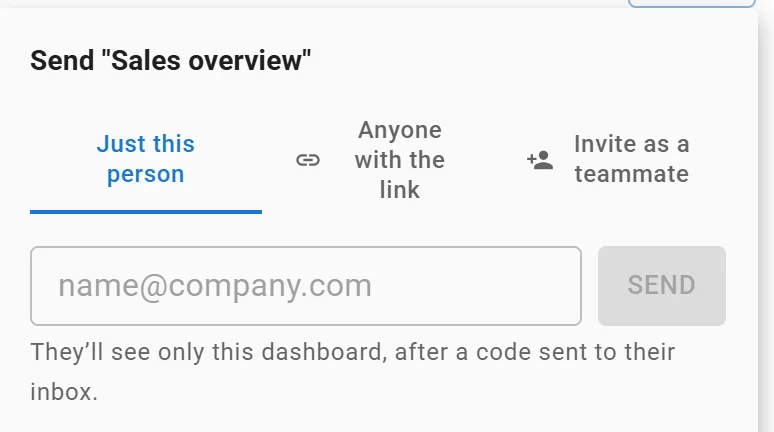
Sending one dashboard to one person: they see only that dashboard. Invented data.
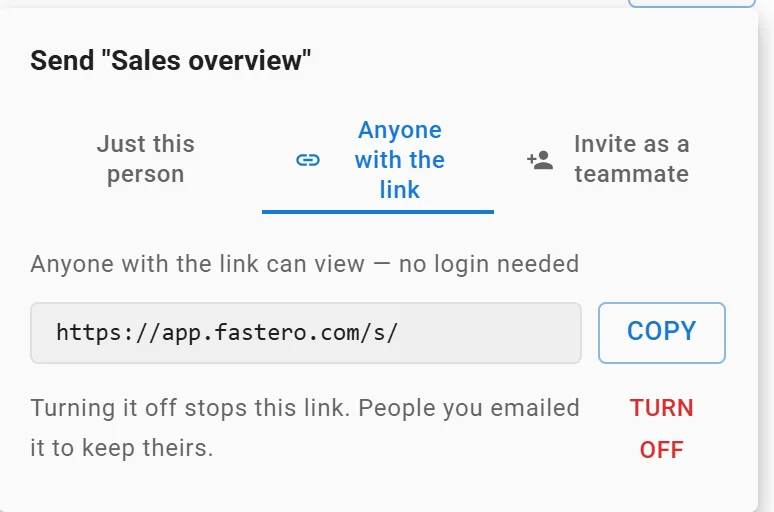
A dashboard's public link: anyone with it can view without a login, and turning it off stops it. Link shortened.
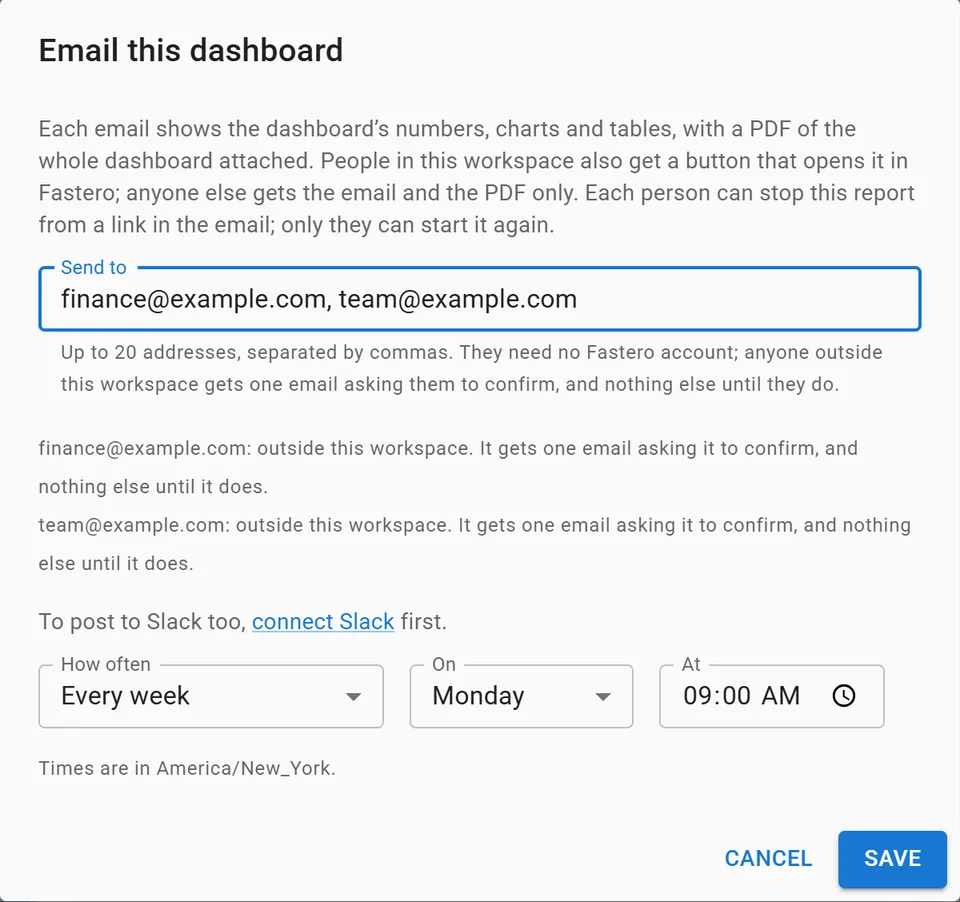
Setting up a weekly email of a dashboard, with invented addresses.
It doesn't white-label: clients see Fastero's name. More on handing over numbers without database access is in how to share live dashboards without giving database access.
FAQ
Can I share a Power BI report with someone outside my organization?
Yes. Invite them as a Microsoft Entra B2B guest from the report's Share dialog with a "Specific people" link; an admin must allow external invitations first. They sign in with their own email address, including Gmail or Outlook.com.
Do external users need a Power BI licence?
To open a shared report, yes: Pro or PPU, from you or their own company, unless the workspace is on a Fabric capacity of F64 or larger or a Premium capacity, where a free licence is enough. Publish to web, an app you embed the report in, and an exported PDF need no licence.
Is Power BI Publish to web secure?
No, and Microsoft says so: anyone with the link can view the report without signing in, and the underlying data in the model can be reached even where the report doesn't show it. Use it only for data you'd publish on your website.
Can I email a Power BI report to an external email address?
A subscription can send to outside addresses only from a workspace on a paid capacity, not from a Pro or PPU workspace or a trial, and only if your admin allows it. Otherwise export the report to PDF or PowerPoint and attach it yourself.
How do I stop sharing a Power BI report published to the web?
Open the workspace's settings, choose Manage embed codes, and delete the report's code; that disables every link to it. A Power BI admin can also switch Publish to web off for the whole organisation.
Sources
Checked on 20 November 2026:
- Microsoft Learn: Distribute Power BI content to external guest users with Microsoft Entra B2B, Share Power BI reports and dashboards, Publish to web, Export and sharing tenant settings, Embed for your customers, Capacity and SKUs in Power BI embedded analytics, Email subscriptions, Export to PDF, Export to PowerPoint, Workspace apps, Microsoft Fabric licenses
- Microsoft prices: Power BI pricing, Azure Retail Prices API (Microsoft Fabric and Power BI Embedded, East US)
- Fastero: Pricing
- Our calculator: Python 3.14.3, run 20 November 2026
Try Fastero free: deliver your client's dashboard with their own login, nothing to host. No credit card required.