 Fastero Dev Team
Row-level security (RLS) lets two people run the same query on the same table and get different rows: a regional manager sees their region, a client sees their own orders. It can live in the database or in a BI tool, and where you put it decides whether it holds when someone writes their own SQL.
The short answer: row-level security is a filter the system adds to every query, based on who is asking. In Postgres, run ALTER TABLE orders ENABLE ROW LEVEL SECURITY and CREATE POLICY ... USING (client = ...). In BigQuery, CREATE ROW ACCESS POLICY ... GRANT TO (...) FILTER USING (...). In Snowflake (Enterprise Edition), a ROW ACCESS POLICY that returns true or false, attached with ALTER TABLE ... ADD ROW ACCESS POLICY. SQL Server and Redshift have their own versions. In BI tools, Power BI uses roles with DAX filters, which apply only to Viewers; Metabase sells "row and column security" on Pro ($575 a month, checked 12 November 2026) and Enterprise; Looker uses access_filter; Tableau uses user filters or data policies. Rules in the database hold for every tool and every query; rules in a BI tool hold only for queries that go through that tool, and some, like Metabase's, not even for SQL written in it.
Fastero
Connect your database. Ask questions. Get dashboards.
Postgres, BigQuery, Snowflake, and 10+ sources — live-connected, AI-powered, no dashboard builder learning curve.
Try free →Three ways to keep rows apart
Google's BigQuery docs compare the options plainly, and the comparison applies to any database:
| Method | How it works | Google's verdict |
|---|---|---|
| Separate tables (or databases) | Each client's data in its own place | "Recommended for security. Users cannot infer data without access to the table." |
| Row-level policies | One table, a filter per person or group | "Recommended for a balance of flexibility and security" |
| Views (BigQuery's authorized views) | A filtered query people read instead of the table | "Recommended for flexibility" but "vulnerable to carefully crafted queries" |
Separate tables suit outside clients when "the total number of rows must be secret". Row-level policies suit "people who all use the same dashboard, even if some people have access to more data than others."
Postgres row-level security, step by step
We ran this in Docker on PostgreSQL 18.6 (postgres:18-alpine) on 12 November 2026, with an invented orders table holding five rows for three clients, two login roles (client_a_reader, client_b_reader) with SELECT granted, and a small lookup table saying which login belongs to which client.
1. Before RLS, a reader sees everything:
  client  | count | sum
----------+-------+-----
 client_a |     2 | 200
 client_b |     2 | 345
 client_c |     1 |  60
2. Turn RLS on with no policy, and the same reader sees nothing. Postgres's docs: "If no policy exists for the table, a default-deny policy is used".
-- as postgres (owner, superuser)
ALTER TABLE orders ENABLE ROW LEVEL SECURITY;
-- as client_a_reader
SELECT count(*) FROM orders;
 count
-------
     0
3. Add a policy that looks up the login's client:
CREATE POLICY client_rows ON orders
  FOR SELECT TO client_a_reader, client_b_reader
  USING (client = (SELECT l.client FROM client_logins l
                   WHERE l.db_role = current_user));
-- as client_a_reader
client | count | sum
----------+-------+-----
client_a | 2 | 200
(1 row)
-- as client_b_reader
client | count | sum
----------+-------+-----
client_b | 2 | 345
(1 row)SELECT * FROM orders WHERE client = 'client_b' as client_a_reader returns (0 rows): the filter is added to every query, so a WHERE clause can't widen it.
4. Lock the lookup table too. Policy expressions "will be run with the rights of the user running the overall query", so each reader needed SELECT on client_logins, and could read the whole mapping, both clients included. A second policy, USING (db_role = current_user), cut that to their own row, and the orders policy kept working.
The traps
- Owners and superusers skip it. "Superusers and roles with the BYPASSRLS attribute always bypass the row security system when accessing a table. Table owners normally bypass row security as well." Our
postgressuperuser still counted 5 rows. A non-superuser owner can opt in withALTER TABLE ... FORCE ROW LEVEL SECURITY. Never connect a dashboard as the owner. - Views hand out every row. A view runs with its owner's rights. We created
order_totalsaspostgresand granted it toclient_a_reader, who then saw all three clients' totals.ALTER VIEW order_totals SET (security_invoker = true)(Postgres 15 and later, per Supabase's docs) brought it back to one row. - Constraints leak a little. "Referential integrity checks, such as unique or primary key constraints and foreign key references, always bypass row security", so the docs warn about "covert channel" leaks through them.
- On Supabase, policies can test
auth.uid(), which returns the ID of the user making the request, and theservice_role"bypasses RLS, so keep it server-side". Supabase also says to "Enable RLS on every table in an exposed schema."
BigQuery row access policies
CREATE ROW ACCESS POLICY apac_filter
ON dataset1.table1 GRANT TO ("group:sales-apac@example.com")
FILTER USING (region = "APAC");
That example is Google's. People not in any policy's grantee list "cannot see any rows", so when you add the first policy, anyone who needs the whole table must be granted a TRUE filter. SESSION_USER() filters by the signed-in email, and a policy can use a subquery against a lookup table. Creating policies takes the BigQuery Admin or BigQuery DataOwner role.
The trap: policies disappear quietly. Google's docs say that "when a table is replaced using the CREATE OR REPLACE TABLE DDL statement, all existing row access policies on the original table are dropped", and loads or queries that use WRITE_TRUNCATE remove them too. A nightly job that rebuilds a table can switch your security off.
Snowflake row access policies
Snowflake's version "requires Enterprise Edition (or higher)". A policy is a function that returns true for the rows a session may see, often checking CURRENT_ROLE() against a mapping table:
CREATE OR REPLACE ROW ACCESS POLICY security.sales_policy
AS (sales_region varchar) RETURNS BOOLEAN ->
  'sales_executive_role' = CURRENT_ROLE()
  OR EXISTS (SELECT 1 FROM salesmanagerregions
             WHERE sales_manager = CURRENT_ROLE() AND region = sales_region);

ALTER TABLE sales ADD ROW ACCESS POLICY security.sales_policy ON (region);
Policies run with their owner's rights, so the people querying don't need access to the mapping table. IS_ROLE_IN_SESSION covers role hierarchies.
SQL Server and Redshift
| Database | Statement | Notes |
|---|---|---|
| SQL Server | CREATE SECURITY POLICY with an inline table-valued function |
Since SQL Server 2016. Filter predicates hide rows; block predicates stop writes that break the rule |
| Amazon Redshift | CREATE RLS POLICY ... USING (...), then attach it |
Created by superusers or roles with sys:secadmin. AWS advises simple policies, since lookup tables add scans |
Connect any database. Ask in plain English.
Start free →Power BI row-level security
Power BI defines rules in the semantic model, not the database:
- In Power BI Desktop, open Modeling → Manage roles and create a role.
- Add a filter, such as
[Region] = "West", or switch to the DAX editor for a dynamic rule like[UserEmail] = USERPRINCIPALNAME(). - Publish the report.
- In the Power BI service, open the semantic model's Security page and add people or groups to each role. You need the workspace Contributor role or higher.
- Check it with Test as role before sharing.
The catch Microsoft states: "RLS only restricts data access for users with Viewer permissions. It doesn't apply to workspace Admin, Member, or Contributor roles." For Analysis Services live connections the rules live in that model instead.
Metabase, Looker and Tableau
Prices checked 12 November 2026:
| Tool | Feature | Plan | Does it hold for hand-written SQL? |
|---|---|---|---|
| Metabase | "Row and column security" (formerly data sandboxing), filtering by user attributes | Pro ($575 a month, 10 users included, then $12 a user) and Enterprise (from $20,000 a year) | No: "Row and column security permissions don't apply to the results of SQL questions." Impersonation (also Pro and Enterprise) passes a database role instead, and does cover SQL |
| Looker | access_filter on each Explore, matched to a user attribute |
Part of Looker | Applies to Explores. "If you forget to add access_filter to an Explore that should have it, the data will not be restricted" |
| Tableau | User filters mapped by hand, dynamic filters with USERNAME() and an entitlements table, or data policies on virtual connections |
Data policies need Data Management | Tableau also lists using "existing RLS in the database" |
Metabase explains why its filter can't cover SQL: it can't read a SQL query to work out what each person is allowed to see. So when you add row security for a group, Metabase takes away that group's native SQL on the database. Its impersonation, by contrast, runs queries under database roles, for PostgreSQL, Redshift, Snowflake, SQL Server, MySQL, ClickHouse and Starburst/Trino.
Database or BI tool: where to put the rule
- In the database when more than one tool touches the data, or anyone can write SQL: analysts, notebooks, AI agents. Tableau's docs give the reason: administrators "can implement and control their data security policy in one place: their databases."
- In the BI tool when viewers only ever open dashboards and the tool connects with one shared login. It's easier to manage, but it is the tool's rule, not the data's.
- Separate tables, schemas or databases when clients must not be able to infer anything about each other, even row counts.
Fastero and row-level security
Fastero is an AI and data platform where people and AI agents work together on a team's data. It has no row-level rules of its own, and it doesn't pass each viewer's identity to your database. What it does:
- A connection runs on its stored credentials. Connect with a role like
client_a_readerand every query through that connection, from dashboards, the SQL editor, notebook SQL cells, the assistant or Claude through Fastero's connector, gets the database's filter. Nothing in Fastero can widen it. - Guests see one project. Invite someone to a single project who isn't a workspace member and they become a guest: a viewer of that project and nothing else, without the workspace's other projects.
- So per-client dashboards work like this: a database role and a connection per client, that client's dashboards in their own project, and the client invited as a guest.
- Everyone on a connection sees the same rows. For per-viewer filtering on one shared connection, use a BI tool's row security or a database login per person.
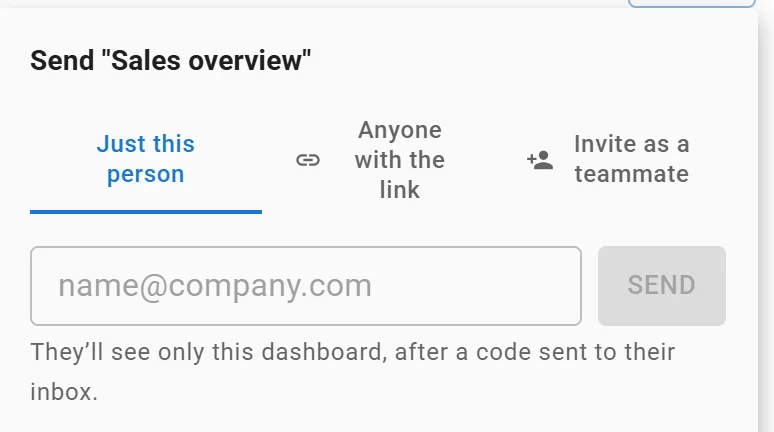
Sending one dashboard to one person: they see only that dashboard. Invented data.
More on sharing a live dashboard without giving database access, Postgres connection strings and keeping an AI agent's database access safe.
FAQ
What is row-level security?
A rule that filters which rows of a table each user can see or change, applied automatically to every query. Two people running the same SELECT get different results.
How do I enable row-level security in Postgres?
ALTER TABLE t ENABLE ROW LEVEL SECURITY; then CREATE POLICY name ON t FOR SELECT TO some_role USING (condition);. With RLS on and no policy, ordinary roles see no rows at all.
Does row-level security apply to the table owner?
Not by default. Owners, superusers and roles with BYPASSRLS skip it in Postgres. FORCE ROW LEVEL SECURITY makes it apply to the owner; superusers always bypass it.
How does row-level security work in Power BI?
You create roles with DAX filters in Power BI Desktop, publish, then add people to the roles in the service. It only filters for people with Viewer permissions in the workspace.
Is Metabase row-level security free?
No. Row and column security, and impersonation, are on Metabase Pro ($575 a month as of 12 November 2026) and Enterprise only.
Can a view bypass row-level security?
In Postgres, yes: a view runs with its owner's rights unless you set security_invoker = true (Postgres 15 and later).
Sources
Read on 12 November 2026; the Postgres example was run that day on PostgreSQL 18.6 in Docker:
- PostgreSQL: Row security policies, CREATE POLICY
- Supabase: Row Level Security
- Google Cloud: Introduction to BigQuery row-level security, Managing row-level security
- Snowflake: Understanding row access policies, Using row access policies
- Microsoft: Row-level security with Power BI, SQL Server row-level security
- AWS: Redshift row-level security, CREATE RLS POLICY
- Metabase: Row and column security, Impersonation, Pricing
- Looker access_filter; Tableau: Restrict access at the data row level, Overview of row-level security options