
You have a Python script. It pulls data from an API, transforms it, writes the results to a database or a Google Sheet. It works. You run it on your laptop, maybe once a day, maybe whenever you remember. Sometimes you forget. Sometimes your laptop is off. Sometimes you're on vacation and nobody runs it at all.
This script should run on a schedule, in the cloud, automatically, with an alert when it fails. You know this. You've known it for months. The reason it's still running on your laptop is that every deployment option you've looked at comes with its own pile of overhead — and none of it has anything to do with the actual work your script does.
I've been through this cycle more times than I'd like to admit. The script works fine. The deployment problem is the entire bottleneck. And the frustrating part is that the deployment problem has nothing to do with data — it's all infrastructure: containers, IAM roles, task definitions, scheduler configuration.
Here's what I've learned about each option, and what I ended up building instead.
The options (and why they all have friction)
AWS Lambda
Lambda is the first thing most people think of, and on paper it's perfect: upload your code, set a CloudWatch Events cron rule, done. In practice, Lambda has packaging constraints that make Python data work surprisingly painful.
Your script uses pandas, requests, and sqlalchemy. That's already too large for a standard Lambda deployment package — you need a Lambda Layer or a container image. If you use numpy or any compiled dependency, you need to build it for the Lambda runtime's specific Linux version, not your local machine. The 15-minute timeout is a hard wall — if your script processes a large dataset or waits on a slow API, you need to refactor it into chunks or move to a different service entirely.
Good for: lightweight scripts with minimal dependencies and short runtimes. Friction: dependency packaging, 15-minute timeout, no interactive debugging, CloudWatch log hunting when something fails.
ECS Scheduled Tasks / Fargate
ECS with Fargate removes the timeout limit and lets you run any Docker container on a schedule. But now you're writing a Dockerfile, pushing to ECR, configuring a task definition, setting up a CloudWatch Events rule, wiring IAM roles, and managing a VPC if your script needs to reach a database.
That's real infrastructure work. The script itself is 80 lines of Python. The deployment wrapper around it is 200 lines of YAML, a Dockerfile, and a CI pipeline. The ratio is wrong.
Good for: long-running jobs that need full control over the environment. Friction: Docker + ECR + task definitions + IAM + VPC — significant setup for a single script.
Apache Airflow
Airflow is a full orchestration platform. If you have 50+ interdependent DAGs and a platform team, it's the right tool. If you have one Python script you want to run at 6am, spinning up Airflow is like buying a forklift to move a chair.
Even managed Airflow (MWAA, Astronomer) starts at $300+/month and takes days to configure properly. You'll learn DAGs, operators, XCom, connections, and the Airflow scheduler's quirks — all to run a script that currently executes with python main.py. We wrote a full comparison of Airflow vs. simpler alternatives if you want the detailed breakdown.
Good for: complex dependency graphs at scale. Friction: massive setup cost, ongoing maintenance, $300+/month minimum for a managed deployment.
GitHub Actions
Scheduled GitHub Actions workflows are free (for public repos) or cheap, and dead simple to set up. Add a .github/workflows/run-script.yml with a cron trigger and you're running.
The limitations show up fast. GitHub Actions runners don't have persistent state — every run starts from scratch, so pip installs happen every time (adding minutes to your job). There's no built-in secret injection beyond GitHub Secrets, which means hardcoding connection logic into the workflow. No database connections you can manage centrally. And when it fails, you get a red X on a commit — no Slack notification, no structured error output, unless you wire that up yourself.
Good for: simple, short scripts in repos you already use Actions for. Friction: cold installs every run, no persistent connections, limited alerting and monitoring.
Dagster Cloud / Prefect Cloud
Modern orchestrators that improve on Airflow significantly — better Python APIs, managed infrastructure, cleaner UIs. But they're still orchestration platforms. You're still writing flow definitions, managing deployments, and learning a framework's abstractions. Pricing starts around $500/month. For a team running 30+ scheduled jobs with real dependencies between them, these are great options. For one script? Same forklift-and-chair problem as Airflow, just with a nicer forklift. See our detailed orchestration comparison for more.
What you actually want
Strip away the infrastructure and framework concerns, and the requirement is simple:
- Run my Python script — with all its dependencies, in a real Python environment
- On a schedule — cron syntax, reliable, no missed runs
- With credentials — database passwords, API keys, injected securely
- With alerts — tell me on Slack or email when it fails
- With logs — let me see what happened without digging through CloudWatch
- Without infrastructure — no Docker, no IAM roles, no task definitions, no Kubernetes manifests
That's it. Everything above is either solving a harder problem than you have (Airflow, Dagster) or making you do infrastructure work to solve the simple one (Lambda, ECS, Actions).
Fastero
Connect your database. Ask questions. Get dashboards.
Postgres, BigQuery, Snowflake, and 10+ sources — live-connected, AI-powered, no dashboard builder learning curve.
Try free →How Fastero handles this
Fastero gives you exactly the list above — nothing more, nothing less.
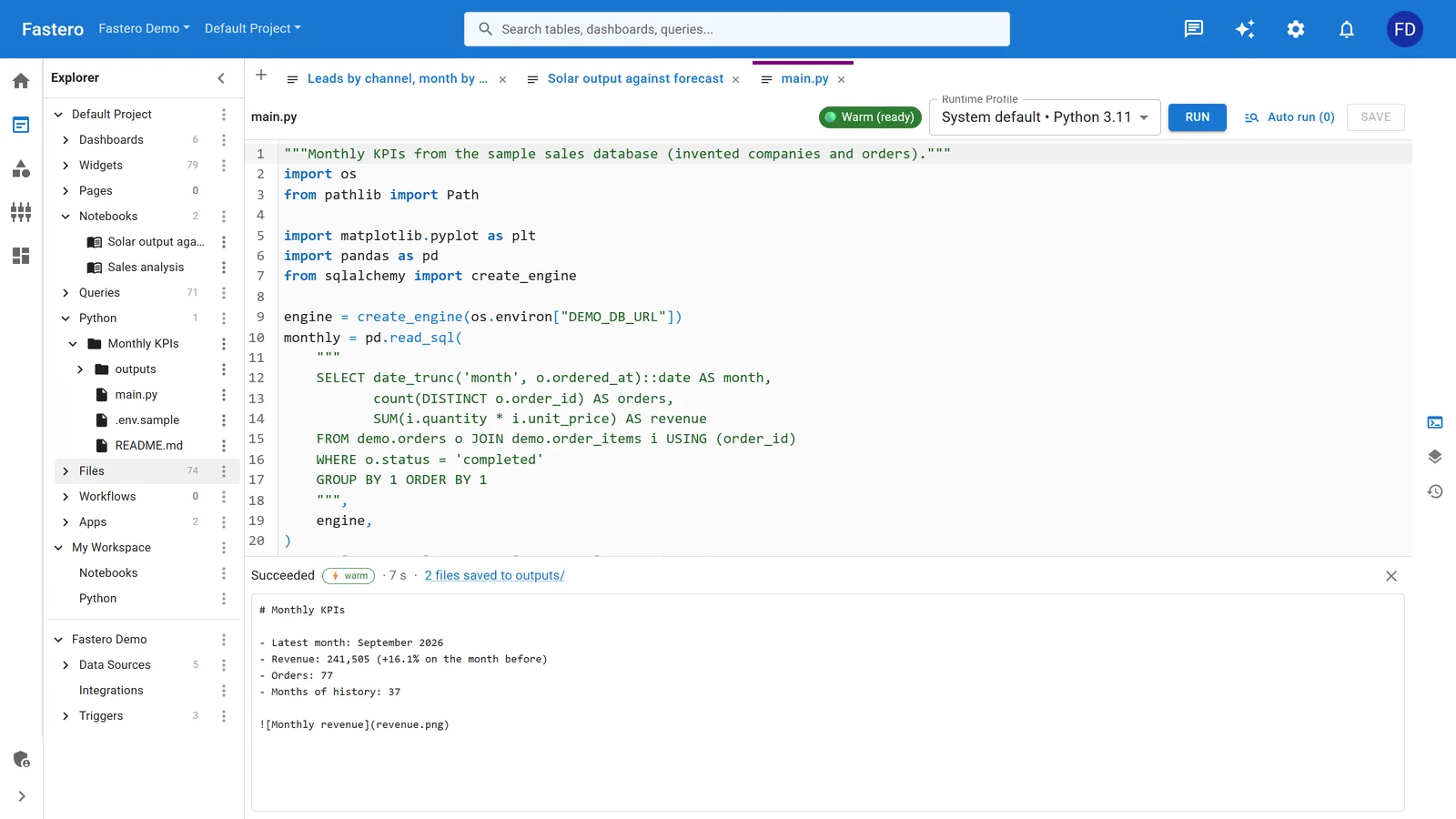
A Python job in Fastero: it reads the database through a Secret, runs in seconds and keeps its outputs. Sample data.
Upload or link your code
Drop your Python script directly, or connect a Git repo and Fastero pulls from it automatically. Push to your repo, the latest version runs on the next trigger. No Docker, no CI/CD pipeline, no build step.
Your full Python environment is available — pip install anything you need. pandas, scikit-learn, dbt-core, custom internal packages — whatever your script imports, it installs. There's no dependency packaging step, no Lambda Layer gymnastics, no "will this compile for the right Linux version" guessing.
If your script lives in a Jupyter notebook, that works too. Fastero runs notebooks natively on JupyterHub, so you can develop interactively and deploy the same notebook to run on schedule. The notebook output — charts, tables, printed results — is captured with every run, so you get a visual record of what happened.
Set a trigger
Open the trigger builder and pick your schedule: every hour, every day at 6am UTC, every Monday at 9am, or any cron expression you want. The script runs on managed Kubernetes — no timeout limits, no cold starts, with compute tiers you can size to your workload.
Cron is only one trigger type. You can also fire on a webhook — so an external system (Stripe, your CRM, a monitoring tool) can kick off your script by hitting a URL. Chain triggers into multi-step workflows when you need "run script A, check the result, then run script B."
Inject secrets
Database credentials, API keys, OAuth tokens — add them once in Fastero's secret manager. They're injected as environment variables at runtime. No hardcoded passwords in your repo, no .env files to manage, no AWS Secrets Manager setup.
Your script reads os.environ['DATABASE_URL'] the same way it does locally, but the value is managed centrally and encrypted at rest. When you rotate a credential, update it in one place — every script that uses it picks up the new value on the next run.
Get alerts when it fails
Every run is monitored. If your script throws an unhandled exception, Fastero sends a Slack message or email immediately — not at the end of some batch window, immediately. The alert includes the error, the traceback, and a link to the full log stream. No more discovering at 2pm that your 6am job silently failed.
You can also set up alerts on success conditions: "notify me when this script writes more than 1,000 rows" or "alert when the output value crosses a threshold." This turns a scheduled script into a lightweight monitoring system — your existing analysis code doubles as a data quality check just by adding a trigger and an alert rule.
See what happened
Full log streaming for every run, in real time. stdout, stderr, execution time, exit code — all in a single view. No CloudWatch log group hunting, no docker logs on a remote instance. Click the run, read the logs.
If your script produces output — a CSV, a chart, a summary table — Fastero can persist those results to dashboard widgets, making them visible to your team without a separate BI tool. Your nightly data pull becomes a live dashboard that updates itself. For scripts that generate data apps or visualizations, the output is immediately shareable.
Choose your compute tier
Not every script needs the same resources. A lightweight API pull can run on a small tier. A script that processes a million-row dataset needs more memory and CPU.
Fastero lets you pick the compute allocation per job, so you're not over-provisioning for simple scripts or under-provisioning for heavy ones. Scale up when the workload demands it, scale down when it doesn't.
From laptop script to production job in 5 minutes
Here's the actual workflow:
- Upload
main.py(or link your Git repo) - Add any pip dependencies
- Set your secrets (database URLs, API keys)
- Pick a cron schedule
- Enable Slack alerts on failure
That's it. Your script runs on the next trigger. No Dockerfile, no task definition, no IAM policy, no Kubernetes manifest. The script that was running on your laptop is now running in the cloud, on schedule, with monitoring and alerts.
When you're ready to go further — adding predictive analytics on top of your scheduled data, or chaining scripts into multi-step workflows with conditional logic — the platform grows with you. But you don't have to think about any of that on day one. Day one is: upload, schedule, done.
Decision guide
| Your situation | Best option |
|---|---|
| Tiny script, no dependencies, under 15 min | Lambda |
| Full container control, platform team available | ECS Fargate |
| 50+ interdependent DAGs, dedicated data platform team | Airflow / Dagster |
| Simple script in existing Actions repo, runs under 5 min | GitHub Actions |
| 1-20 Python scripts, need scheduling + secrets + alerts, no infra team | Fastero |
Most data practitioners land in that last row. You have real scripts doing real work. You just don't want to become an infrastructure engineer to run them. The script was always the easy part — it's the "make it run reliably somewhere that isn't my laptop" part that's been the problem. That's the part Fastero removes.
Try Fastero free — upload your Python script, set a schedule, and let it run — with secrets, alerts, and zero infrastructure to manage. No credit card required.