 Fastero Dev Team
Gemini Canvas is the workspace that opens beside a Gemini chat. You ask for a document, a slide deck or an app, Gemini builds it in the panel, and you keep editing it there, by hand or by asking. Google launched it in March 2025 and has added to it since.
The short answer: Canvas is on every Gemini plan, free included. It makes and edits docs, slides, code and small web apps, and its Create menu turns a doc into a web page, an infographic, a quiz or an Audio Overview. To share one, click Share & export → Share and copy the g.co/gemini/share link. That link is public, it opens only on gemini.google.com, and viewers can make their own copy; in an app that shares data between users, "Anyone with that public link can view and edit data associated with the app". Canvas runs within Gemini's usage limits and context window, which is 32K tokens on the free plan and 1M on Google AI Pro ($19.99 a month). It holds the numbers you give it: Google's help describes apps that save their own data, not a canvas that reads your database. Checked 12 November 2026.
Fastero
Connect your database. Ask questions. Get dashboards.
Postgres, BigQuery, Snowflake, and 10+ sources — live-connected, AI-powered, no dashboard builder learning curve.
Try free →What Gemini Canvas makes
| Ask for | What you get | Where it can go |
|---|---|---|
| A document | A doc you edit directly or by selecting text and asking; tone, length, formatting and LaTeX tools | Google Docs; a PDF for docs with LaTeX |
| Slides | A slide presentation | Google Slides, or a PDF |
| An app or code | A live preview of React or HTML, with a Code view, a console and Select & ask | A public link, from Share & export |
| Python | Code in the panel | Google Colab, with Export to Colab |
| A web page, infographic, quiz or Audio Overview | Made from a doc with the Create menu | Share & export |
In Google's words, you can "create or edit a doc, app, slides, or code", then "turn your creation into an Audio Overview, quiz, or other format". Apps can also get Add Gemini features, such as text and image generation inside the app, if you're 18 or over.
The timeline, from Google's release notes: Canvas arrived on 18 March 2025 for documents and code; on 20 May 2025 the Create menu added "custom web pages, visual infographics, engaging quizzes, and immersive Audio Overviews", and apps that "save data between sessions, and share data between multiple users". The same release let Deep Research reports go into Canvas as visuals and quizzes.
How to start a canvas
- Go to gemini.google.com.
- Below the text box, open Add files and choose Canvas.
- Describe what you want. To get a particular format, such as a slide deck, say so in the prompt.
- Optionally add files or an image, then submit.
Changes "are auto-saved", and Previous Version and Next Version step through earlier drafts of a doc.
How sharing works, and what the viewer gets
To share, open the chat, click Share & export → Share, review the app's details if it's an app, and copy the g.co/gemini/share link, or post it to a social platform. For documents and slides, Share & export also exports to Docs, Slides or PDF, which is the way to give someone a file instead of a link.
| What happens | |
|---|---|
| Who can open it | Anyone with the link; Google's help describes no way to share a canvas with named people |
| Where | "Shared links only open in gemini.google.com", not the Gemini mobile app |
| What they can do | View the doc or use the app; Copy Canvas to keep editing their own copy (not for under-18s) |
| Data in a multi-user app | "Anyone with the public link to a multi-user app can view and edit all data associated with the app" |
| Data in a single-user app | Kept "in a private database and can only be seen or edited by the person using the app" |
| What the creator sees | "Any info that you share with the app is visible to the app creator" |
When an app needs storage, "Gemini Apps creates a firestore database instance for you". Simon Willison noted in June 2025 that a canvas app which runs prompts asks the person using it to sign in with a Google account. Google's own advice to viewers is blunt: "Do not provide sensitive or private info in the app." To stop sharing, Google's help on shared links says you can delete a public link you created from Settings → Your public links.
Gemini Canvas limits (checked 12 November 2026)
| Limit | Free | AI Plus ($4.99) | AI Pro ($19.99) | AI Ultra ($99.99 or $199.99) |
|---|---|---|---|---|
| Usage | Standard | 2x standard | 4x standard | 5x or 20x AI Pro |
| Context window | 32K tokens | 128K | 1M | 1M |
| Files per prompt | Up to 10 | Up to 10 | Up to 10 | Up to 10 |
| File size | 100 MB (video 2 GB) | 100 MB | 100 MB | 100 MB |
Canvas has no allowance of its own: it uses the same compute-based limits as the rest of Gemini, which refresh "every 5 hours until you reach your weekly limit". Long, heavily edited chats cost more, because Gemini re-reads the conversation each turn. Some features are 18+: the Create menu, copying someone else's canvas and adding AI to an app.
Can Gemini Canvas use live data?
Not in the sense a dashboard does. Google documents three things a canvas app can do with data: save it between sessions, share it between users, and use Gemini-powered features. Its storage is the Firestore database Gemini sets up, though "If you prefer, you can always substitute your own storage solution". Nothing in Google's help connects a canvas to your database, a warehouse or a file that keeps changing. A canvas built from an uploaded spreadsheet works from that copy of the file, so new numbers mean a new upload and a new request.
If your data is in Google Sheets, there's a separate feature for that. Sheets canvas, launched on 13 August 2026, is "a dynamic, read-write layer that sits directly on top of your spreadsheet data": changes sync "between the canvas and the original sheet in real time", and you share it like any sheet. It's for Google AI Pro and Ultra subscribers and Workspace Business and Enterprise Standard and Plus plans.
Connect any database. Ask in plain English.
Start free →Gemini Canvas vs Claude artifacts vs ChatGPT canvas
| Gemini Canvas | Claude artifacts | ChatGPT canvas | |
|---|---|---|---|
| Plans | All, free included | All, free included | Removed from current models in 2026 |
| Makes | Docs, slides, code, apps, web pages, infographics, quizzes, Audio Overviews | Docs, slides, designs, interactive tools, dashboards (Claude Data, Pro and up) | Writing and code, now inline in the chat |
| Saves data | Firestore database, private or shared | Up to 20 MB of text per artifact, personal or shared (Pro and up) | n/a |
| Calls the AI | Gemini features in the app (18+) | Calls Claude; "usage counts against each person's own plan limits" | n/a |
| Live data | Not documented; Sheets canvas syncs with a sheet | Connected apps through each viewer's own connections (Pro and up); Claude Data queries warehouses | n/a |
| Sharing | Public link only | Anyone with the link (Pro and up), your organization (Team and Enterprise), or email invitations (beta) | n/a |
| Who opens it | Anyone with the link, on gemini.google.com | Most artifacts shared with Anyone with the link "open without a Claude account or sign-in" | n/a |
| Export | Docs, Slides, PDF, Colab | Docs to Word, PDF, Markdown or Google Docs; decks to PowerPoint, PDF or Google Slides | n/a |
OpenAI's release note in late May 2026, as reported by Thurrott, said "canvas will no longer be available in GPT-5.5 Instant or GPT-5.5 Thinking", with writing and coding "supported directly in chat responses through writing blocks and code blocks". Paid users could keep canvas on legacy models until those were retired, and o3 was scheduled to leave ChatGPT on 26 August 2026. For hosted pages, ChatGPT now has Sites, which builds and hosts a website from a prompt.
Two Claude details matter for data. An artifact that uses connected apps "uses the viewer's connections, not yours", so two people can see different numbers. And Claude Data, Anthropic's dashboard format, writes a SQL query for each chart against a warehouse, and "Claude refreshes a dashboard's data when someone opens it and the data is due for a refresh". Our guides to Claude artifacts and sharing them with your team go further, and Gemini vs Claude compares the two assistants as a whole.
When the page needs live numbers for a team
A canvas or an artifact is the right tool for a one-off page: a brief, a quiz, a quick calculator. When a team opens the same numbers every week, the page should read them from the database, not from last month's upload. Fastero is an AI and data platform where people and AI agents work together on a team's data:
- Dashboards on your database. Connect Postgres, BigQuery, MySQL, SQL Server, Redshift, Snowflake or Oracle. A dashboard refreshes every 1, 5, 15 or 60 minutes, or when the data changes on Postgres and BigQuery.
- Hosted pages that keep up. A page in Fastero reads its numbers from your data and can refresh on a timer, or when the data changes on Postgres and BigQuery. In a Claude chat it shows as a card with a Refresh button.
- Colleagues sign in with their own login. Viewers are free, and someone you invite to one project becomes a guest who sees only that project.
- Public links you can revoke, and dashboards sent by scheduled email.
- Claude can build it. Through Fastero's connector, Claude runs read-only SQL and saves charts to dashboards. Free has no end date; Pro is $20 per editor a month.
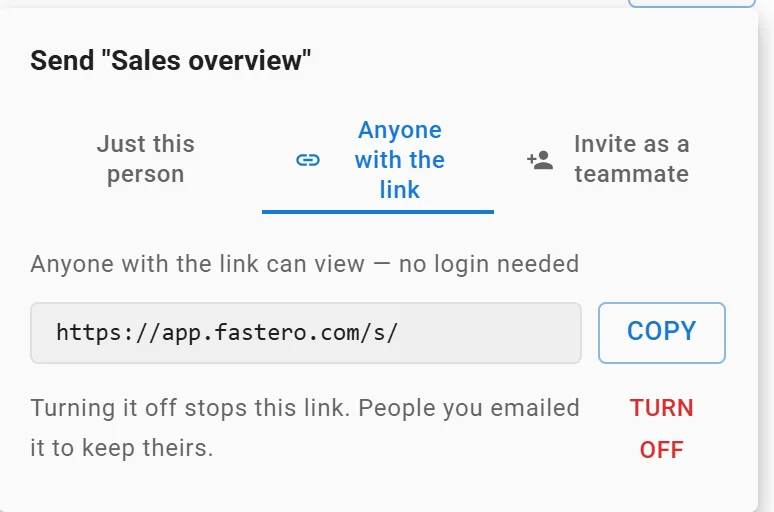
A dashboard's public link: anyone with it can view without a login, and turning it off stops it. Link shortened.
FAQ
Is Gemini Canvas free?
Yes. Canvas is included in Gemini's free plan, within its usage limits and 32K-token context window. Paid plans raise the limits, and Google AI Pro reads 1M tokens at once.
How do I share a Gemini canvas?
Open the chat, click Share & export → Share, and copy the g.co/gemini/share link. It's a public link that opens on gemini.google.com, not in the mobile app.
Can people edit my shared canvas?
They can click Copy Canvas and edit their own copy; your original doesn't change. In an app that shares data between users, though, anyone with the link can view and edit all of the app's data.
Can Gemini Canvas use live data?
Google's help describes apps that save their own data and use Gemini, not canvases that read your database or a changing file. For live Google Sheets data, use Sheets canvas, which syncs with the sheet.
Can I export a Gemini canvas?
Yes. Docs export to Google Docs, slides to Google Slides or PDF, docs with LaTeX to PDF, and Python to Colab. You can also copy the contents.
Gemini Canvas or Claude artifacts?
Gemini Canvas if you want Audio Overviews, quizzes and exports to Google Docs and Slides. Claude artifacts if you want finer sharing (your organization, invitations) and pages that use connected apps or warehouse data.
Sources
Checked 12 November 2026:
- Google: Create docs, apps and more with Canvas, Canvas safety and security, Share chats, Gemini Apps limits, Upload files, Gemini subscriptions, Release notes, Gemini Apps Privacy Hub, Sheets canvas
- Simon Willison: Gemini Canvas apps, June 2025
- Anthropic: What are artifacts, Share artifacts, Claude Data, Claude pricing
- OpenAI: canvas removal, as reported by Thurrott (30 May 2026) and The Decoder (29 May 2026); ChatGPT Sites