 Fastero Dev Team
DuckDB is a SQL database that runs inside your Python process: no server, no setup, and it reads CSV files, Parquet files and DataFrames where they are. We installed DuckDB 2.0.0 on 20 November 2026 and ran every example below on a file of invented orders, with the output it printed.
The short answer: pip install duckdb (2.0.0, released 21 October 2026, needs Python 3.11 or later). Then duckdb.sql("SELECT ... FROM 'sales.csv'") queries a CSV file, a Parquet file, or a pandas or Polars DataFrame by its variable name, on an in-memory database. duckdb.connect("file.duckdb") keeps tables in a file instead. Turn a result into Python with .fetchall(), pandas with .df() or Polars with .pl(), and write files with .write_parquet() or COPY. On our laptop the same group-by took 0.14 seconds in DuckDB and 1.26 in pandas on 9.5 million rows. One process at a time can write to a database file.
Fastero
Connect your database. Ask questions. Get dashboards.
Postgres, BigQuery, Snowflake, and 10+ sources — live-connected, AI-powered, no dashboard builder learning curve.
Try free →Install DuckDB
pip install duckdb pandas polars pyarrow matplotlib
python -c "import duckdb, pandas, polars, sys; print(duckdb.__version__, pandas.__version__, polars.__version__, sys.version.split()[0])"
2.0.0 3.1.1 2.1.0 3.14.3DuckDB itself has no dependencies; pandas, Polars and pyarrow are for the DataFrame examples and matplotlib for our timing chart. If you're coming from a 2025 tutorial, 2.0 changed a few things (from the duckdb-python release notes and the Python docs):
- Python 3.11 or later is required.
duckdb.sql(...)returns a relation that runs its query each time you read it, so.fetchone()on it now fails. We got:AttributeError: Relations no longer have fetchone(): a relation keeps no result between calls, so every call runs it again. Use rel.limit(1).fetchall() instead.duckdb.execute("SELECT 42").fetchone()still returns(42,)..pl()oncon.execute(...)results is gone; usecon.sql(query).pl().- DuckDB 1.5 can't open a database file DuckDB 2.0 wrote, unless you write it with
storage_compatibility_versionset tov1.5.0.
Our SQL in Jupyter notebooks guide covers the same changes alongside pandas 3 and SQLAlchemy 2.1.
duckdb.sql or a connection: in memory or a file
duckdb.sql() runs on an in-memory database stored globally inside the module. duckdb.connect() with no argument gives a connection to an in-memory database of its own (a table we made in one wasn't visible from another, or from duckdb.sql()). duckdb.connect("shop.duckdb") opens or creates a file that keeps its tables:
con = duckdb.connect("shop.duckdb")
con.execute("CREATE OR REPLACE TABLE sales AS FROM 'sample-sales.csv'")
con.close()

with duckdb.connect("shop.duckdb", read_only=True) as con:
    print(con.sql("SELECT count(*) AS orders, min(order_date), max(order_date) FROM sales").fetchall())
[(4734, datetime.date(2024, 11, 1), datetime.date(2026, 10, 31))]The docs recommend connection objects over the module functions if you're writing a package, because the module's shared global database "can cause hard to debug issues if used from within multiple different packages". The file was 536,576 bytes, bigger than the 382,923-byte CSV it came from; for passing data around, Parquet is smaller (below).
Query a CSV file
The sample is sample-sales.csv: 4,734 invented orders from November 2024 to October 2026 with order_date, region, channel, category, product, quantity and revenue. Put the file name where a table name would go:
import duckdb

duckdb.sql("""
    SELECT region, count(*) AS orders, round(sum(revenue)) AS revenue
    FROM 'sample-sales.csv'
    GROUP BY region
    ORDER BY revenue DESC
""").show()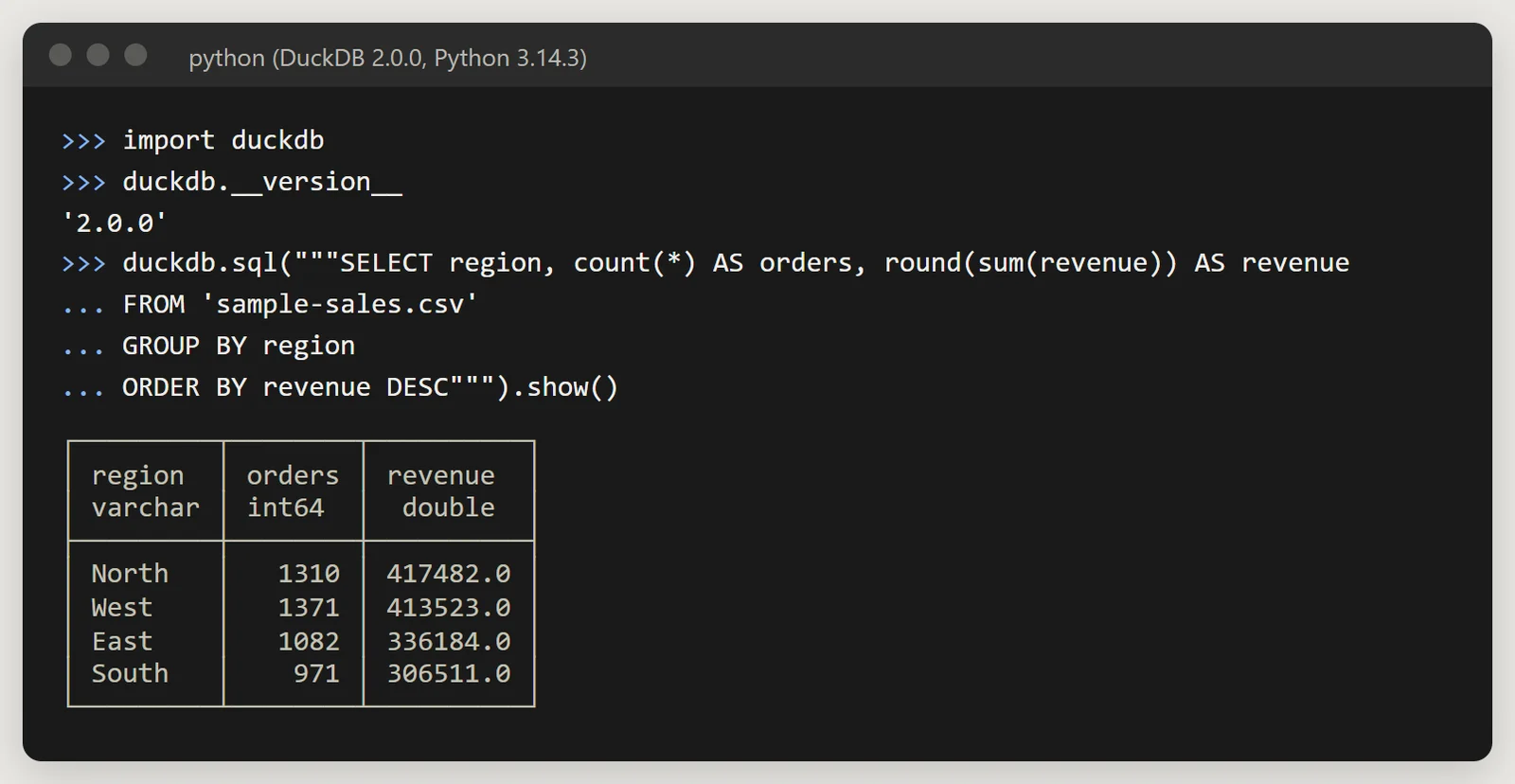
DuckDB 2.0.0 reading a CSV with no loading step. Invented data.
DuckDB detected the columns and types by sampling the file; read_csv('file.csv', ...) takes options when the detection needs help, and 'folder/*.csv' reads many files as one table.
Query a pandas or Polars DataFrame
A DataFrame in a Python variable can be queried by its name:
import pandas as pd

sales = pd.read_csv("sample-sales.csv", parse_dates=["order_date"])
by_region = duckdb.sql("""
    SELECT region, count(*) AS orders, round(sum(revenue)) AS revenue
    FROM sales
    GROUP BY region
    ORDER BY revenue DESC
""").df()
print(by_region)
region orders revenue
0 North 1310 417482.0
1 West 1371 413523.0
2 East 1082 336184.0
3 South 971 306511.0The same works for Polars:
import polars as pl

orders = pl.read_csv("sample-sales.csv", try_parse_dates=True)
print(duckdb.sql("SELECT channel, count(*) AS orders FROM orders GROUP BY channel ORDER BY orders DESC").pl())
shape: (3, 2)
┌────────────┬────────┐
│ channel ┆ orders │
│ --- ┆ --- │
│ str ┆ i64 │
╞════════════╪════════╡
│ Online ┆ 2338 │
│ Sales team ┆ 1423 │
│ Partner ┆ 973 │
└────────────┴────────┘The docs note these DataFrames are read-only to DuckDB: "editing these tables via INSERT or UPDATE statements is not possible". To change the data, create a table from the DataFrame first. Only variables visible where sql() is called are found; duckdb.register("name", df) names any other.
Get results as Python, pandas or Polars
q = duckdb.sql("SELECT category, round(sum(revenue)) AS revenue FROM sales GROUP BY category ORDER BY revenue DESC")
print(q.fetchall())
print(type(q.df()).__name__, type(q.pl()).__name__)
[('Hardware', 704343.0), ('Software', 374298.0), ('Supplies', 198372.0), ('Services', 196687.0)]
DataFrame DataFrame| You want | On a relation (duckdb.sql, con.sql) |
On con.execute() |
|---|---|---|
| Python tuples | .fetchall(), .iter_rows() |
.fetchone(), .fetchmany(), .fetchall() |
| pandas | .df() |
.df() |
| Polars | .pl() |
not in 2.0 |
| Arrow | .to_arrow_table(), .to_arrow_reader() |
the same, with a copy |
| NumPy | .fetchnumpy() |
.fetchnumpy() |
The docs recommend relations "for most conversion, except when you want to do row-based work". Each call re-runs the query, so store the result if you read it several times.
Connect any database. Ask in plain English.
Start free →Join a CSV file to a DataFrame
One query can mix sources. Here the orders come from the CSV and the regional targets (made up for this example) from a DataFrame:
targets = pd.DataFrame({"region": ["North", "West", "East", "South"], "target": [400_000, 400_000, 350_000, 300_000]})
duckdb.sql("""
    SELECT s.region, round(sum(s.revenue)) AS revenue, t.target,
           round(100 * sum(s.revenue) / t.target, 1) AS pct_of_target
    FROM 'sample-sales.csv' AS s
    JOIN targets AS t USING (region)
    GROUP BY s.region, t.target
    ORDER BY pct_of_target DESC
""").show()
┌─────────┬──────────┬────────┬───────────────┐
│ region │ revenue │ target │ pct_of_target │
│ varchar │ double │ int64 │ double │
├─────────┼──────────┼────────┼───────────────┤
│ North │ 417482.0 │ 400000 │ 104.4 │
│ West │ 413523.0 │ 400000 │ 103.4 │
│ South │ 306511.0 │ 300000 │ 102.2 │
│ East │ 336184.0 │ 350000 │ 96.1 │
└─────────┴──────────┴────────┴───────────────┘A window function: month on month
Monthly revenue, the change on the month before (lag) and a three-month moving average, in one query:
duckdb.sql("""
    WITH monthly AS (
        SELECT date_trunc('month', order_date) AS month, sum(revenue) AS revenue
        FROM 'sample-sales.csv'
        GROUP BY ALL
    )
    SELECT strftime(month, '%Y-%m') AS month,
           round(revenue) AS revenue,
           round(100 * (revenue / lag(revenue) OVER w - 1), 1) AS mom_pct,
           round(avg(revenue) OVER (w ROWS BETWEEN 2 PRECEDING AND CURRENT ROW)) AS avg_3m
    FROM monthly
    WINDOW w AS (ORDER BY month)
    ORDER BY month DESC
    LIMIT 6
""").show()
┌─────────┬─────────┬─────────┬─────────┐
│ month │ revenue │ mom_pct │ avg_3m │
│ varchar │ double │ double │ double │
├─────────┼─────────┼─────────┼─────────┤
│ 2026-10 │ 57518.0 │ -11.3 │ 69846.0 │
│ 2026-09 │ 64819.0 │ -25.7 │ 78720.0 │
│ 2026-08 │ 87202.0 │ 3.6 │ 83436.0 │
│ 2026-07 │ 84137.0 │ 6.5 │ 79778.0 │
│ 2026-06 │ 78969.0 │ 3.6 │ 75735.0 │
│ 2026-05 │ 76228.0 │ 5.9 │ 69953.0 │
└─────────┴─────────┴─────────┴─────────┘GROUP BY ALL groups by every column that isn't aggregated, and a named WINDOW saves repeating the OVER clause. More patterns are in SQL window functions.
Write Parquet and CSV files
duckdb.sql("SELECT * FROM 'sample-sales.csv'").write_parquet("sales.parquet")
duckdb.execute("COPY (SELECT * FROM 'sample-sales.csv') TO 'sales-zstd.parquet' (FORMAT parquet, COMPRESSION zstd)")| File | Size | Against the CSV |
|---|---|---|
| sample-sales.csv | 382,923 bytes | |
| sales.parquet (default Snappy) | 83,784 bytes | 4.6x smaller |
| sales-zstd.parquet | 52,442 bytes | 7.3x smaller |
Snappy is the documented default for Parquet; zstd takes a COMPRESSION_LEVEL from 1 to 22, default 3. Reading the Parquet back gave the same 4,734 rows and 1,473,700.87 of revenue. .write_csv("out.csv") writes CSV the same way, and in 2.0 overwrite=False refuses to replace a file that exists.
The relational API
The same queries can be built from Python methods. Each step returns a new relation; nothing runs until you read it:
rel = duckdb.read_csv("sample-sales.csv")
top = (rel.filter("channel = 'Online'")
          .aggregate("product, round(sum(revenue)) AS revenue", "product")
          .order("revenue DESC").limit(3))
top.show()
┌───────────────┬──────────┐
│ product │ revenue │
│ varchar │ double │
├───────────────┼──────────┤
│ Standing desk │ 176079.0 │
│ Office chair │ 94809.0 │
│ Team plan │ 90365.0 │
└───────────────┴──────────┘top.sql_query() prints the SQL it will run. In 2.0 the relational API was rebuilt on SQL text, and a plain string in an expression is a value, not a column name: wrap column names in col().
Read remote files with httpfs
The httpfs extension reads files over HTTP(S) and reads and writes S3, and it loads itself the first time a query needs it. From the docs (we didn't run these, to keep large downloads out of the test):
SELECT * FROM 'https://domain.tld/file.extension';
SELECT column_a FROM 'https://domain.tld/file.parquet';duckdb.read_parquet("https://some.url/some_file.parquet")For Parquet, DuckDB uses range requests "to only download the parts of the file that are actually required by the query", so the second query fetches one column. A remote CSV "will be downloaded entirely in most cases". Private endpoints take a secret, such as CREATE SECRET http_auth (TYPE http, BEARER_TOKEN 'token').
DuckDB vs pandas groupby: timings
We repeated the sample 200, 1,000 and 2,000 times (up to 9,468,000 rows) and timed the same summary in both, first on a DataFrame in memory, then from a Parquet file. The core of the script:
big = pd.concat([sales] * 2000, ignore_index=True)   # 9,468,000 rows

def pandas_groupby():
    return big.groupby(["region", "category"], as_index=False).agg(
        orders=("order_id", "count"), revenue=("revenue", "sum"))

def duckdb_groupby():
    return duckdb.sql("""
        SELECT region, category, count(order_id) AS orders, sum(revenue) AS revenue
        FROM big GROUP BY ALL ORDER BY ALL""").df()
The Parquet test read the file with pd.read_parquet(path, columns=[...]) then grouped, against DuckDB querying the file directly. Each figure is the median of five runs after a warm-up, and DuckDB's includes turning its result into a pandas DataFrame:
| Rows | Test | pandas | DuckDB | DuckDB faster by |
|---|---|---|---|---|
| 946,800 | DataFrame in memory | 0.109 s | 0.026 s | 4.1x |
| 4,734,000 | DataFrame in memory | 0.663 s | 0.084 s | 7.9x |
| 9,468,000 | DataFrame in memory | 1.260 s | 0.141 s | 8.9x |
| 946,800 | From a Parquet file | 0.180 s | 0.019 s | 9.2x |
| 4,734,000 | From a Parquet file | 0.752 s | 0.036 s | 20.9x |
| 9,468,000 | From a Parquet file | 2.198 s | 0.074 s | 29.8x |
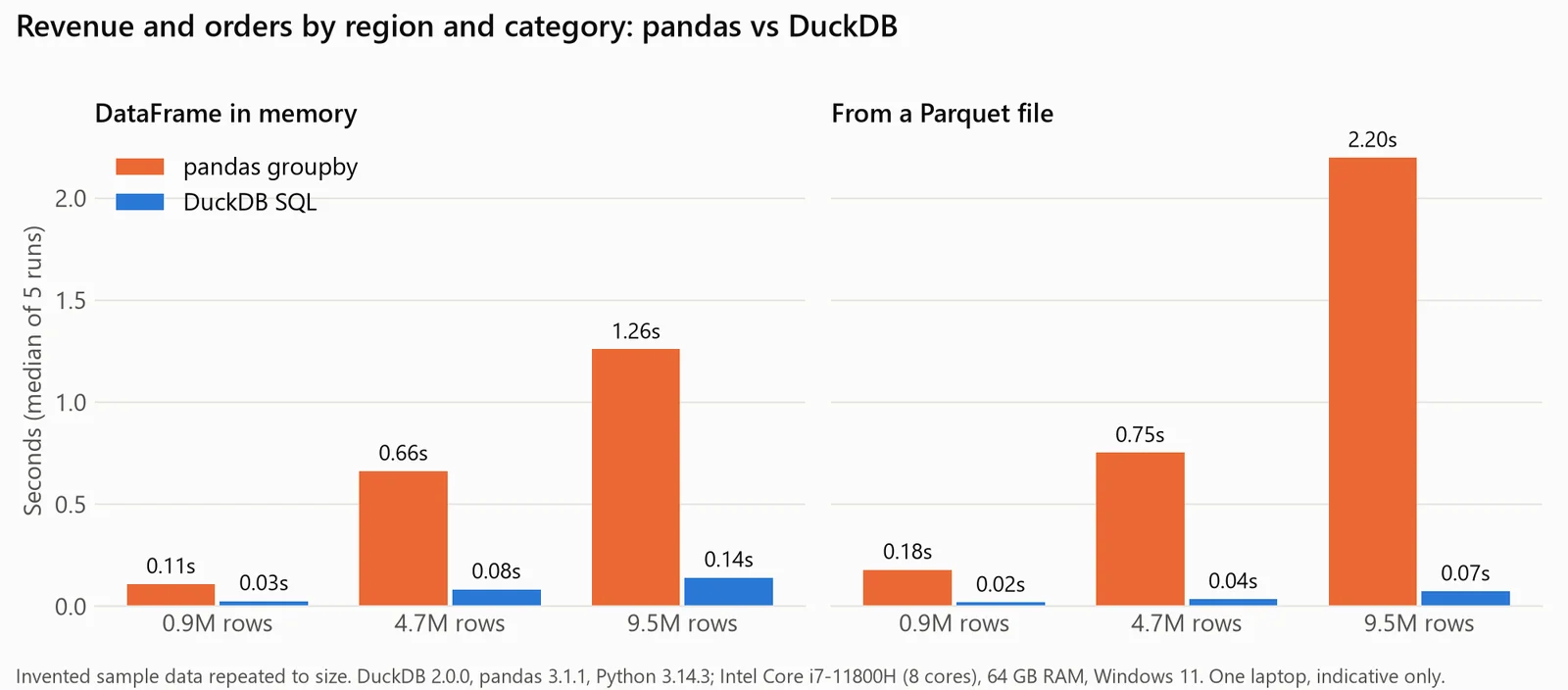
Same group-by, same machine: pandas groupby against DuckDB SQL. Invented data repeated to size; one laptop, indicative only.
The machine: an Intel Core i7-11800H laptop (8 cores, 16 threads, all of which DuckDB used), 64 GB of RAM and an NVMe SSD, on Windows 11, with DuckDB 2.0.0, pandas 3.1.1 and Python 3.14.3. In memory, both gave the same totals. Treat this as indicative only: it's one laptop, one query shape, and repeated rows compress unusually well, so the 9.5-million-row Parquet file was only 48.1 MB. DuckDB vs pandas covers when each fits, and pandas groupby has the pandas side in depth.
Limits: one writer, in your process
DuckDB runs inside the program that opens it. A database file can be opened read-write by one process, or read-only by several. We held sales.duckdb open for writing in one Python process and tried it from a second (paths shortened, and the line naming the other process left out):
process 1: [(4734,)]
process 2, read_only=False: IOException: IO Error: Cannot open file "C:\...\sales.duckdb": The process cannot access the file because it is being used by another process.
process 2, read_only=True: IOException: IO Error: Cannot open file "C:\...\sales.duckdb": The process cannot access the file because it is being used by another process.
Once the first process closed the file, both connected. Within one process, several threads can write as long as they don't edit the same rows. A connection runs one call at a time, so give each thread its own con.cursor(). For writes from many processes, the docs point to Quack, DuckDB's remote protocol, "which turns DuckDB into a client-server database", or to DuckLake with a PostgreSQL catalog. When the job is many people writing to one database all day, a server database fits better: see DuckDB vs PostgreSQL.
When the data is in the team's database
DuckDB is at its best on files and DataFrames on your own machine. When the data lives in the team's database and other people need the result, the query has to run where they can see it. Fastero is an AI and data platform where people and AI agents work together on a team's data, and its notebooks cover that part:
- A SQL cell runs on one of the workspace's database connections with its stored credentials, and the result lands in Python as a pandas DataFrame named after the cell.
- Secrets reach cells as environment variables (
os.environ), in interactive and scheduled runs, so no password sits in the notebook. - Run a cell, Run All, or a cron schedule; notebooks and their schedules are on the Free plan.
- Colleagues sign in to read the notebook, and viewers are free.
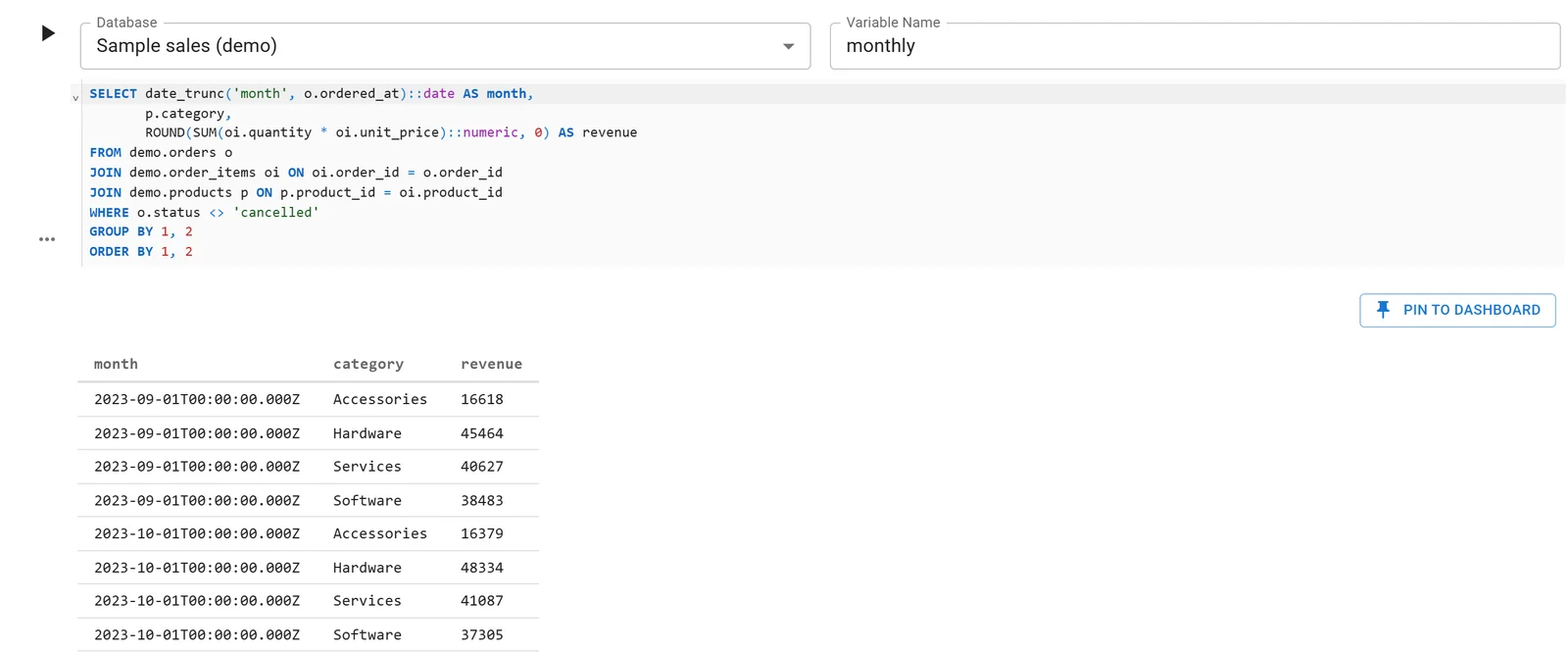
A Fastero notebook whose SQL cell reads a database connection; the rows arrive in Python as a DataFrame. Sample data.
FAQ
Is DuckDB free?
Yes. DuckDB is open source and, in its own words, "MIT-licensed, governed by the independent DuckDB Foundation". pip install duckdb is all it takes in Python.
Is DuckDB faster than pandas?
For group-bys on millions of rows, usually. In our test DuckDB was 4 to 9 times faster on a DataFrame in memory and 9 to 30 times faster reading a Parquet file, on one laptop. On small data both finish in a fraction of a second.
Can DuckDB query a pandas DataFrame?
Yes, by the DataFrame's variable name: duckdb.sql("SELECT * FROM df"). Polars DataFrames and Arrow tables work the same way. DuckDB reads them but can't insert into or update them.
Does DuckDB need a server?
No. It runs inside your Python process and stores data in memory or in a single file. DuckDB 2.0 also has Quack, an optional remote protocol, for when several processes need to write.
What is the difference between duckdb.sql() and duckdb.connect()?
duckdb.sql() uses one shared in-memory database inside the duckdb module. duckdb.connect() gives you a connection of your own, in memory or to a database file you name, which is the better choice in scripts and packages.
How do I read a Parquet file with DuckDB in Python?
duckdb.sql("SELECT * FROM 'file.parquet'") or duckdb.read_parquet("file.parquet"). A glob such as 'folder/*.parquet' reads many files as one table, and an https:// path works through httpfs.
Sources
Read on 20 November 2026:
- DuckDB docs (2.0): Python API overview, data ingestion, conversion between DuckDB and Python, relational API, Parquet, COPY, httpfs and HTTP(S) support, concurrency
- DuckDB home page, Why DuckDB, duckdb-python release notes (2.0.0), PyPI JSON for duckdb
- Hands-on: DuckDB 2.0.0, pandas 3.1.1, Polars 2.1.0, pyarrow 26.0.1, matplotlib 3.11.2 and Python 3.14.3 on Windows 11, over
sample-sales.csv(4,734 invented orders); the terminal picture is a page we made from the query's real output.