

Last month I ran the same churn cohort analysis through both ChatGPT and Julius AI, five times each, on an identical CSV. ChatGPT gave me five different Python scripts with three different retention curve calculations. Julius gave me five charts that looked similar but used two different methods for defining "churned." Neither tool told me it had changed its approach between runs. I only caught it because I was specifically looking for it.
That experience sums up the current state of AI data analysis tools better than any feature matrix. Both ChatGPT and Julius are genuinely useful. Both are genuinely unreliable in ways that matter. And the differences between them are more architectural than most comparisons acknowledge.
What you are actually comparing
ChatGPT (specifically, its Advanced Data Analysis / Code Interpreter feature) is a general-purpose LLM that happens to have a Python sandbox attached. You upload a file, describe what you want, and GPT writes and executes Python code in a sandboxed environment. It returns the output — charts, tables, statistical results — inline in the conversation.
Julius AI is a purpose-built data analysis platform. It has a structured interface: you upload data (or connect a source), and it provides a workspace with visualization options, data exploration panels, and a chat interface for asking questions about your data. Under the hood, it is also routing through LLMs and generating code, but the UI is designed specifically for analysis workflows.
The distinction matters. ChatGPT is a Swiss army knife where one of the blades happens to be a data analysis tool. Julius is a dedicated analytics knife. Both cut, but the grip is different, and so are the failure modes.
Data upload and handling
ChatGPT accepts file uploads directly in the chat. Drop a CSV, Excel file, or even a PDF table, and it parses it into a pandas DataFrame. The file handling is decent but not bulletproof — I have seen it misparse date columns, silently drop rows with encoding issues, and occasionally interpret numeric strings as categories. You get no preview step. It just parses and starts working. If the parse was wrong, you find out when the analysis looks off.
There is a file size limit (currently around 512 MB for Code Interpreter), and the sandbox session is ephemeral. Close the conversation, lose the environment. Upload the same file in a new chat and GPT might parse it differently, because the instructions it gives itself for parsing vary between sessions.
Julius has a dedicated data upload flow with a preview step. You see your columns, data types, and a sample of rows before the analysis begins. It handles CSVs, Excel files, Google Sheets (via connection), and a few database connectors. The preview is a genuine advantage — you catch parsing errors before they contaminate your analysis.
Julius also retains your datasets across sessions, so you can come back to the same data without re-uploading. For ongoing work, that matters.
Winner: Julius. The structured upload with preview and persistent storage is meaningfully better for data analysis than ChatGPT's drop-and-pray approach.
Fastero
Connect your database. Ask questions. Get dashboards.
Postgres, BigQuery, Snowflake, and 10+ sources — live-connected, AI-powered, no dashboard builder learning curve.
Try free →Code generation and execution
ChatGPT generates full Python scripts. You can see every line — the imports, the data cleaning steps, the statistical methods, the matplotlib calls. The code quality is generally good, sometimes surprisingly sophisticated. I have gotten well-structured pandas pipelines, proper use of scipy for statistical tests, and nicely formatted plotly charts when I ask for them.
The catch is that the code is different every time. Ask "show me monthly revenue trends" on the same dataset in two sessions and you might get a line chart with a 3-month rolling average in one session and a bar chart with month-over-month percentage change in another. Both are valid interpretations. Neither is wrong. But they are answering different questions, and GPT does not flag that it made a choice.
You can, however, take the generated code, paste it into your own notebook, modify it, and run it again. The code is portable. This is an underrated advantage.
Julius also generates code behind the scenes, and you can view it. But the interface nudges you away from the code and toward the output. The default experience is: ask a question, get a chart or table. You have to click through to see what code produced it. For non-technical users, this is a feature. For analysts who want to understand and reproduce the methodology, it is a friction point.
Julius also constrains what you can do more than ChatGPT does. You cannot write arbitrary Python and run it. You work within the analysis framework Julius provides. This is a deliberate design choice — it reduces the chance of errors from bad code, but it also caps what you can do when you need something unusual.
Winner: ChatGPT for power users who want full code access and portability. Julius for users who prefer a guided experience and do not need to customize the analysis.
Visualization
ChatGPT generates charts via matplotlib, seaborn, or plotly, depending on the prompt and its mood. The charts are functional but rarely beautiful out of the box. You get standard academic-style plots with default color palettes. You can ask it to style them ("make it look professional," "use a dark theme," "increase the font size"), and it will iterate, but each iteration is a round-trip conversation turn.
Julius has better default chart styling. The built-in visualization engine produces cleaner output with less prompting — consistent color schemes, proper axis labels, legends that do not overlap the data. It also offers interactive charts (hover for values, zoom, filter) that ChatGPT's static image output cannot match.
For presentation-ready charts, Julius requires less work. For highly customized or unusual chart types (small multiples, heatmaps with custom annotations, multi-panel statistical plots), ChatGPT's raw Python access wins because you can specify exactly what you want.
Winner: Julius for most use cases. ChatGPT when you need something unusual and are willing to iterate on the code.
Reproducibility
This is the big one, and honestly, both tools fail.
I wrote about Julius's reproducibility problems in detail in our Julius AI review. The short version: ask the same question on the same data and you can get different statistical methods, different preprocessing steps, and different conclusions. This is structural — it is how LLM-based analysis works, and no amount of product polish fixes it.
ChatGPT has the exact same problem, arguably worse. Because the Code Interpreter session is ephemeral, you cannot even go back and re-run the same analysis. You start a new chat, upload the file again, and get a fresh LLM inference that may choose entirely different methods. There is no session persistence, no saved analyses, no way to pin a methodology.
Julius at least retains your previous analyses and lets you revisit them. The output is stored. But the methodology that produced it is still an LLM inference, and re-running the same question can produce different results.
If reproducibility matters for your use case — and if you are making business decisions, it should — neither tool meets the bar. As I covered in our practical guide to AI for data analysis, the architectures that produce reproducible AI-assisted analytics look fundamentally different from chat-with-your-CSV.
Winner: Neither. Julius is slightly better because it persists results. But "I can see what the AI said last time, even though it might say something different today" is a low bar.
Accuracy
Both tools hallucinate. I need to say that clearly because the marketing for both implies otherwise.
ChatGPT's most common accuracy failure is inventing numbers when it cannot parse the data correctly. I uploaded a CSV with a column containing mixed currency formats ($1,234 and EUR 1.234), and GPT generated a chart with values that did not match any row in the source data. It had silently failed to parse the European decimals and then averaged the garbage. No error, no warning.
Julius's accuracy failures tend to be more subtle. It parses data more carefully (the preview step helps), but the statistical method selection can be wrong in ways that require domain expertise to catch. Applying a parametric test to non-normal data, choosing a correlation coefficient that assumes linearity when the relationship is logarithmic — these are errors of judgment, not parsing, and they are harder to spot.
For straightforward descriptive analysis (counts, averages, group-bys), both tools are generally accurate. The errors show up in inferential statistics, forecasting, and any analysis that requires methodological choices.
Winner: Slight edge to Julius for basic accuracy because the structured data handling reduces parsing errors. For statistical analysis, trust neither without checking the methodology.
Pricing
ChatGPT Plus costs $20/month and includes Advanced Data Analysis. ChatGPT Team is $25-30/month per user. You get the full GPT model plus Code Interpreter, file uploads, and the rest of the ChatGPT feature set. Data analysis is a feature, not the product.
Julius AI starts free with limited analyses. The Pro plan is $20/month for individual users. Team pricing is higher. You are paying specifically for data analysis — no general-purpose chat, no writing assistance, no image generation.
If you are already paying for ChatGPT Plus for other reasons, the data analysis capability is effectively free. If data analysis is your only use case, Julius offers a more focused experience for the same price.
Winner: ChatGPT on pure price-to-value if you use it for other things. Julius if you want to pay for a dedicated data analysis tool with a better workflow for that specific task.
The comparison table
I know you skimmed here for the table.
| Feature | ChatGPT (Advanced Data Analysis) | Julius AI |
|---|---|---|
| Core approach | General-purpose LLM + Python sandbox | Purpose-built data analysis platform |
| Data upload | Drag-and-drop, no preview | Structured upload with preview |
| Data persistence | Ephemeral (per session) | Persistent across sessions |
| Code visibility | Full Python code shown by default | Code available but de-emphasized |
| Code portability | Copy code to your own environment | Limited export options |
| Custom code execution | Full arbitrary Python | Constrained to platform capabilities |
| Chart quality (default) | Functional, needs styling | Polished, interactive |
| Reproducibility | Poor (sessions are ephemeral) | Poor (LLM methodology varies) |
| Data source connections | Upload only | Upload + some connectors |
| Statistical accuracy | Prone to parsing hallucinations | Better parsing, inconsistent methods |
| Pricing | $20/mo (included in ChatGPT Plus) | Free tier, then $20/mo for Pro |
| Best for | Power users, custom analysis | Guided exploration, quick charts |
When ChatGPT wins
You need custom analysis. If your question requires 50 lines of scipy, a custom distance metric, or a multi-step data pipeline that does not fit a template, ChatGPT's unrestricted Python sandbox is what you want. Julius cannot do things it was not designed for. ChatGPT can attempt anything Python can express.
You want portable code. The Python scripts ChatGPT generates can go straight into a Jupyter notebook or a production pipeline (after review). That portability has real value — the AI helps you write the code, and then the code exists independently of the AI.
You are already a ChatGPT user. If you pay for Plus or Team for writing, coding, and research, data analysis is a free add-on. Paying separately for Julius only makes sense if the better UX justifies the cost.
You need to analyze non-tabular data. ChatGPT can work with JSON, log files, code output, API responses — anything you can paste or upload. Julius is built for tabular data.
When Julius wins
You are not a coder. Julius's guided interface, chart builder, and structured workflow mean you do not need to understand Python to get useful output. ChatGPT requires you to either write prompts that produce good code or understand the code well enough to fix it when it is wrong.
You do repeat analysis on the same datasets. Julius remembers your data and previous analyses. You can iterate without re-uploading and re-explaining your data structure every time. ChatGPT's ephemeral sessions make repeat analysis painful.
You want quick, clean charts. For "give me a chart of X for my presentation" tasks, Julius produces better-looking output with less effort. The interactive charts are a nice touch that ChatGPT's static images cannot match.
You work with a team. Julius has collaboration features — shared datasets, shared analyses — that ChatGPT's conversation model does not support well.
The limitation neither tool addresses
Here is what neither comparison article nor product landing page wants to say plainly: both ChatGPT and Julius are CSV upload tools. You export data from your database, download it as a file, upload it to a chat interface, and ask questions about a static snapshot.
This workflow breaks in production analytics for reasons that compound:
Your data is stale the moment you upload it. Revenue changed since you exported that CSV. New users signed up. A customer churned. The analysis you ran this morning is about yesterday's data, and you will not know it drifted unless you re-export and re-upload.
You cannot schedule or automate. There is no "run this analysis every Monday on fresh data." Every analysis is manual — export, upload, prompt, check, repeat.
You cannot join across sources. Your CRM data is in one CSV. Your billing data is in another. Your product analytics is in a third. Neither ChatGPT nor Julius lets you join across live data sources. You are stuck doing manual VLOOKUP-style merges in the chat, which is fragile and error-prone.
The tools that solve these problems — connecting directly to databases, running queries against live data, scheduling recurring analysis, joining across sources — look architecturally different from chat-with-your-CSV. They look more like the agentic forecasting tools and NL2SQL platforms that connect to your warehouse and treat the AI as a query translator rather than an analyst. Fastero takes this approach: it connects to your actual databases, lets AI run analysis across multiple live sources, and produces results you can save, schedule, and reproduce because the underlying queries are deterministic.
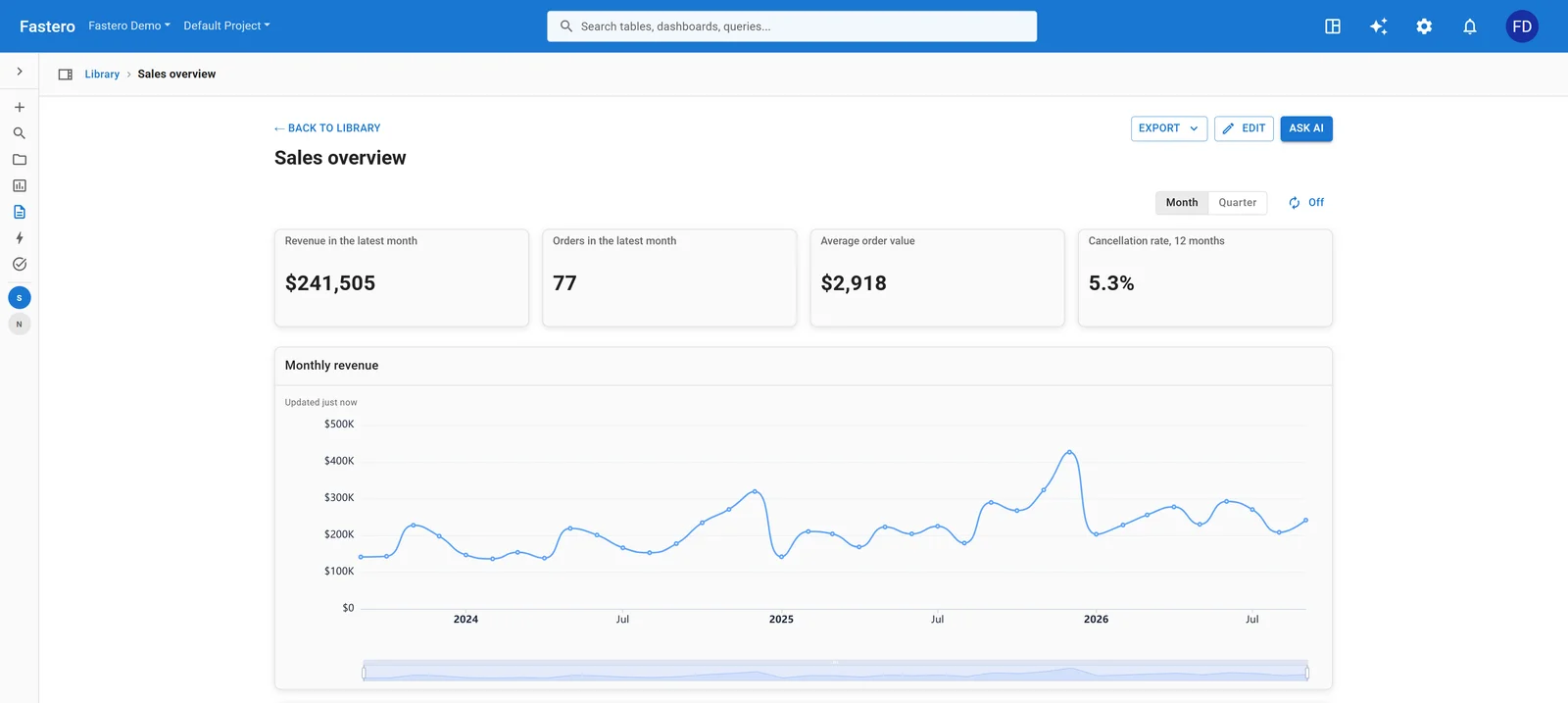
A dashboard in Fastero, built from saved queries that re-run against the database. Sample data.
Bottom line
For one-off exploratory analysis on a CSV, pick the tool that matches your skill level. If you are comfortable reading and editing Python, ChatGPT gives you more power and flexibility. If you want a guided experience with better charts and do not want to think about code, Julius is the better product.
For anything you need to trust, reproduce, or run more than once — neither tool is the right category. You need something that connects to your live data and separates the AI's job (translating your question into a query) from the database's job (returning a deterministic answer). That distinction is the real difference that matters, and it is the one that the ChatGPT-vs-Julius debate entirely misses.
Need AI analytics that connects to your live data and produces reproducible results? Try Fastero free — connect your database, ask questions in English, and get answers you can save and schedule.
Related: AI Data Analyst Tools for Small Business: What Actually Works | Julius AI Review: The Reproducibility Problem