 Fastero Dev Team
merge puts two tables side by side on a shared key: orders next to their product's category, this year's revenue next to last year's. It works like a SQL join, down to the way repeated keys multiply rows, with one difference SQL users don't expect: missing keys match each other.
The short answer: orders.merge(products, on="product", how="left") keeps every order and adds the product's columns, like SQL's LEFT JOIN. how can be "inner" (the default), "left", "right", "outer" or "cross", and since pandas 3.0 "left_anti" and "right_anti". Pass a list to on for several key columns, left_on and right_on when the names differ, suffixes for clashing columns, indicator=True to see where each row came from, and validate="many_to_one" to get an error instead of multiplied rows. join does the same against the other table's index; concat stacks tables instead of matching them. Every example ran on pandas 3.1.1 and Python 3.14.3 on 20 November 2026, with the output it printed.
Fastero
Connect your database. Ask questions. Get dashboards.
Postgres, BigQuery, Snowflake, and 10+ sources — live-connected, AI-powered, no dashboard builder learning curve.
Try free →The data
The sample CSV every new Fastero workspace starts with: 4,734 invented orders from November 2024 to October 2026, split into orders and a product catalog whose list price is each product's median price, rounded:
import pandas as pd

sales = pd.read_csv("sample-sales.csv", parse_dates=["order_date"])
orders = sales.drop(columns="category")
products = (sales.groupby("product", as_index=False)
                 .agg(category=("category", "first"), unit_price=("unit_price", "median"))
                 .round({"unit_price": 0}))
print(orders.shape, products.shape)
print(products.head(3))
(4734, 9) (13, 3)
product category unit_price
0 Cable kit Supplies 26.0
1 Desk lamp Hardware 48.0
2 Label rolls Supplies 12.0The join types, on five orders
Five orders and four catalog rows: one order (Training day) has no catalog row, and one catalog row (Standing desk) has no order.
orders_5 = orders.loc[:4, ["order_id", "product", "revenue"]]
products_4 = (products[products["product"].isin(["Team plan", "Starter plan", "Notebook set", "Standing desk"])]
              [["product", "category"]].reset_index(drop=True))
print(orders_5.merge(products_4, on="product", how="left"))
order_id product revenue category
0 10001 Team plan 680.28 Software
1 10002 Training day 903.73 NaN
2 10003 Starter plan 190.68 Software
3 10004 Notebook set 95.60 Supplies
4 10005 Notebook set 72.32 Supplies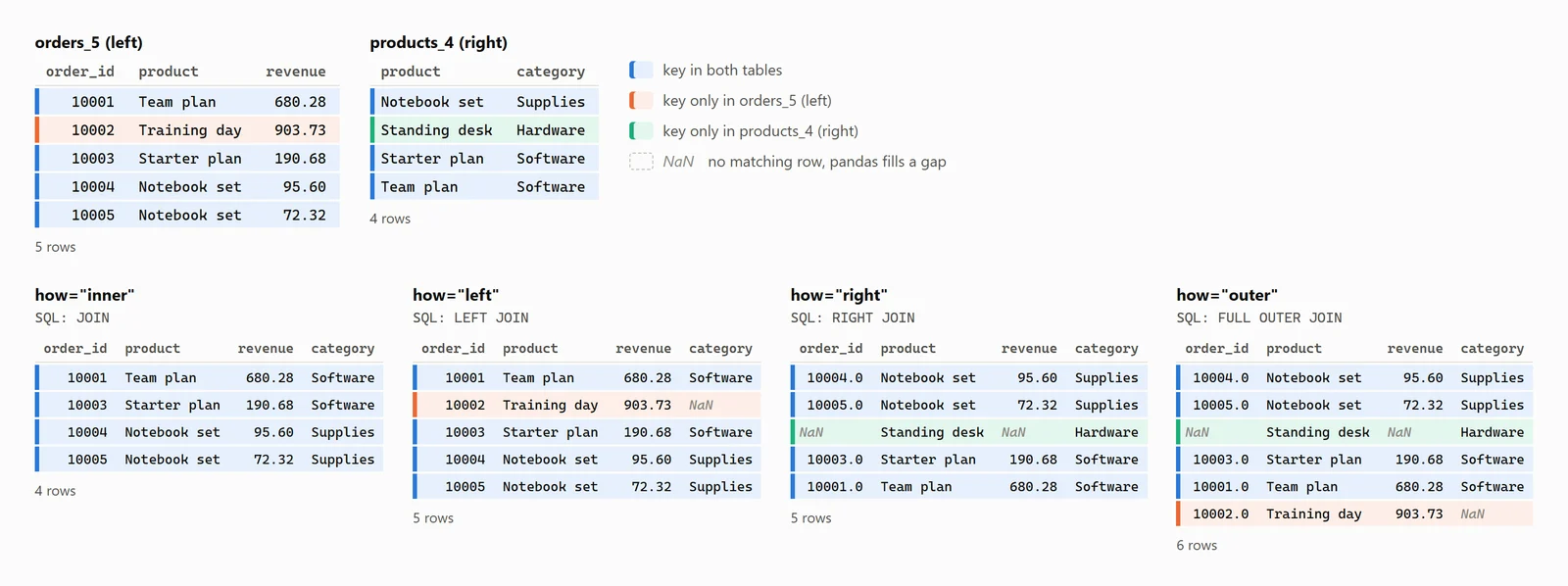
The same five orders and four catalog rows under each join type, as pandas 3.1.1 printed them. Invented sample data.
how= |
Keeps | SQL | Rows here |
|---|---|---|---|
| inner (default) | Keys found in both tables | JOIN |
4 |
| left | Every left row | LEFT JOIN |
5 |
| right | Every right row | RIGHT JOIN |
5 |
| outer | Every row of both, keys sorted | FULL OUTER JOIN |
6 |
| cross | Every pair, no key | CROSS JOIN |
20 |
| left_anti (3.0+) | Left rows with no match | ANTI JOIN (DuckDB) |
1 |
| right_anti (3.0+) | Right rows with no match | ANTI JOIN, tables swapped |
1 |
Two things are easy to miss. In the right and outer joins order_id comes back as 10004.0: the Standing desk row has no order, and the gap turns the integers into floats. And left_anti keeps the right table's columns, all NaN, where SQL's anti join returns only the left table's.
The same joins in SQL
DuckDB (2.0.0 here) queries a pandas DataFrame by its variable name, so each join can be checked against SQL:
import duckdb

print(duckdb.sql("""
    SELECT order_id, product, revenue, category
    FROM orders_5 LEFT JOIN products_4 USING (product)
    ORDER BY order_id
""").df())
It printed the same five rows. A small helper then ran each join both ways and compared them:
inner        pandas rows:     4   DuckDB rows:     4   same rows: True
left         pandas rows:     5   DuckDB rows:     5   same rows: True
right        pandas rows:     5   DuckDB rows:     5   same rows: True
outer        pandas rows:     6   DuckDB rows:     6   same rows: True
cross        pandas rows:    20   DuckDB rows:    20   same rows: True
left_anti    pandas rows:     1   DuckDB rows:     1   same rows: True
At full size, 4,734 orders left-joined to the catalog, both gave the same rows too. pandas' SQL comparison page adds that MySQL has no FULL JOIN.
Merge on multiple columns
January to October 2025 against the same months of 2026, per region and segment:
def jan_oct(year):
    d = sales[(sales["order_date"].dt.year == year) & (sales["order_date"].dt.month <= 10)]
    return d.groupby(["region", "segment"], as_index=False)["revenue"].sum().round(0)

y25, y26 = jan_oct(2025), jan_oct(2026)
yoy = y25.merge(y26, on=["region", "segment"], suffixes=("_2025", "_2026"), validate="one_to_one")
yoy["change_pct"] = ((yoy["revenue_2026"] / yoy["revenue_2025"] - 1) * 100).round(1)
print(yoy.sort_values("change_pct").head(4))
region segment revenue_2025 revenue_2026 change_pct
9 West Enterprise 27465.0 23383.0 -14.9
3 North Enterprise 23082.0 23771.0 3.0
2 East Small business 75180.0 82361.0 9.6
10 West Mid-market 57197.0 64520.0 12.8Mistake 1: one key too few, and the rows multiply
Leave segment out of the keys and nothing fails:
wrong = y25.merge(y26, on="region", suffixes=("_2025", "_2026"))
print(len(y25), len(y26), len(wrong))
12 12 36Each region appears three times on each side, so pandas pairs every 2025 segment with every 2026 segment: nine rows per region, six comparing the wrong segments. SQL does the same; DuckDB's join on region alone also returned 36 rows.
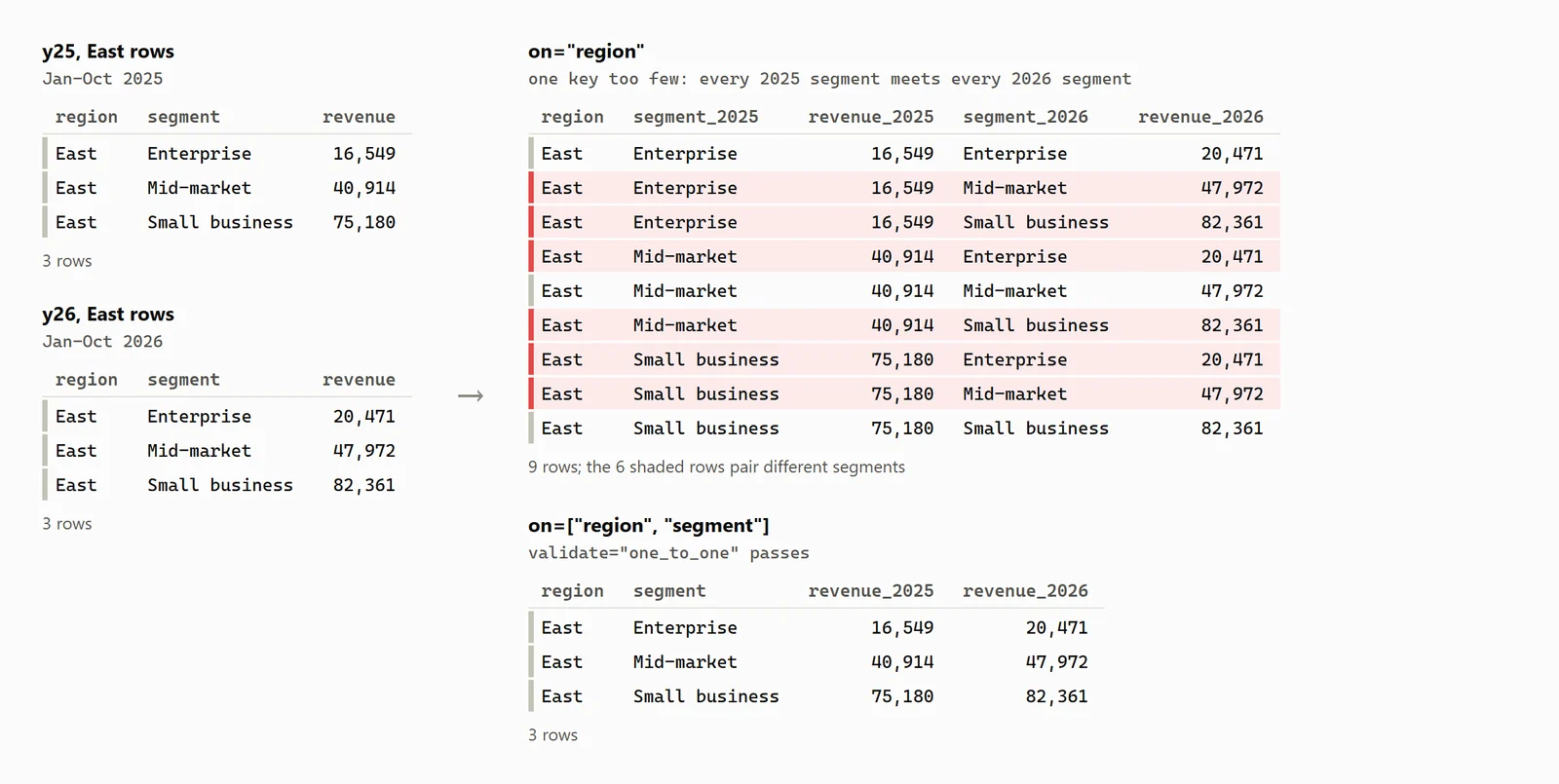
Merging on one key too few: three rows on each side became nine, as pandas 3.1.1 printed them. Invented sample data.
validate turns it into an error, which since pandas 3.0 lists the first duplicate keys:
y25.merge(y26, on="region", suffixes=("_2025", "_2026"), validate="one_to_one")pandas.errors.MergeError: Merge keys are not unique in either left or right dataset; not a one-to-one merge.
Duplicates in left:
region
East
East
North
North
South ...
Duplicates in right:
region
East
East
North
North
South ...The options are "one_to_one", "one_to_many", "many_to_one" (or "1:1", "1:m", "m:1") and "many_to_many", which checks nothing. Orders against a catalog is "many_to_one".
Mistake 2: the key columns have different types
A refunds table we made up, with the order number stored as text and one refund (15020) for an order that doesn't exist:
refunds = pd.DataFrame({"order_ref": ["10002", "10417", "12950", "14731", "15020"],
                        "refund": [903.73, 726.64, 82.54, 193.44, 49.00]})
orders.merge(refunds, left_on="order_id", right_on="order_ref")
ValueError: You are trying to merge on int64 and str columns for key 'order_id'. If you wish to proceed you should use pd.concatThe key has a different name on each side, hence left_on and right_on; both columns stay in the result. Ignore the advice to use concat, which matches nothing: make the types agree with astype("int64"). DuckDB cast the text itself and returned the four refunds, and stopped on a value like 'A-10417' with "Could not convert string 'A-10417' to INT64".
Mistake 3: keys that don't match, and what indicator shows
indicator=True adds a _merge column: both, left_only or right_only. On the fixed refunds, an outer merge marked 4 rows both, 4,730 left_only and one right_only, refund 15020. A left merge hides gaps better, because it never drops a row. Here the catalog spells one product with a capital D:
catalog = products[["product", "category"]].copy()
catalog["product"] = catalog["product"].replace({"Standing desk": "Standing Desk"})
m = orders.merge(catalog, on="product", how="left", indicator=True)
print(m["_merge"].value_counts())
print(orders.merge(catalog, on="product", how="left_anti")["product"].value_counts())
_merge
both 4394
left_only 340
right_only 0
Name: count, dtype: int64
product
Standing desk 340
Name: count, dtype: int64No error, just 340 orders with a blank category, which a later groupby("category") drops by default.
Connect any database. Ask in plain English.
Start free →Mistake 4: duplicate column names, and leaving out on=
Both tables have a unit_price: the price paid and the list price.
print(list(orders.merge(products, on="product").columns))
print(orders.merge(products).shape)
['order_id', 'order_date', 'region', 'channel', 'segment', 'product', 'quantity', 'unit_price_x', 'revenue', 'category', 'unit_price_y']
(11, 10)With on, the clash becomes unit_price_x and unit_price_y; suffixes=("_paid", "_list") gives better names. Without on, pandas joins on every shared column, product and unit_price, and only 11 orders whose price equalled the rounded list price survive.
Mistake 5: missing keys match each other
The pandas docs warn that null keys "will be matched against each other. This is different from usual SQL join behaviour". Two made-up tables:
a = pd.DataFrame({"product": ["Team plan", None], "orders": [455, 3]})
b = pd.DataFrame({"product": ["Team plan", None], "category": ["Software", "Unknown"]})
print(a.merge(b, on="product"))
print(duckdb.sql("SELECT * FROM a JOIN b USING (product)").df())
product orders category
0 Team plan 455 Software
1 NaN 3 Unknown
product orders category
0 Team plan 455 Softwarepandas paired the two blanks; SQL didn't. Drop rows with a missing key first if you want SQL's result.
merge vs join vs concat
merge |
join |
concat |
|
|---|---|---|---|
| Matches on | Columns, or an index with left_index / right_index |
The other table's index (a column of yours with on=) |
Nothing: it stacks |
| Default | how="inner" |
how="left" |
join="outer" on the other axis |
| Best for | Most joins | Lookups keyed by index; several tables at once, as a list | Appending files with the same columns |
join merges against an index:
by_name = products.set_index("product")
print(orders.join(by_name, on="product", suffixes=("_paid", "_list"))
      [["order_id", "product", "unit_price_paid", "category", "unit_price_list"]].head(3))
order_id product unit_price_paid category unit_price_list
0 10001 Team plan 170.07 Software 179.0
1 10002 Training day 903.73 Services 906.0
2 10003 Starter plan 63.56 Software 60.0pandas 3.1 deprecated join's lsuffix and rsuffix for suffixes; passing them printed a Pandas4Warning, and passing nothing raised "columns overlap but no suffix specified".
concat stacks, like SQL's UNION ALL: the 2,187 orders of 2025 and 2,253 of 2026 became 4,440 rows, as DuckDB's UNION ALL counted too.
merge_asof: the price that applied on the day
A price list, here each product's median price in each 12-month half of the file, has two rows per product, so a plain merge doubles every order:
period = pd.to_datetime((sales["order_date"] >= "2025-11-01").map({False: "2024-11-01", True: "2025-11-01"}))
prices = (sales.assign(valid_from=period)
               .groupby(["product", "valid_from"], as_index=False)["unit_price"].median().round({"unit_price": 2})
               .rename(columns={"unit_price": "list_price"}))
print(len(prices), len(orders), len(orders.merge(prices, on="product")))
26 4734 9468validate="many_to_one" catches it. merge_asof instead matches each order to the last price on or before its date, within its product; both tables must be sorted by date:
asof = pd.merge_asof(orders.sort_values(["order_date", "order_id"]), prices.sort_values("valid_from"),
                     left_on="order_date", right_on="valid_from", by="product")
cols = ["order_id", "order_date", "product", "unit_price", "valid_from", "list_price"]
print(len(asof), "\n", asof[(asof["product"] == "Team plan")
                             & asof["order_date"].between("2025-10-30", "2025-11-02")][cols])
4734
order_id order_date product unit_price valid_from list_price
2096 12097 2025-10-30 Team plan 166.68 2024-11-01 178.89
2100 12101 2025-10-30 Team plan 167.16 2024-11-01 178.89
2104 12105 2025-10-31 Team plan 179.26 2024-11-01 178.89
2106 12107 2025-11-01 Team plan 170.26 2025-11-01 179.98
2110 12111 2025-11-02 Team plan 178.90 2025-11-01 179.98One row per order, and the price switches on 1 November. DuckDB's ASOF JOIN returned the same 4,734 rows.
When the join belongs in the database
When both tables live in one database, join there and bring back only the result. Fastero is an AI and data platform where people and AI agents work together on a team's data, and in its notebooks that is a SQL cell:
- SQL cells run on one of the workspace's connections with its stored credentials, and the result lands in Python as a pandas DataFrame named after the cell. The join runs in the database, and no password sits in the notebook.
- Then pandas: merge that DataFrame with a CSV or Excel file uploaded to the project; notebooks read the project's files by path.
- Schedules: run a cell, Run All, or a cron schedule, on the Free plan.
- Pin to Dashboard: a SQL cell's rows, or the DataFrame a Python cell shows, becomes a dashboard widget that refreshes when the notebook runs on its schedule.
- Sharing: colleagues sign in; viewers are free and can read a notebook but not run or save it.
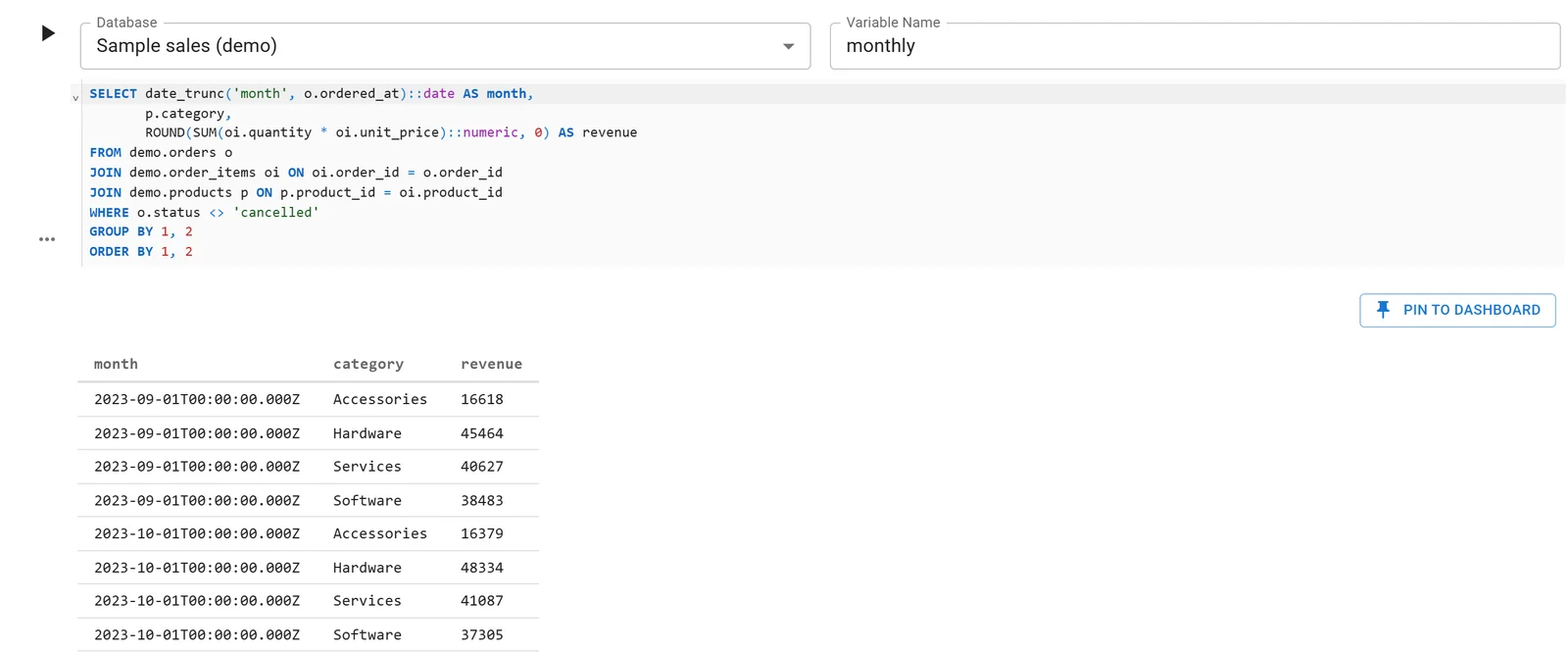
A Fastero notebook whose SQL cell reads a database connection; the rows arrive in Python as a DataFrame. Sample data.
More on SQL in a Jupyter notebook and joining CSV files with database tables in DuckDB.
FAQ
What is the difference between merge and join in pandas?
merge matches on columns and defaults to an inner join; join matches the other table's index and defaults to a left join. Use join when the lookup table is indexed by its key, merge otherwise.
How do I merge on multiple columns in pandas?
Pass a list: df1.merge(df2, on=["region", "segment"]). If the names differ, pass lists of equal length to left_on and right_on.
Why does my pandas merge have more rows than before?
The key repeats on both sides, so pandas returns every matching pair. Add the missing key column, or pass validate="many_to_one" so the merge raises an error instead.
How do I find the rows that didn't match?
Merge with how="outer", indicator=True and filter _merge for left_only or right_only. On pandas 3.0 or later, how="left_anti" returns the unmatched left rows.
How do I fix "You are trying to merge on int64 and str columns"?
The key is a number in one table and text in the other. Convert one side with astype("int64") and merge again; pd.concat, which the message suggests, won't match anything.
Related reading:
- Pandas groupby, 12 examples with output
- Pandas pivot table, crosstab and melt
- SQL vs pandas: when to use each
Sources
Read on 20 November 2026:
- pandas 3.1.1 documentation: pandas.merge, DataFrame.join, pandas.concat, pandas.merge_asof, DataFrame.groupby, Merge, join, concatenate and compare, Comparison with SQL, What's new in 3.0.0, What's new in 3.1.0
- DuckDB 2.0 documentation: FROM and JOIN clauses, SQL on Pandas
- Hands-on: pandas 3.1.1, DuckDB 2.0.0 and Python 3.14.3, 20 November 2026, on Fastero's sample CSV of invented orders; the refunds table is made up.
Try Fastero free: notebooks next to your team's databases, with SQL cells that hand pandas a DataFrame, and scheduled runs on the Free plan. No credit card required.