 Fastero Dev Team
Neon doesn't charge a plan fee. You pay for compute by the hour while it runs, for storage by the gigabyte-month, and for a few extras, so the bill depends on how long your database stays awake, including the five minutes it waits before it goes to sleep. We wrote a small calculator from Neon's published rates, checked it against Neon's own examples, and priced three workloads.
The short answer: Neon has three self-serve plans. Free is $0, permanent and needs no card: up to 100 projects, each with 100 CU-hours of compute a month, up to 2 CU, 1 GB of storage (20 GB across all projects), 5 GB of egress and 10 branches, and compute always scales to zero after 5 idle minutes. Launch and Scale are pay-as-you-go with no monthly minimum: compute costs $0.106 (Launch) or $0.222 (Scale) per CU-hour, storage $0.35 per GB-month, restore history $0.20 per GB-month, and egress is free up to 500 GB per project, then $0.10 per GB. A CU is about 4 GB of RAM, and "Suspended (scaled-to-zero) compute = $0." Scale adds an uptime SLA, SOC 2, HIPAA, IP Allow and a scale-to-zero delay you can set from 1 minute. Neon puts typical spend at about $15 a month on Launch for a small database and $701 on Scale for a production workload. Prices checked 20 November 2026.
Fastero
Connect your database. Ask questions. Get dashboards.
Postgres, BigQuery, Snowflake, and 10+ sources — live-connected, AI-powered, no dashboard builder learning curve.
Try free →Neon plans at a glance (checked 20 November 2026)
| Free | Launch | Scale | |
|---|---|---|---|
| Price | $0 | Pay for what you use | Pay for what you use |
| Projects | 100 | 100 | 1,000 (more on request) |
| Branches per project | 10 | 10, then $1.50 per branch-month | 25, then $1.50 per branch-month |
| Compute | 100 CU-hours per project | $0.106 per CU-hour | $0.222 per CU-hour |
| Autoscaling | Up to 2 CU (8 GB RAM) | Up to 16 CU (64 GB RAM) | Up to 16 CU, or fixed sizes up to 56 CU |
| Scale to zero | After 5 minutes, can't be turned off | After 5 minutes, can be turned off | 1 minute to 1 week, or off |
| Storage | 1 GB per project, 20 GB total | $0.35 per GB-month | $0.35 per GB-month |
| Instant restore | Free, 6 hours (1 GB of changes) | $0.20 per GB-month, up to 7 days | $0.20 per GB-month, up to 30 days |
| Snapshots | 1 manual | 100 manual, $0.09 per GB-month | 100 manual, $0.09 per GB-month |
| Public egress | 5 GB per project | 500 GB per project, then $0.10 per GB | 500 GB per project, then $0.10 per GB |
| Auth | 60,000 MAU per project | 1M MAU per project | 1M MAU per project |
| Compliance and SLA | None | Protected branches | SOC 2, HIPAA, IP Allow, Private Networking, uptime SLA |
| Support | Community | Billing support | Standard |
Every plan includes branching, read replicas, connection pooling ("up to 10,000 pooled connections per compute") and the backend services Neon made generally available in September 2026. Of those, Object Storage ($0.023 per GB-month), Functions and the AI Gateway are billed separately from Postgres.
How a Neon bill is calculated
Paid plans are "metered hourly and billed at the end of the month, with no monthly minimum", per organisation. The lines:
- Compute: CU-hours = compute size × hours running. "0.25 CU × 4 hours = 1 CU-hour." With autoscaling, it's the average size while running. Every compute counts, read replicas included. Neither paid plan includes any CU-hours: the first one is billed.
- Storage: your data size in GB-months, metered hourly. A child branch is billed on the lower of the changes made on it and its data size, so a fresh branch adds no storage.
- Instant restore: the change history you keep for point-in-time restore, charged on root branches only. Paid projects default to a 1-day history window.
- Egress: data sent over the public internet, counted per project, with 500 GB free on each paid project.
- Extra branches: beyond 10 (Launch) or 25 (Scale) per project, $1.50 a month each, about $0.002 an hour.
Neon bills on "a fixed billing period of 744 hours (31 x 24)", so a 30-day month costs slightly less, and "Invoices under $0.50 are not collected."
| Compute size | RAM |
|---|---|
| 0.25 CU | 1 GB |
| 0.5 CU | 2 GB |
| 1 CU | 4 GB |
| 2 CU | 8 GB, the Free plan's ceiling |
| 16 CU | 64 GB, the autoscaling ceiling |
| 56 CU | 224 GB, Scale's largest fixed size |
Scale to zero and the five-minute delay
A Neon compute suspends after a stretch with no activity and "reactivates automatically within a few hundred milliseconds" on the next query. The delay is fixed at 5 minutes on Free and Launch; only Scale lets you change it, "Configurable (1 minute to 1 week)", through the API. Computes larger than 16 CU never scale to zero.
Two things keep a database awake. Any activity restarts the five-minute clock, so a query that wakes a sleeping compute costs at least five minutes of it. And in Neon's words, "Applications that maintain long-lived connections or scheduled jobs (like cron tasks) can prevent your compute from scaling to zero, keeping it active 24/7." Logical replication from Neon does the same while a subscriber is connected.
Free plan limits, and what happens when you hit one
| Limit | What happens |
|---|---|
| 100 CU-hours or 5 GB of egress per project | Compute is suspended until the next billing period, and connections, pg_dump included, fail with SQLSTATE 53000 |
| 1 GB per project, or 20 GB across all projects | Inserts, updates and deletes fail; you can still query and export |
| 10 branches per project | New branches fail |
"None of these limits delete your data." Neon also doesn't pause idle Free projects; only the compute sleeps. That differs from Supabase, whose pricing page says "Free projects are paused after 1 week of inactivity." To get a suspended Free project back early, Neon suggests upgrading to Launch and later downgrading, which resets the Free allowances; Neon says the round trip "usually costs nothing".
What changed in Neon's pricing, with dates
Neon now describes itself as "a complete set of cloud backend primitives built around Lakebase Postgres, for developers, startups, and agent platforms, from Databricks". From Neon's changelog:
| Date | Change |
|---|---|
| May 2025 | "Neon joined Databricks" |
| 15 Aug 2025 | Usage-based Launch and Scale plans, "starting at just $5/month" |
| 24 Oct 2025 | Child-branch storage capped at the branch's data size |
| 7 Nov 2025 | Compute cut "by up to 25%": Launch $0.14 to $0.106, Scale $0.26 to $0.222 per CU-hour |
| 12 Dec 2025 | $5 monthly minimum removed: "if you use $3 one month, that's the bill you'll receive" |
| 19 Dec 2025 | Free plan raised to 100 projects, from 80 |
| 1 May 2026 | Snapshot storage billed at $0.09 per GB-month |
| 5 Jun 2026 | Paid-plan egress allowance raised from 100 GB to 500 GB per project |
| 18 Sep 2026 | The Neon backend (Lakebase Postgres, Object Storage, Auth, Functions, AI Gateway, Data API) generally available |
| 2 Oct 2026 | Free storage raised from 0.5 GB to 1 GB per project |
Guides that quote $0.14 per CU-hour, a $5 minimum or 0.5 GB of Free storage are out of date.
Three example workloads, priced
Our calculator is a Python script built from the rates above, run on Python 3.14.3. Its core:
def bill(plan, cu_hours, root_gb, child_gb=0.0, history_gb=0.0, egress_gb=0.0, branches=1):
    r = RATES[plan]
    lines = {
        "compute": cu_hours * r["cu_hour"],
        "storage": (root_gb + child_gb) * r["gb_month"],
        "history": history_gb * r["history_gb_month"],
        "egress": max(0.0, egress_gb - r["egress_included_gb"]) * r["egress_gb"],
        "branches": max(0, branches - r["branches_included"]) * r["branch_month"],
    }
    lines["total"] = sum(lines.values())
    return lines
The workloads are examples, priced for a 31-day month:
| Workload | Compute | Awake | Data |
|---|---|---|---|
| Side project | 0.25 CU, fixed | 12 wake-ups a day, each 2 minutes of queries plus the delay | 0.4 GB, 1 GB egress |
| Small app | 0.25 to 2 CU, averaging 0.5 | 8 hours on 22 workdays; a dev branch 22 hours a month at 0.25 CU | 3 GB, 0.5 GB of branch changes, 1 GB history, 20 GB egress |
| Production | Scale to zero off, 1 to 4 CU, averaging 1.5 | All 744 hours; a staging branch 8 hours on workdays at 0.25 CU | 40 GB, 2 GB of branch changes, 15 GB history, 650 GB egress |
It first recomputes Neon's published examples, then prices ours. The output, unedited:
Step 1: Neon's published examples, recomputed
Example                             Neon says    We get
Pricing page: Intermittent, Launch        $15    $15.19
Pricing page: Intermittent, Scale         $31    $31.43
Pricing page: Low load, Launch            $22    $21.89
Pricing page: Medium load, Launch         $80    $79.82
Pricing page: High load, Scale           $701   $701.00
Pricing page: XL load, Scale           $1,682 $1,682.00
Plans doc: Launch example 2            $23.47    $23.47
Plans doc: Scale example 1            $431.15   $431.15

Step 2: three example workloads, 31-day month (USD)
Workload                              Plan     Awake h    CU-h  Compute  Storage  History  Egress    Total
Side project, asleep most of the day  Free        43.4    10.8                                               $0.00
Side project, asleep most of the day  Launch      43.4    10.8     1.15     0.14     0.01    0.00     1.30
Side project, asleep most of the day  Scale       18.6     4.7     1.03     0.14     0.01    0.00     1.18
Small app, awake 8 hours a workday    Free       177.8    94.4  doesn't fit: 3 GB > 1 GB; 20 GB egress > 5 GB
Small app, awake 8 hours a workday    Launch     177.8    94.4    10.01     1.22     0.20    0.00    11.43
Small app, awake 8 hours a workday    Scale      176.4    93.7    20.80     1.22     0.20    0.00    22.22
Production, always on                 Free                      not possible: scale to zero can't be turned off
Production, always on                 Launch     744.0  1160.0   122.96    14.70     3.00   15.00   155.66
Production, always on                 Scale      744.0  1160.0   257.52    14.70     3.00   15.00   290.22

Side project on Launch: 43.4 awake hours, 31.0 of them (71%) waiting out the 5-minute delay

Side project on Scale: 18.6 awake hours, 6.2 of them (33%) waiting out the 1-minute delay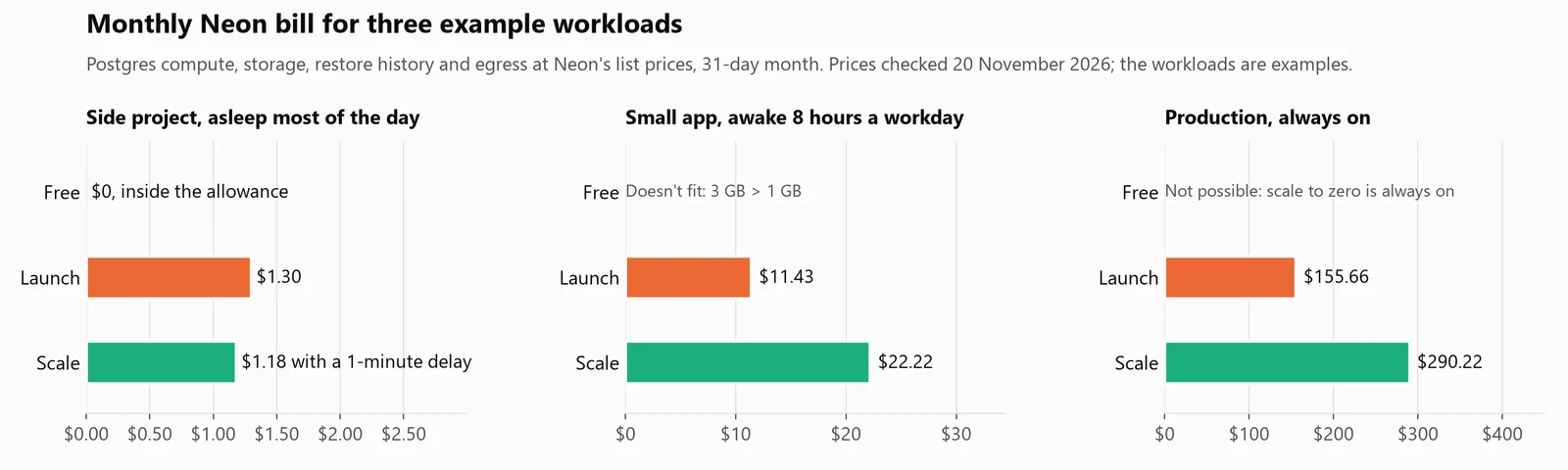
Monthly Neon bill for three example workloads at list prices, checked 20 November 2026. The workloads are examples.
What the numbers say:
- The delay is most of a sporadic bill. Of the side project's 43.4 awake hours, 31 are the compute waiting out five idle minutes after each burst. It fits Free with room to spare; on Scale, a 1-minute delay makes it cheaper than Launch despite the doubled rate.
- Storage, not compute, pushes a small app off Free. It uses 94 of its 100 CU-hours, but 3 GB is over the 1 GB cap, and 20 GB of egress is over 5 GB. On Launch it's $11.43, of which compute is $10.01.
- Scale doubles the compute line. The production database is $155.66 on Launch and $290.22 on Scale, because compute is 79% of the Launch bill. Neon says the higher rate pays for "higher availability, advanced security features, compliance certifications, and SLAs".
Connect any database. Ask in plain English.
Start free →How to cap a Neon bill
Neon has no dollar spending cap. It has three controls:
- Spending notifications (Launch and Scale) "email your organization at 80% and 100% of a monthly dollar threshold; they alert but don't stop usage."
- An autoscaling maximum caps each compute's size, so compute can't cost more than that size for every hour it runs.
- Consumption limits, set per project with the API, suspend compute when a project reaches a compute, storage or transfer quota.
When to pick Supabase instead
Supabase prices the other way: Pro starts at $25 a month per organisation, and "Paid plans include $10/mo in compute credits, enough to cover one Micro instance" (1 GB of RAM) running all month, with 8 GB of disk per project. For a small database that must stay on, that's a predictable bill close to Neon's own "Low load" example ($22 on Launch). For a database idle most of the day, Neon bills only the hours it runs: our side project is $1.30 on Launch. And where Supabase lists "Additional projects from $10/mo", Neon has no per-project fee. Our Supabase pricing breakdown and Neon vs Supabase comparison go further, and free Postgres hosting compares the free tiers.
When a Neon database feeds a team's dashboards
A Neon database usually ends up in someone's reports. Fastero is an AI and data platform where people and AI agents work together on a team's data, and it connects Neon as Postgres:
- Guided setup. Choose Neon in the connection list; in your Neon project click Connect, copy the connection string and paste it, and Fastero fills in the host, port, database and user.
- Dashboards colleagues open with their own login. They refresh on a timer (1, 5, 15 or 60 minutes) or, for Postgres data like Neon's, when the data changes. Each refresh is a query, and a query wakes a sleeping Neon compute for at least five minutes, so a 1- or 5-minute timer can keep it awake while the dashboard is open; 15 or 60 minutes lets it sleep in between. Viewers are free.
- Notebooks. SQL cells run on the connection with its stored credentials and land in Python as a pandas DataFrame, and notebooks can run on a cron schedule on the Free plan.
- Claude can query it. Through Fastero's MCP server, Claude lists the tables, reads the metric definitions your team saved and runs SQL: one
SELECT,WITH,EXPLAINorSHOWstatement, in a read-only transaction on Postgres, at most 500 rows. Postgres, Neon included, is the path that has been run end to end.
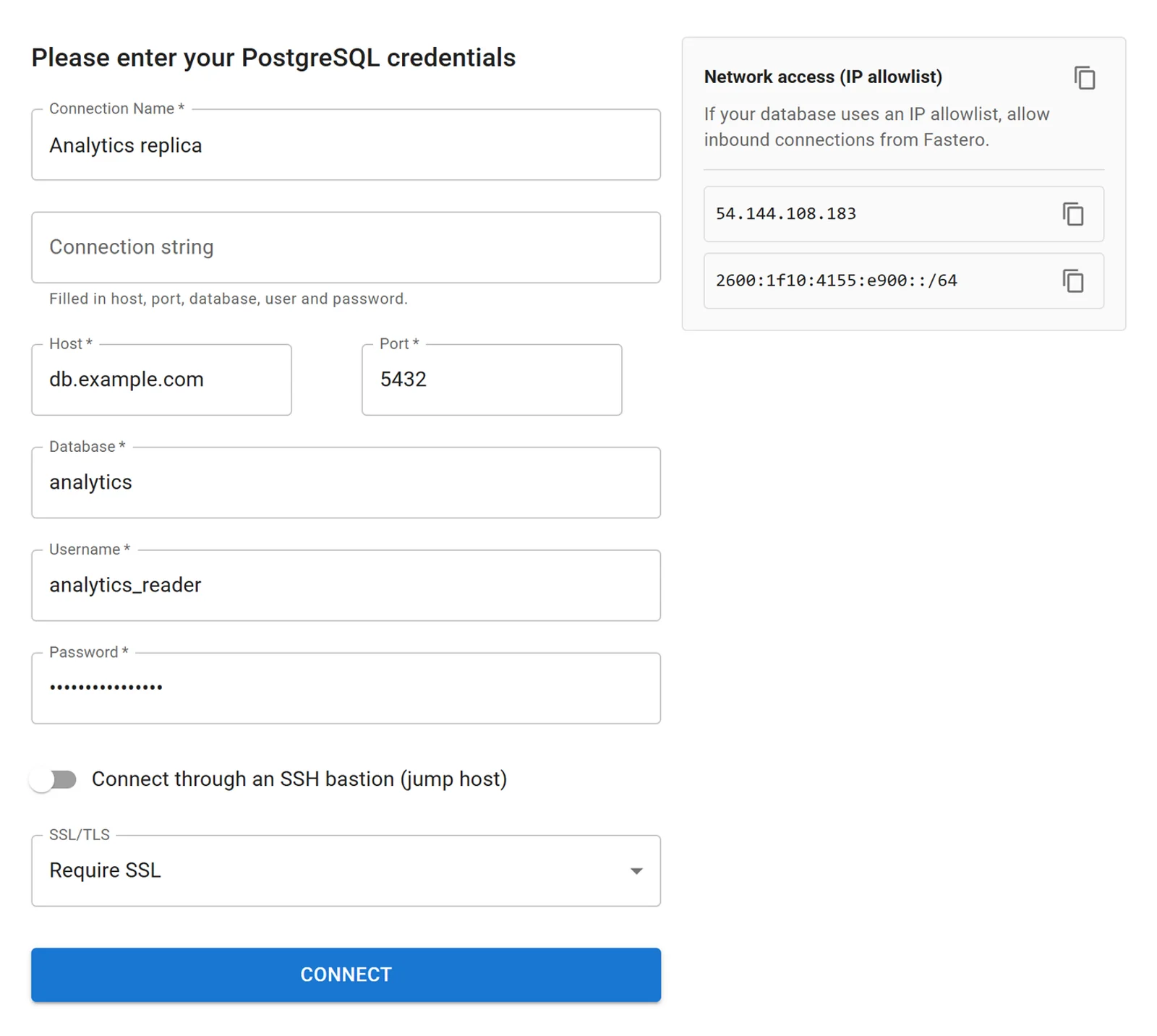
The Postgres connection form after pasting a connection string, with invented values.
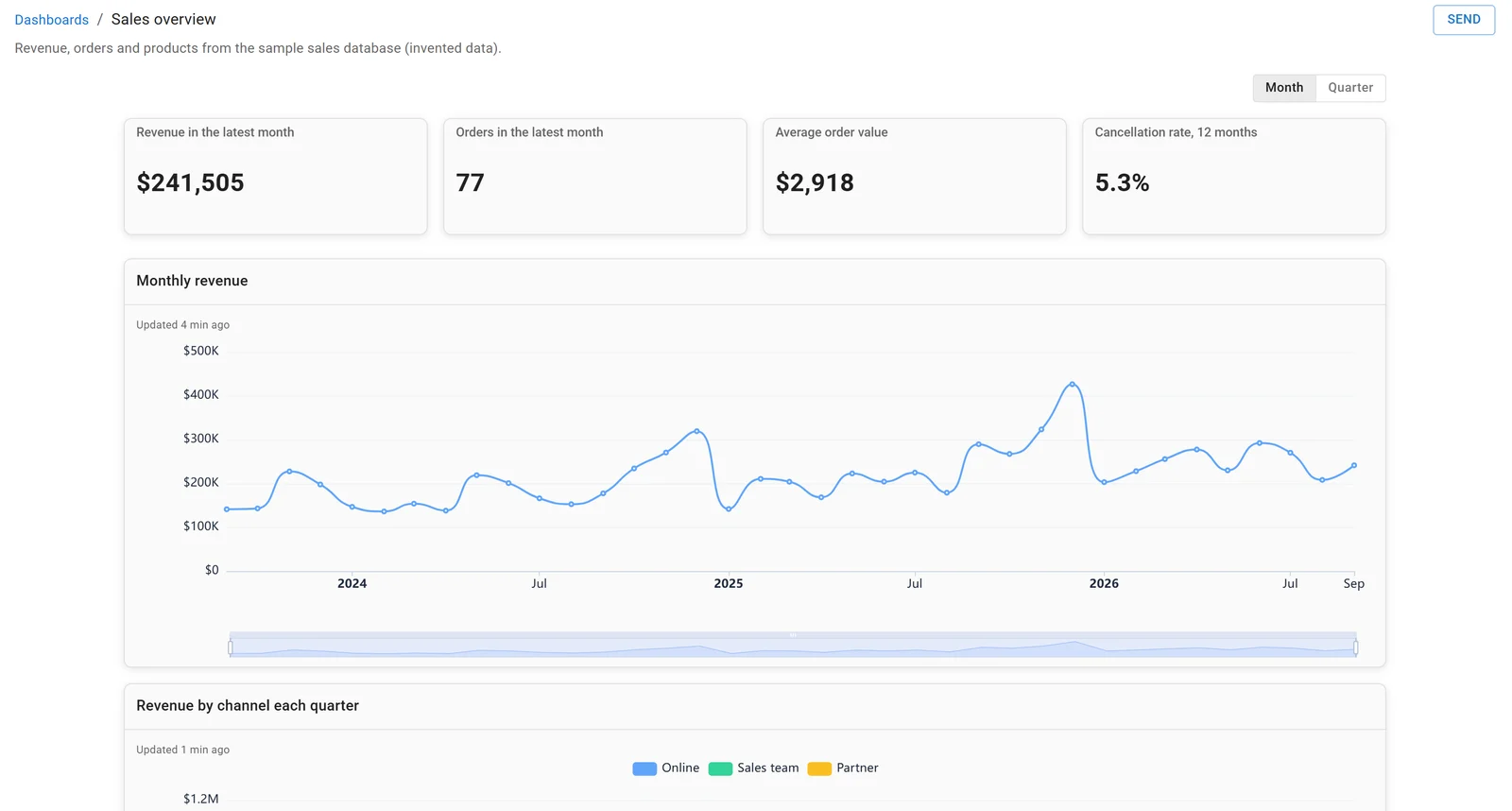
A dashboard in Fastero, built on the sample sales database. Invented data.
For Claude working on Neon directly, see our Neon MCP server guide.
FAQ
Is Neon free?
Yes. The Free plan is permanent and needs no credit card: up to 100 projects, each with 100 CU-hours of compute a month, 1 GB of storage (20 GB in total) and 5 GB of egress. Compute always scales to zero after 5 idle minutes.
How much does Neon cost per month?
Free costs $0. Launch and Scale have no minimum: you pay $0.106 or $0.222 per CU-hour plus $0.35 per GB-month of storage. Neon's typical figures are about $15 a month on Launch for a small database that scales to zero and $701 on Scale for a production workload (checked 20 November 2026).
What is a CU-hour on Neon?
One compute unit, about 4 GB of RAM with its CPU, running for one hour. A 0.25 CU compute running 4 hours uses 1 CU-hour.
Does Neon charge when the database is idle?
Not for compute once it has scaled to zero: suspended compute costs $0. Storage is still billed, and on Free and Launch the compute keeps running, and counting, for 5 minutes after the last activity before it suspends.
What happens when you go over Neon's free plan?
Running out of CU-hours or egress suspends the project's compute until the next billing period; going over 1 GB makes writes fail. Neon says none of the limits delete data, and upgrading lifts them at once.
Did Neon's pricing change after Databricks bought it?
Yes. Neon joined Databricks in May 2025; since then compute went from $0.14 to $0.106 per CU-hour on Launch and from $0.26 to $0.222 on Scale (November 2025), the $5 minimum was dropped (December 2025), and paid egress rose to 500 GB per project (June 2026).
Sources
Read on 20 November 2026. The calculator ran on Windows 11 with Python 3.14.3; the chart was drawn with matplotlib 3.11.2. No Neon account was used.