
The best free dashboard tool in 2026 is Metabase if you can self-host, Looker Studio if you can't, and Fastero if you want AI to build the dashboard for you. Below are nine tools that are genuinely free — not "free for 14 days," not "free until you add a second user." Every one of them can build a real dashboard from real data at $0.
Comparison table
| Tool | Truly free? | Self-host? | SQL editor | Viz types | Best for |
|---|---|---|---|---|---|
| Metabase | Yes (OSS) | Yes (Docker/JAR) | Yes + visual builder | 15+ | Teams who want self-serve BI fast |
| Apache Superset | Yes (OSS) | Yes (Docker + Celery) | Yes (SQL Lab) | 50+ | Large-scale SQL analytics |
| Grafana | Yes (OSS) | Yes (binary/Docker) | Yes (limited) | 30+ panels | Infra monitoring + mixed sources |
| Redash | Yes (OSS) | Yes (Docker) | Yes (SQL only) | 10+ | Quick SQL-to-chart pipelines |
| Looker Studio | Yes (cloud) | No | No (drag-and-drop) | 20+ | Google ecosystem teams |
| Lightdash | Yes (OSS) | Yes (Docker) | Yes (via dbt) | 15+ | dbt-native metrics layers |
| Evidence | Yes (OSS) | Yes (Node.js) | Yes (inline SQL) | 12+ | Dashboards-as-code in git |
| Google Sheets | Yes (cloud) | No | No | Charts + pivots | Quick-and-dirty one-offs |
| Fastero | Yes (free tier) | No | Yes + natural language | 20+ | AI-powered dashboards, zero setup |
Where each tool sits: setup effort vs. feature depth
Feature depth
     ^
     |
     |  ★ Superset
     |                          ★ Grafana
     |
     |       ★ Metabase           ★ Lightdash
     |                  ★ Fastero
     |   ★ Redash          ★ Evidence
     |
     |         ★ Looker Studio
     |  ★ Google Sheets
     +-------------------------------------------->
       Easy                              Hard
                    Setup effort

  Left  = sign up and go (or single docker run)
  Right = multi-container deploy, config tuning, infra team
Most free tools make you pick: easy setup with limited features, or powerful features behind a wall of Docker Compose files and YAML. That tradeoff runs through this entire list.
Fastero
Connect your database. Ask questions. Get dashboards.
Postgres, BigQuery, Snowflake, and 10+ sources — live-connected, AI-powered, no dashboard builder learning curve.
Try free →1. Metabase — the best free self-hosted option
Metabase is the answer to "I want a BI tool running in 15 minutes." A single Docker container or a JAR file on any machine with Java installed. Point it at Postgres, MySQL, BigQuery, or any of 20+ databases. Done. Your marketing team is building charts by tomorrow.
The visual query builder is genuinely useful. It handles joins, filters, aggregations, and custom columns — no SQL required. Power users can drop into raw SQL mode when they need it. This split between "drag-and-drop for business users" and "SQL editor for analysts" is why Metabase has the adoption curve it does.
The Community Edition (AGPL 3.0) is fully featured for dashboarding. You lose embedded analytics, row-level permissions, and audit logs compared to the paid Pro/Enterprise tiers, but for internal dashboards those gaps rarely matter.
Where it falls short: Metabase assumes your data is in one database. Cross-database joins don't exist. If your data lives in three different Postgres instances plus a Google Sheet, you'll need a warehouse first. For a deeper breakdown, see Metabase vs Superset.
2. Apache Superset — the most powerful free option
Superset is what you reach for when Metabase can't keep up. 50+ visualization types. SQL Lab for ad-hoc exploration. Row-level security. A full role-based permission model. If your org has 200 analysts hitting the same dashboards, Superset is the only free tool on this list built for that scale.
It's an Apache Software Foundation project with active governance and a large contributor base. That matters for long-term stability — this isn't one company's open-source side project.
The cost is setup complexity. A production Superset deployment needs Python, Redis, Celery for async queries, a metadata database, and probably a reverse proxy. Budget half a day for a dev environment; budget a full sprint for production-grade deployment with auth, caching, and alerting. Some teams never finish that sprint.
Where it falls short: The learning curve is steep for non-technical users. There's no visual query builder — you write SQL or you don't use Superset. If your stakeholders are marketing managers who want to "just see the numbers," Superset will sit unused.
3. Grafana — the monitoring standard, now doing business dashboards
Grafana owns the infrastructure monitoring space. Prometheus metrics, Loki logs, Tempo traces — if your team runs any of these, you already have Grafana. The 150+ data source plugins mean you can put CloudWatch alarms, Postgres query results, and Elasticsearch logs on the same dashboard without any ETL.
What's changed is that teams are increasingly pointing Grafana at business data too. Connect it to Postgres or MySQL, build a few panels, and suddenly you have revenue dashboards next to your uptime dashboards. The free Grafana Cloud tier (10k metrics, 50GB logs) is generous enough for small teams.
Where it falls short: Grafana thinks in time series. It wants to show you the last 6 hours, auto-refreshing every 30 seconds. Building a static "Q2 revenue by region" report fights the grain. It'll do bar charts and tables from SQL, but the experience feels bolted on compared to tools that were built for business analytics from the start.
4. Redash — the lightest option
Redash is the tool for people who think in SQL. Write a query, pick a chart type, drag it onto a dashboard. That's it. No visual builder, no semantic layer, no configuration wizard. It's a SQL editor with visualization bolted on, and for a specific kind of user — the analyst who lives in a terminal — that's exactly right.
Redash connects to 35+ data sources out of the box, including databases, APIs, and Google Sheets. The query scheduling feature means you can set a dashboard to refresh every morning before the team opens it. Simple, effective, and done.
The elephant in the room: Development has slowed significantly since the Databricks acquisition. The open-source repository still works, community contributors still submit patches, but there's no company actively pushing new features. For new projects, I'd pick Metabase over Redash unless your entire team is SQL-fluent and you specifically want the minimal approach.
5. Looker Studio (Google) — truly free, no asterisks
Looker Studio is the only tool on this list with zero infrastructure cost and zero catch. No self-hosting, no tier limits, no "free for 3 users." Google runs it, Google pays for it, and you get unlimited dashboards shared with anyone who has a Google account.
The sweet spot is obvious: if your data lives in BigQuery, Google Sheets, or Google Analytics, Looker Studio connects natively and the experience is polished. The template gallery gets you from zero to dashboard in minutes. Sharing is a link — no viewer accounts, no SSO setup.
Where it falls short: Step outside the Google ecosystem and the experience degrades fast. Third-party connectors exist, but many of them are paid and mediocre. There's no SQL editor — you're limited to the drag-and-drop interface. And Google can change the product, rename it, or sunset it without asking you (they've renamed it twice already).
6. Lightdash — the dbt-native BI tool
If your data team already runs dbt, Lightdash is the BI layer that actually understands your models. It reads your dbt project, imports your metrics and dimensions, and lets analysts explore data using the definitions you've already written. No re-defining "monthly active users" in a second tool.
The self-hosted Community Edition (MIT license) is fully functional. There's also a free cloud tier with limits. The tight dbt integration means you get lineage, documentation, and metric definitions for free — they flow directly from your dbt YAML.
Where it falls short: If you don't use dbt, Lightdash has nothing to offer you. It's not a general-purpose BI tool. It's the best BI layer for dbt shops, and completely irrelevant to everyone else. For the broader open-source landscape, see best open-source dashboard tools.
7. Evidence — dashboards as code
Evidence treats dashboards like software. You write SQL queries in Markdown files, commit them to git, and CI/CD builds a static site with charts, tables, and KPIs. Version control. Pull requests. Code review on your dashboards. If that sentence excites you, Evidence is your tool.
The developer experience is genuinely good. Hot reload in dev mode. Built-in components for charts, big numbers, and data tables. Conditional logic in templates. It's closer to building a report in a web framework than configuring panels in a BI tool.
Where it falls short: Evidence is for developers. If your stakeholders can't read Markdown or your workflow doesn't include git, this is a non-starter. There's also no interactive exploration — viewers see what you built, and that's it. No "let me filter by this other dimension" unless you coded that filter in.
8. Google Sheets — the dashboard nobody admits to using
Every data team has at least one Google Sheet that functions as a dashboard. Pivot tables, QUERY formulas, conditional formatting, a few charts — it works. The data refreshes when someone re-imports the CSV or when a script pushes new rows via the API.
Google Sheets is free, everyone already has it, and the collaboration model (link sharing, comments, version history) is better than most BI tools. For a five-person startup tracking ten metrics, it's honestly the right choice.
Where it falls short: It breaks. A 50k-row sheet starts lagging. Formulas get fragile. Someone accidentally deletes a column and breaks every chart. There's no access control at the row level, no automated refresh from a database, and no way to handle data that changes shape. It's the first dashboard tool every team uses and the first one every team outgrows.
9. Fastero — AI-powered dashboards, no setup
Fastero takes a different approach: instead of building dashboards by hand, you describe what you want in plain English. Connect a database — Postgres, MySQL, BigQuery, Snowflake, or any of 15+ sources — and ask "show me monthly revenue by product category." Fastero writes the SQL, picks the chart type, and builds the dashboard.
The free tier doesn't require a credit card and there's nothing to install. No Docker containers, no Java runtimes, no YAML files. You sign up, connect a data source, and start asking questions. For solo analysts and small teams who need answers today and don't have an afternoon to spend on infrastructure, that tradeoff matters.
Fastero also handles the follow-up questions that kill productivity in traditional BI tools. "Now break that down by region." "Show only customers who signed up after January." "Add a trend line." In Metabase or Superset, each of those is a manual edit. In Fastero, it's a sentence.
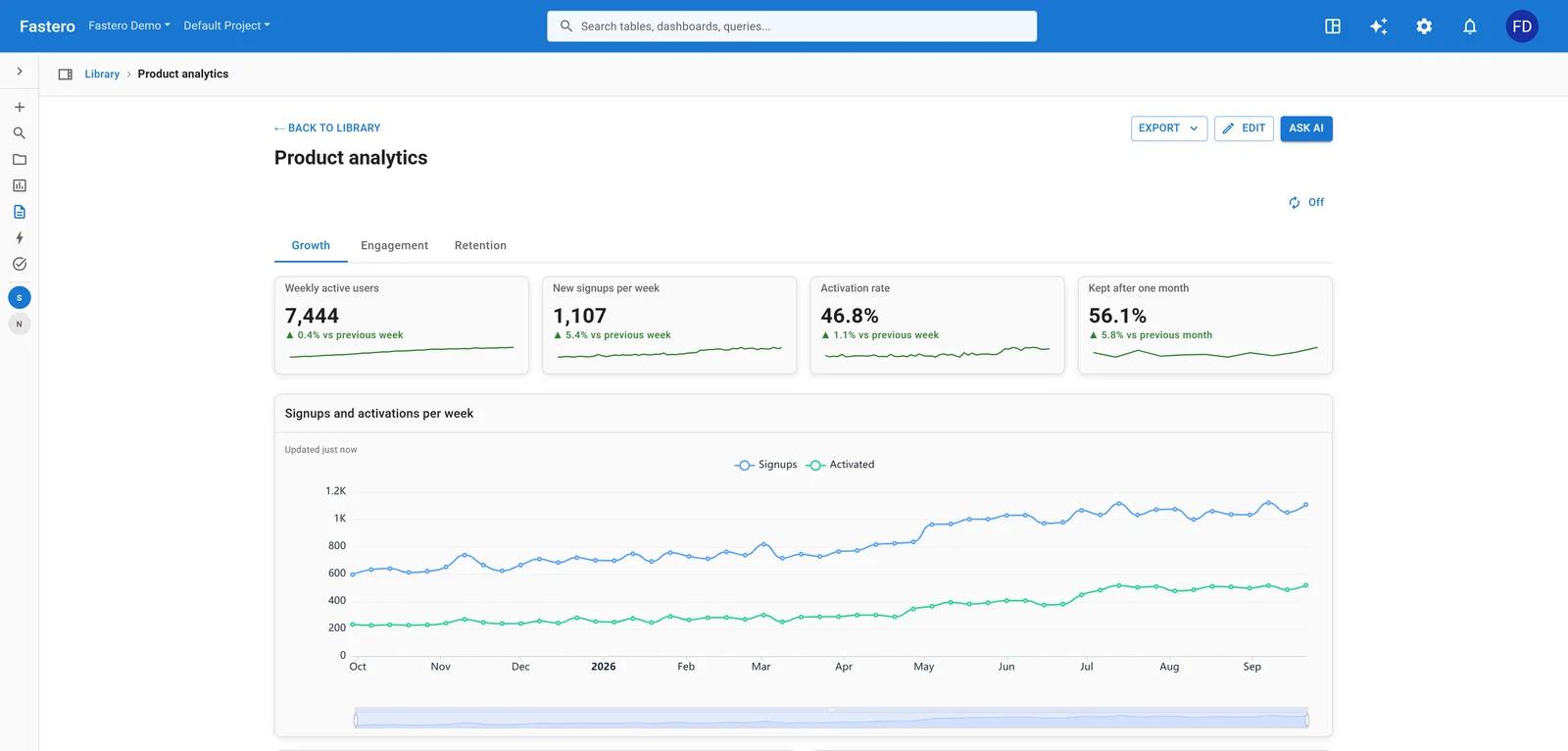
A dashboard in Fastero. Sample data.
Which free tool should you actually pick?
The "best" free dashboard tool depends on three things: your team's SQL comfort, your infrastructure appetite, and how much time you have.
Decision flow:

  Do you have someone who can manage a server?
  |
  +-- Yes
  |   |
  |   Does your team write SQL daily?
  |   |
  |   +-- Yes
  |   |   |
  |   |   How many dashboard users?
  |   |   |
  |   |   +-- Under 50  --> Metabase
  |   |   +-- 50-500    --> Superset
  |   |   +-- dbt shop  --> Lightdash
  |   |
  |   +-- No
  |       |
  |       +-- Need self-serve for business users? --> Metabase
  |       +-- Monitoring / ops dashboards?        --> Grafana
  |
  +-- No
      |
      Is your data in Google's ecosystem?
      |
      +-- Yes --> Looker Studio
      +-- No  --> Fastero (AI builds it for you)
A few patterns I see repeatedly:
Startups with no data engineer: Start with Google Sheets. When it breaks, move to Fastero or Looker Studio. Don't self-host anything until you have someone whose job includes keeping servers running.
Data teams with a warehouse: Metabase for under 50 users, Superset for more. If you're running dbt, add Lightdash on top.
DevOps teams adding business metrics: You already have Grafana. Add a Postgres data source and build business panels there before introducing a second tool.
Solo analysts with database access: Fastero or Redash. Both get you from query to chart in minutes. Fastero handles the SQL for you; Redash assumes you'll write it.
FAQ
Is Metabase really free?
The Community Edition is free and open-source under AGPL 3.0. You can run it forever on your own server at $0 in license fees. You will pay for hosting — a small VM costs $5-20/month. The paid tiers (Pro, Enterprise) add embedded analytics, row-level permissions, and SSO. For internal dashboards, the free edition is enough. See best open-source alternatives to Tableau for how Metabase stacks up against paid tools.
Is Looker Studio actually free or is there a catch?
No catch. Google runs it at no cost. Unlimited dashboards, unlimited viewers. The paid "Looker Studio Pro" adds team features and governance, but the core product is genuinely free. The real cost is ecosystem lock-in: Looker Studio works best with Google data sources, and migrating away later isn't trivial.
What's the easiest free dashboard tool to set up?
Looker Studio and Fastero require zero installation — sign up and connect your data. Google Sheets requires nothing at all. For self-hosted tools, Metabase is the easiest: docker run -d -p 3000:3000 metabase/metabase and you're done. Superset and Lightdash need more configuration.
Can I use these tools with a production database?
You can, but you probably shouldn't. Running analytics queries against your production database adds load and can slow down your application. Most of these tools work best when pointed at a read replica or a separate analytics database. Metabase and Superset both support read-only connection modes.
Which free tool handles the most data sources?
Grafana wins on raw count with 150+ plugins. Redash covers 35+ sources. Superset and Metabase handle 20-30 SQL databases each. Looker Studio relies on third-party connectors for anything outside Google. For connecting multiple databases without a warehouse, Fastero's 15+ native connectors handle the most common setups without ETL.
Is there a free way to host a Python dashboard, not just a BI tool?
Yes, with limits. Streamlit Community Cloud is free and hosts Streamlit apps, but its docs cap you at one private app at a time and apps sleep after 12 hours without traffic. Hugging Face Spaces now needs a Docker Space, and creating one requires a paid plan from $9 a month.
Do free dashboard tools let you restrict who sees a dashboard?
Mostly not, at the free tier. Metabase and Superset support proper user accounts and permissions once self-hosted, because you own the deployment. The hosted free tiers are where this breaks down: Looker Studio ties sharing to Google accounts, and Streamlit Community Cloud allows a single private app with email-invited viewers.
What happened to Ploomber Cloud?
It shut down. Deployments stopped on 3 October 2025 and all running apps were switched off on 31 October 2025, per its own announcement. Any comparison article still listing it as a live free host predates the shutdown — a useful signal that the rest of that article's prices may also be stale.
Sources
Free-tier limits above were checked against primary pages on 16 September 2026:
- Streamlit Community Cloud — Manage your app and Share your app
- Hugging Face pricing and Spaces SDKs: Streamlit
- Posit Connect Cloud plans
- Ploomber Cloud shut-down announcement (archived)
Try Fastero free — AI-powered dashboards from any database. Describe what you want, get a dashboard. No credit card, no setup, no self-hosting. Free to start.