
Two years ago DuckDB was "SQLite for analytics" — a clever embedded engine you'd drop into a Python script. In 2026 it's the hub of a full ecosystem: cloud hosting, GUI clients, a growing extension registry, WASM builds for the browser, and platforms that treat it as their default analytical store. The shift happened because DuckDB got one bet right — a columnar, in-process engine that reads anything — and an ecosystem grew around that bet.
Here's every tool and extension worth knowing, with real opinions on where each one fits.
How did DuckDB become the analytics hub?
DuckDB reads Parquet, CSV, JSON, and remote files natively. It speaks SQL. It embeds anywhere — Python, Node, Rust, your browser. That combination turned it into a universal adapter: point it at whatever data you have, query it with whatever SQL you know.
The result looks something like this:
┌──────────┐  ┌──────────┐  ┌──────────┐  ┌──────────┐
│ Postgres │  │    S3    │  │  CSV /   │  │ BigQuery │
│          │  │ (Parquet)│  │  JSON    │  │          │
└────┬─────┘  └────┬─────┘  └────┬─────┘  └────┬─────┘
     │             │             │             │
     └──────┬──────┘─────────────┘─────────────┘
            │
     ┌──────▼──────┐
     │   DuckDB    │    ◄── In-process, no server
     │  (your hub) │
     └──────┬──────┘
            │
     ┌──────┴──────────────────────┐
     │              │              │
┌────▼─────┐ ┌─────▼────┐ ┌──────▼─────┐
│  Python  │ │  Dash-   │ │  BI tools  │
│ notebooks│ │  boards  │ │  & apps    │
└──────────┘ └──────────┘ └────────────┘
Extensions plug into that hub — spatial queries, HTTP file access, Postgres wire protocol — without adding a server process or a deployment step. That's the mental model for everything below.
Which DuckDB clients should you actually use?
DBeaver — the full-featured GUI
DBeaver has supported DuckDB natively since 2024 via the DuckDB JDBC driver. You get a schema browser, visual query builder, data editor, ER diagrams, and export options. If you already use DBeaver for Postgres or MySQL, adding DuckDB is just a new connection — same interface, same workflow.
Where it fits: Analysts who want a visual SQL editor with auto-complete and result grids. Teams that already standardize on DBeaver across multiple databases.
The tradeoff: It's a Java desktop app. Heavy. Slow to start. The DuckDB-specific features (like reading Parquet from S3 directly) require configuring the connection with the right extensions loaded — DBeaver doesn't do that automatically.
Harlequin — the terminal-first SQL client
Harlequin is a TUI (terminal user interface) SQL client built specifically for DuckDB. Think of it as a keyboard-driven query editor that runs in your terminal — auto-complete, syntax highlighting, result tables, and a catalog browser, all without leaving the command line.
Where it fits: Engineers and analysts who live in the terminal. The startup time is near-instant compared to DBeaver, and it reads .duckdb files directly. If your workflow is SSH + tmux + vim, Harlequin belongs in that stack.
The tradeoff: No graphical charts, no drag-and-drop query building. It's for people who already think in SQL.
The DuckDB CLI
DuckDB ships its own CLI (duckdb binary). Bare-bones — a REPL prompt, .commands for metadata, copy-paste results. Most people outgrow it within a week, but it's always there and it's always correct. Good for scripts, cron jobs, and quick ad-hoc checks.
Client comparison
| Client | Type | DuckDB-native | Auto-complete | Parquet browsing | Startup | Price |
|---|---|---|---|---|---|---|
| DBeaver | GUI | Via JDBC | Yes | With config | ~5 sec | Free / Pro |
| Harlequin | TUI | Native | Yes | Yes | <1 sec | Free |
| DuckDB CLI | REPL | Native | Basic | Yes | Instant | Free |
| MotherDuck UI | Cloud | Native | Yes | Yes | N/A | Free tier |
Fastero
Connect your database. Ask questions. Get dashboards.
Postgres, BigQuery, Snowflake, and 10+ sources — live-connected, AI-powered, no dashboard builder learning curve.
Try free →What about DuckDB in the cloud?
MotherDuck — managed DuckDB as a service
MotherDuck is the "serverless cloud" for DuckDB. It splits query execution between your local machine and a cloud backend — a hybrid model they call "dual execution." Your laptop handles what it can; MotherDuck handles the rest. You get a web UI, sharing, persistent storage, and team collaboration on top.
Where it fits: Teams that outgrew local-only DuckDB. You have datasets too big for one laptop, or multiple people need to query the same data. MotherDuck gives you a hosted DuckDB without the operational burden of running a warehouse.
The tradeoff: You're adding a cloud dependency to a tool whose whole appeal was "no cloud dependency." The free tier is generous (10GB storage, shared compute), but production workloads mean production pricing. And the hybrid execution model means your query plan depends on where your data lives — local-only tables stay local, cloud tables go to MotherDuck, and cross-table joins can get interesting.
Which extensions matter most?
DuckDB's extension system is one of the things that separates it from SQLite. You INSTALL and LOAD extensions at runtime — no recompilation, no separate binary. Here are the ones that earn their spot in most workflows.
httpfs — read files from S3, GCS, and HTTP
The httpfs extension lets DuckDB read Parquet, CSV, and JSON files directly from S3 buckets, Google Cloud Storage, or any HTTP URL. No download step. No local copy. Point DuckDB at s3://your-bucket/data/*.parquet and query.
INSTALL httpfs;
LOAD httpfs;
SET s3_region = 'us-east-1';

SELECT product_id, SUM(revenue)
FROM 's3://analytics-lake/events/2026/*.parquet'
WHERE event_type = 'purchase'
GROUP BY product_id;
This is what makes DuckDB a practical data lake query engine. Combined with Parquet's columnar format and predicate pushdown, you can scan terabytes from S3 without downloading the full files.
Parquet, CSV, and JSON readers — the built-in trio
These aren't extensions — they're built into DuckDB core — but they deserve a callout because they're half the reason people adopt DuckDB in the first place. You can query files directly, glob entire directories, and auto-detect schemas:
-- Read every CSV in a folder, union them automatically
SELECT * FROM read_csv('logs/2026-*.csv', auto_detect=true);

-- Query a single JSON file as a table
SELECT user_id, event
FROM read_json('events.json', auto_detect=true);
No CREATE TABLE. No COPY INTO. No schema file. For one-off analysis — the kind you used to do in Pandas — this is drastically faster. (We compared the workflows in depth: DuckDB vs Pandas.)
duckdb_spatial — GIS without PostGIS
The spatial extension gives DuckDB geometry types (POINT, LINESTRING, POLYGON), spatial functions (ST_Distance, ST_Contains, ST_Intersect), and the ability to read Shapefiles and GeoJSON directly. It's not a full PostGIS replacement — it doesn't have spatial indexes yet — but for analytical spatial queries (which stores are within 10km of a warehouse? which delivery zones overlap?) it's enough, and you don't need a running Postgres server.
postgres_scanner and sqlite_scanner — query external databases
These extensions let DuckDB attach to a live Postgres or SQLite database and query its tables as if they were local. The scanner reads data over the wire and pulls it into DuckDB's columnar engine for fast analytical processing. Good for ad-hoc analysis against production replicas — you keep Postgres as the source of truth and DuckDB as the analytical lens.
If you're joining data across Postgres and other sources, this is where things get interesting — and where a platform like Fastero can remove the plumbing.
What about dbt with DuckDB?
The dbt-duckdb adapter is one of the fastest-growing dbt adapters in 2026. It lets you run dbt transformations against a local DuckDB database — no warehouse, no cloud account, no credentials file.
Where it fits:
- Local development. Build and test dbt models on your laptop against DuckDB, then deploy to Snowflake/BigQuery in CI. The feedback loop drops from minutes to seconds.
- Small-to-mid data. If your total data volume is under ~100GB, DuckDB-backed dbt might be all you need. Skip the warehouse entirely.
- CI/CD pipelines. Run your full dbt test suite in GitHub Actions against DuckDB. No warehouse spin-up, no cloud costs.
The tradeoff: SQL dialects differ between DuckDB and your production warehouse. A query that works in DuckDB might fail in Snowflake (different date functions, different type coercion rules). The adapter handles most of this, but edge cases exist.
Can DuckDB run in the browser?
Yes. DuckDB WASM compiles the full DuckDB engine to WebAssembly and runs it inside a browser tab. No backend. No API calls. The data stays on the client.
This opens up a category of applications that didn't exist before: analytical dashboards that run entirely client-side, Parquet file explorers that process data in the browser, and embedded data tools that work offline. Observable, the notebook platform, uses DuckDB WASM under the hood for its SQL cells.
┌───────────────────────────────────────────┐
│              Browser tab                  │
│                                           │
│  ┌─────────────────────────────────────┐  │
│  │          DuckDB WASM               │  │
│  │  ┌───────┐  ┌────────┐  ┌───────┐  │  │
│  │  │Parquet│  │  SQL   │  │Results│  │  │
│  │  │reader │──│ engine │──│  out  │  │  │
│  │  └───────┘  └────────┘  └───────┘  │  │
│  └─────────────────────────────────────┘  │
│                                           │
│  No server. No API. Data stays local.     │
└───────────────────────────────────────────┘
The tradeoff: WASM is single-threaded in most browsers, so it's noticeably slower than native DuckDB on large datasets. Memory is limited to what the browser tab can allocate (typically 2-4GB). Great for datasets under a few hundred MB; beyond that, you'll want server-side DuckDB.
Which platforms build on DuckDB?
Rill Data — fast dashboards on DuckDB
Rill is a BI tool that uses DuckDB (and Apache Druid for larger-scale deployments) as its query engine. You point it at Parquet files or a database, and it generates interactive dashboards with sub-second filtering. The pitch: dashboards that feel like spreadsheets — click, drag, filter — powered by DuckDB's speed.
Where it fits: Teams that have data in Parquet or a warehouse and want dashboards without the overhead of a full BI stack.
Fastero — cross-source DuckDB store
Fastero takes a different angle. It has DuckDB built in as its analytical engine, but the point isn't DuckDB itself — it's what DuckDB enables: pulling data from Postgres, Snowflake, BigQuery, Stripe, HubSpot, and other sources into a single DuckDB store, then running cross-source SQL joins and building dashboards on top. You ask questions in natural language, the AI writes SQL against the unified DuckDB layer, and the results come back as charts, tables, or full dashboards.
No separate DuckDB install. No ETL pipeline to maintain. The cross-source join — the query that usually requires a warehouse — just works because everything lands in DuckDB first.
Where it fits: Teams with data scattered across 3-5 SaaS tools and a database or two. You want to join Stripe payments against Postgres users against HubSpot deals without building a warehouse.
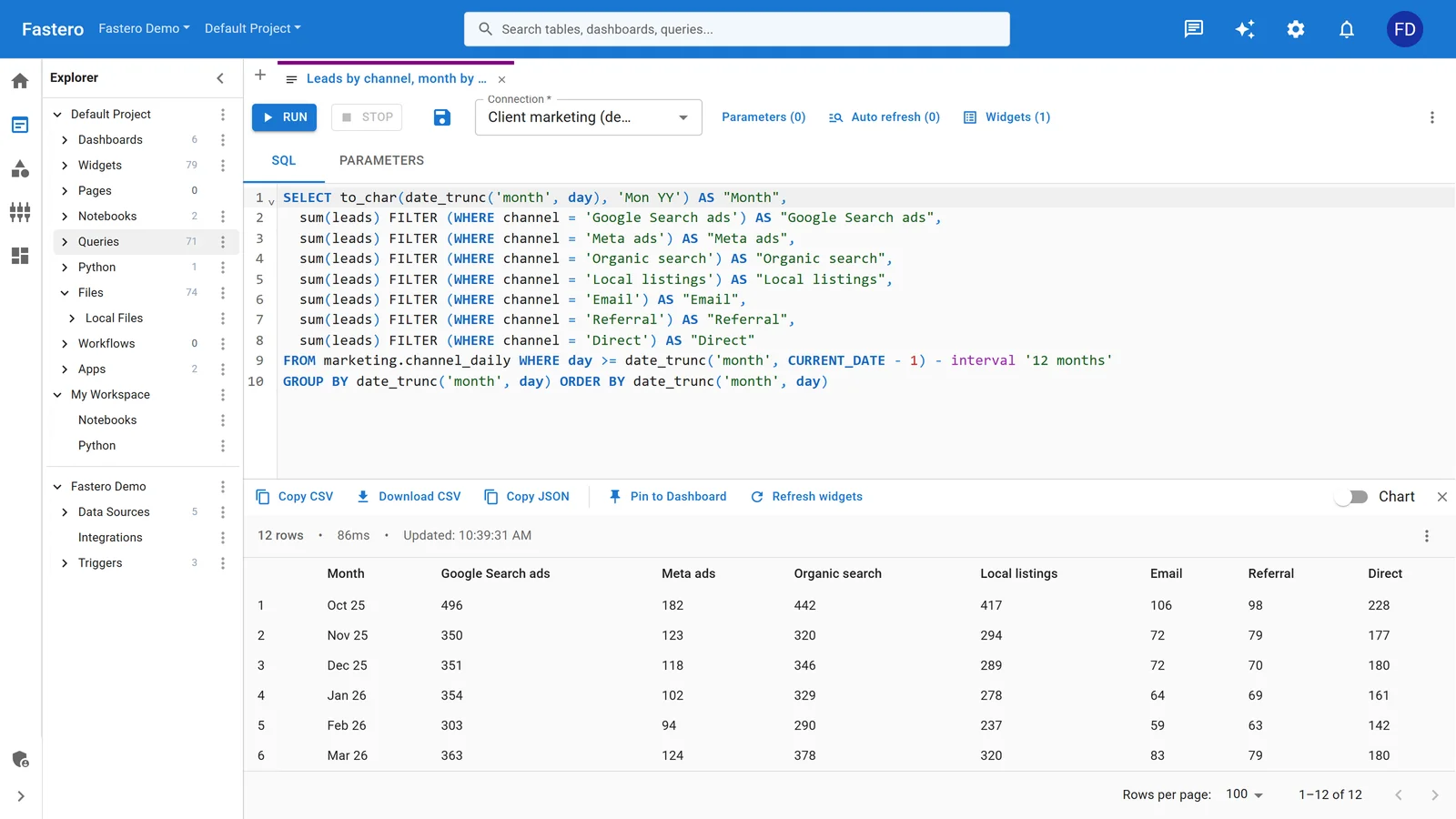
The SQL editor in Fastero. Sample data.
FAQ
Is DuckDB ready for production?
DuckDB hit 1.0 in June 2024 and has been stable since. MotherDuck runs production workloads on it. Multiple BI tools (Rill, Fastero, Evidence) use it as their primary query engine. The extension ecosystem is still maturing — some extensions are more stable than others — but the core engine is production-grade.
Can DuckDB replace my data warehouse?
For datasets under ~100GB, probably yes. DuckDB handles complex analytical SQL, reads directly from S3, and runs on a $20/month VM. Beyond that, you hit single-machine limits — memory, disk I/O, concurrency. DuckDB is single-writer, so concurrent writes from multiple processes won't work. MotherDuck extends the ceiling, but a true multi-tenant warehouse (Snowflake, BigQuery) is still the answer at enterprise scale.
How does DuckDB compare to Polars?
Different tools for different mental models. Polars is a DataFrame library — you chain method calls in Python or Rust. DuckDB is a SQL database — you write queries. Both are columnar and fast. If you think in SQL, DuckDB. If you think in DataFrames, Polars. They can also work together — DuckDB can query Polars DataFrames directly. We did a deeper comparison here.
Do I need MotherDuck, or is local DuckDB enough?
If your data fits on one machine and you're the only one querying it, local DuckDB is enough. MotherDuck adds value when you need sharing (multiple users querying the same data), persistence (data that outlives your laptop), or scale (datasets that don't fit in local memory). Start local. Move to MotherDuck when you hit a wall.
Can I use DuckDB with my existing Postgres database?
Yes. The postgres_scanner extension connects to a live Postgres instance and lets you query its tables through DuckDB. The data flows over the wire — DuckDB doesn't copy the entire database. For recurring analytical queries, you'd want to materialize the Postgres data into DuckDB (or use a tool like Fastero that handles that sync for you).
Which DuckDB extension should I install first?
httpfs if you have data on S3 or GCS. postgres_scanner if you want to query a Postgres database. spatial if you work with geographic data. Most other functionality — Parquet, CSV, JSON reading — is built into core DuckDB and doesn't require any extension at all.
Try Fastero free — DuckDB built in. Pull from Postgres, Snowflake, BigQuery into DuckDB and cross-join without ETL. No credit card required.